The 'City of Portland Bureau of Environmental Services' operates and maintains a network of rain gauges around Portland, and publishes their data publicly: http://or.water.usgs.gov/non-usgs/bes/
The data tables available on the site look something like...
Daily  Hourly data -->

   Date     Total    0   1
--------------------------
25-MAR-2016     0    0   0
24-MAR-2016     6    0   1
23-MAR-2016     -    -   -
MORE...
Download one of these files and write a function to load the file. The two columns that are most important are the date and the daily total. The simplest representation of this data is a list of tuples, but you may also use a list of dictionaries, or a list of instances of a custom class.
To parse the dates, use datetime.strptime. This allows for easy access to the year, month, and day as ints. Below I've shown how to parse an example string, resulting in a datetime object. We can then access the year, month, and day on that datetime as ints. Later, if you want to print the datetime in a more human-readable format, you can use datetime.strftime.
import datetime
date = datetime.datetime.strptime('25-MAR-2016', '%d-%b-%Y')
print(date.year)   # 2016
print(date.month)  # 3
print(date.day)    # 25
print(date)  # 2016-03-25 00:00:00
print(date.strftime('%d-%b-%Y')) # 25-Mar-2016Now that you've successfully extracted the data, let's do some statistics.
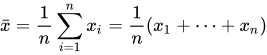
Calculate the mean of the data:
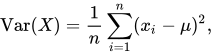
Use the mean to calculate the variance:
Find the day which had the most rain.
Find the year which had the most rain on average.
Using matplotlib create a chart of the dates and the daily totals for a given year. The x_values will be a list of dates, The y_values are a list of the daily totals. If you don't have matplotlib installed, run pip install matplotlib. You can learn more about matplotlib here.
import matplotlib.pyplot as plt
...
plt.plot(x_values, y_values)
plt.show()
Some charts you can make are:
- all the data, date vs daily total
- monthly totals, average across multiple years
- total yearly rainfall, year by year