
pip install customisedlogs --upgrade
A well maintained program to have coloured logs on the terminal. This would help isolate errors and success messages from each other just by their colours.
The package contains all colours combinations from https://davidpiesse.github.io/tailwind-md-colours
To install:
pip install customisedlogs --upgrade
pip3 install customisedlogs --upgrade
python -m pip install customisedlogs --upgrade
python3 -m pip install customisedlogs --upgrade
from customisedLogs import CustomisedLogs
logger = CustomisedLogs(100)

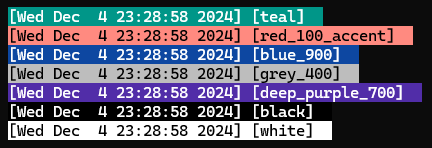
logger.log(logger.Colors.teal, "teal")
logger.log(logger.Colors.red_100_accent, "red_100_accent")
logger.log(logger.Colors.blue_900, "blue_900")
logger.log(logger.Colors.grey_400, "grey_400")
logger.log(logger.Colors.deep_purple_700, "deep_purple_700")
logger.log(logger.Colors.black, "black")
logger.log(logger.Colors.white, "white")
And it would look like:
- Let user change the default RGB values.
- Different formats. Compatible to render on HTML or any other stdout method.