Fails to toggle #5

Description

| Firefox | OS | Extension |
|---|---|---|
| 102.0 | Win 10 | 1.2 |
This is how my userchrome starts. It works as intended.
@import url("./CSS/userChrome-tab-tweaks.css") screen;
@namespace url("http://www.mozilla.org/keymaster/gatekeeper/there.is.only.xul");
@namespace html url("http://www.w3.org/1999/xhtml");
@-moz-document url(chrome://browser/content/browser.xul),
url(chrome://browser/content/browser.xhtml),
url(chrome://browser/content/places/bookmarksSidebar.xhtml),
url(chrome://browser/content/webext-panels.xhtml),
url(chrome://browser/content/places/places.xhtml)
{
/* Hide tab bar */
:root[titlepreface=""] #titlebar {
visibility: collapse;
}
/* And so on… */
}For testing purpose, I added the :root[titlepreface=""] on the first rule only. I copied this magic CSS selector from the addon. VScode shows me the invisible UTF-8 characters. So that’s not the problem.
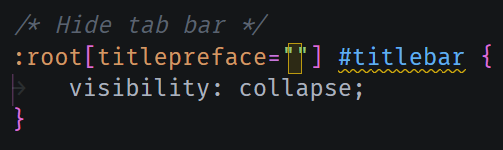
The CSS file is encoded as UTF-8 (no bom).
I applied changes in addon, saved my userChromme.css and restart FF. But when I click the UC button, it notifies it applies the rule but nothing happens. Is it supposed to comment my userChrome ? because it doesn’t.
Did I do something wrong ?