Because juggling multiple apps for each small feature should be simplified.





📌 About
🚀 Getting Started
🏗️ Technical Documentation
📚 Additional Info
Project Raven is a self-coded all-in-one productivity app that consolidates multiple everyday tools into one seamless experience. Born from my own frustration with app-switching, it's designed to handle the tasks I do every day: tracking goals, managing events, writing notes, organizing links, composing emails, and receiving shared files.
Built with: Flutter + Dart
Developed for: Android (tested exclusively on Samsung and Google Pixel Emulator)
Development Philosophy: Learn by building something I actually use
- 📅 In-App Calendar - Recurring events with customizable notification timing (8 options)
- 🎯 Daily Goals - Visual progress tracking with customizable icons
- 📝 Markdown Editor - Full-featured note-taking with live preview
- 🔗 Link Manager - Save and organize important URLs
- ✉️ Email Templates - Compose emails faster with reusable templates
- 📁 File Receiver - Handle shared files from anywhere on Android
- 🐛 Debug Console - Real-time logging and troubleshooting
⚠️ Platform Note: This app has been developed and tested exclusively on Android. iOS/macOS builds are untested as I don't own Apple devices, though the code should be compatible with minimal modifications.
Your daily command center with visual goal tracking and integrated event management.
|
Daily Goals:
In-App Calendar Events:
|

|
Perfect for: Daily habits, workout tracking, study goals, appointments, meetings, or any recurring tasks
💡 Note: In-app calendar events are separate from your device calendar. They're stored locally and designed for personal event tracking with automatic notifications.
A powerful markdown editor with live preview and smart file handling.
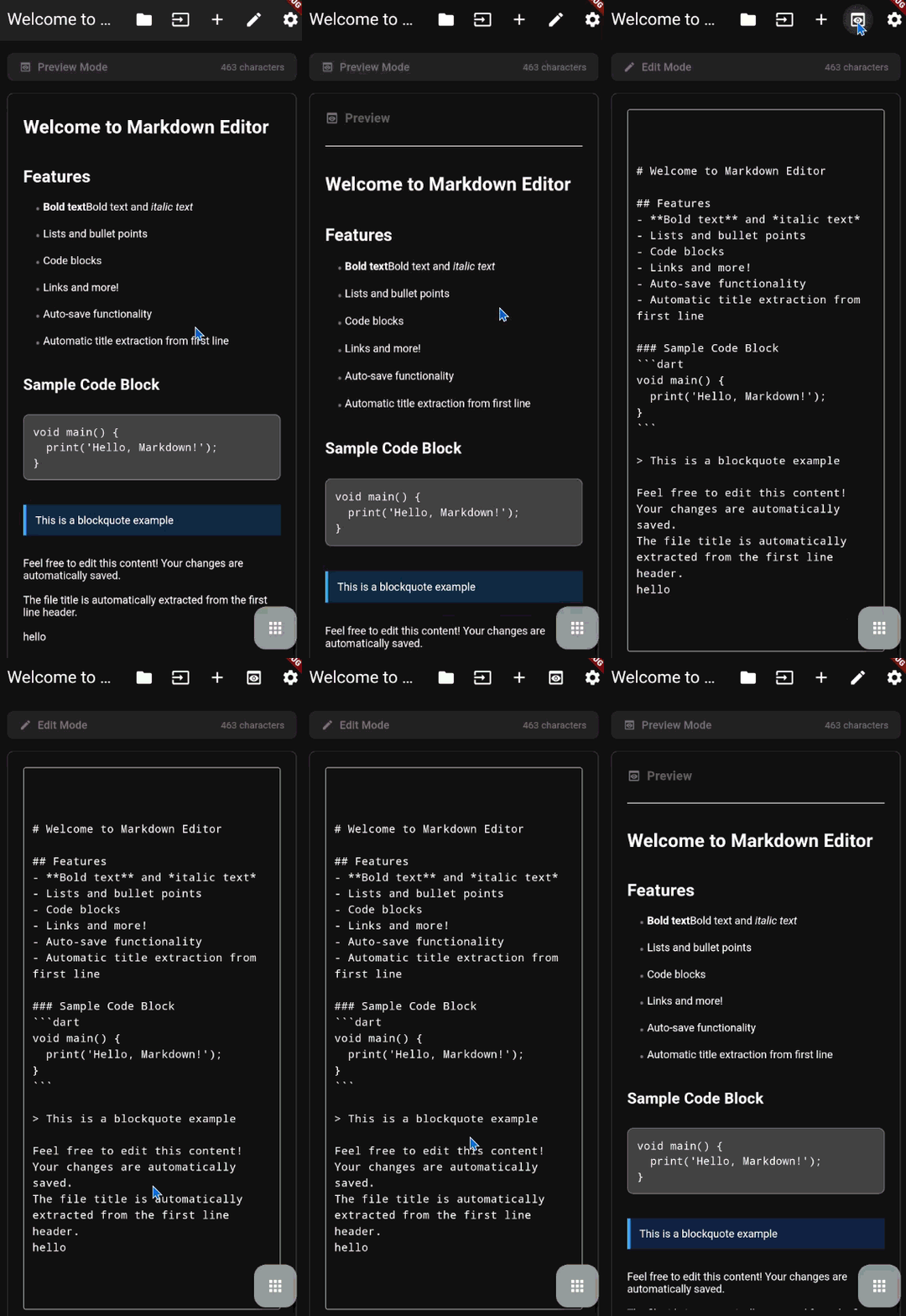
|
What you can do:
|
Perfect for: Notes, documentation, code snippets, project planning, journaling
Save and organize important links with automatic metadata fetching.
|
What you can do:
|

|
Perfect for: Research links, tutorials, articles, reference materials, because we all lose some links we wish we had saved
Compose emails faster with customizable templates and placeholders.

|
What you can do:
|
Perfect for: Business emails, follow-ups, standard replies
Ever tried to download a file, but only found the option to share it? Handle files shared to your app from anywhere on Android and be able to download them issue free from there.
|
What you can do:
|

|
Perfect for: Temporary file storage, file transfers, quick access to shared content
Control your experience with flexible settings and debugging tools.

|
What you can configure:
Debug & Testing:
|
A comprehensive debugging tool to monitor app behavior and troubleshoot issues.
|
What you can do:
Monitored Components:
|

|
Perfect for: Troubleshooting calendar issues, monitoring app behavior, development debugging
Navigate seamlessly between all features using the slide-out drawer menu.
|
What you can do:
|

|
Perfect for: Switching between tasks without losing your place
What it does: Create personal events with customizable notifications and recurring patterns. Events are stored locally in the app.
Go to Daily Goals → Upcoming Events → + Add Event
- Title, Date, Time - Basic event info
- Color - Visual organization (7 colors)
- Reminder - When to notify: None, At time, 30m/1h/3h before, 1d/2d/1w before
- Repeat - Daily, Weekly, or Monthly (optional end date)
- 🔄 Recurring events - Shows only next occurrence (e.g., "DAILY" badge)
- ⏱️ Live countdown - "in 2d 5h" or "5h ago"
- 🔔 Smart notifications - Scheduled automatically, works when app is closed
- 🗑️ Long-press to delete
Test: Settings → Debug & Testing → Test Notification
Not working? Enable notifications in Android Settings → Apps → Project Raven → Notifications
| Daily Goals | Markdown Editor | Link Manager |
|---|---|---|
|
 |
|
| Email Templates | File Receiver | Settings |
|---|---|---|
|
|
|
Make sure you have these installed:
- Flutter SDK (3.7.0 or higher) - Install Flutter
- Dart SDK (3.7.0 or higher) - Comes with Flutter
- Android Studio or VS Code with Flutter extensions
- Android Device or Emulator (iOS untested)
-
Clone the repository
git clone https://github.com/Le0nyx/raven_project.git cd raven_project/prjct_raven -
Install dependencies
flutter pub get
-
Run the app
flutter run
That's it! The app should launch on your connected device or emulator.
flutter build apk📁 Output: build/app/outputs/flutter-apk/app-debug.apk
flutter build apk --release📁 Output: build/app/outputs/flutter-apk/app-release.apk
If you encounter build issues:
# Clean and rebuild
flutter clean
flutter pub get
flutter run

# For Android Gradle issues
cd android
./gradlew clean
cd ..
flutter clean
flutter pub getprjct_raven/
├── lib/
│ ├── main.dart # App entry point & navigation
│ │
│ ├── config/
│ │ ├── app_config.dart # App-wide constants
│ │ ├── app_icons.dart # Centralized icon definitions
│ │ └── theme_config.dart # Color schemes & themes
│ │
│ ├── models/
│ │ ├── calendar_event.dart # In-app calendar event structure
│ │ ├── daily_goal.dart # Daily goal structure
│ │ ├── email_template.dart # Email template structure
│ │ ├── markdown_file.dart # Markdown file structure
│ │ ├── received_file.dart # Received file metadata
│ │ └── saved_link.dart # Link data structure
│ │
│ ├── services/
│ │ ├── calendar_service.dart # Device calendar integration
│ │ ├── debug_service.dart # Debug logging system
│ │ ├── email_service.dart # Email template operations
│ │ ├── file_service.dart # File handling & storage
│ │ ├── in_app_calendar_service.dart # In-app event CRUD operations
│ │ ├── link_service.dart # Link management & metadata
│ │ ├── markdown_service.dart # Markdown file operations
│ │ ├── notification_service.dart # Push notification scheduling
│ │ ├── preferences_service.dart # SharedPreferences wrapper
│ │ ├── settings_service.dart # App settings management
│ │ └── sharing_service.dart # Android share intents
│ │
│ ├── pages/ # UI Screens
│ │ ├── daily_goals/
│ │ ├── debug/ # Debug console UI
│ │ ├── email_template/
│ │ ├── file_receiver/
│ │ ├── link_manager/
│ │ ├── markdown_editor/
│ │ ├── permissions/
│ │ └── settings/
│ │
│ └── utils/ # Utility Functions
│ ├── download_helper.dart # Unified download
│ └── icon_helper.dart # Icon mapping
│
├── android/ # Android-specific code
├── assets/ # App assets
│ └── icon/ # App icon files
├── docs/ # Documentation
│ └── assets/screenshots/
│
├── pubspec.yaml # Dependencies & configuration
├── analysis_options.yaml # Linter rules
└── README.md
Clean Architecture Principles:
- Models - Data structures with serialization (
lib/models/) - Services - Business logic, data persistence, API calls (
lib/services/) - Pages - UI screens and state management (
lib/pages/) - Widgets - Reusable UI components (within each page)
- Config - App-wide constants and configuration (
lib/config/) - Utils - Helper functions and utilities (
lib/utils/)
Key Design Decisions:
- ✅ Service layer pattern for separation of concerns
- ✅ StatefulWidget for state management (simple and effective)
- ✅ SharedPreferences + File System for data persistence
- ✅ Singleton pattern for services
- ✅ Material Design 3 for modern UI
| Technology | Version | Purpose |
|---|---|---|
| Flutter | 3.7+ | Cross-platform UI framework |
| Dart | 3.7+ | Programming language |
| Material Design 3 | Latest | UI/UX design system |
- shared_preferences
^2.3.2- Local key-value storage for settings - path_provider
^2.1.4- Access to file system directories
- intl
^0.19.0- Date formatting and internationalization - timezone
^0.9.4- Timezone support for notification scheduling
- device_calendar
^4.3.1- Access device calendar events - flutter_local_notifications
^18.0.1- Local push notifications for event reminders - permission_handler
^11.3.1- Runtime permissions management
- file_picker
^8.1.4- File selection from device - receive_sharing_intent
^1.8.1- Receive shared files/links
- url_launcher
^6.3.1- Launch URLs and compose emails - http
^1.2.2- HTTP requests for link metadata - html
^0.15.4- HTML parsing for link previews
- flutter_lints
^5.0.0- Recommended linting rules - flutter_launcher_icons
^0.14.3- Generate app icons
# Run the app
flutter run

# Run on specific device
flutter devices
flutter run -d <device_id>

# Hot reload (r) / Hot restart (R)
# Press in terminal while app is running

# Check for issues
flutter analyze

# Format code
dart format .

# Run tests
flutter test

# View logs
flutter logs

# Update dependencies
flutter pub upgrade

# Clean build
flutter clean
flutter pub getAfter modifying assets/icon/app_icon.png:
flutter pub run flutter_launcher_icons:mainTo clear all app data during development:
import 'package:shared_preferences/shared_preferences.dart';

final prefs = await SharedPreferences.getInstance();
await prefs.clear();
Or use Android Settings:
- Settings → Apps → Project Raven
- Storage → Clear Data
This project follows the official Dart Style Guide:
# Format all files
dart format .

# Check formatting
dart format --set-exit-if-changed .Step-by-step guide:
-
Create Data Model (
lib/models/)class MyFeature { final String id; final String title; // ... add fields Map<String, dynamic> toJson() => {...}; factory MyFeature.fromJson(Map<String, dynamic> json) => ...; }
-
Create Service (
lib/services/)class MyFeatureService { Future<List<MyFeature>> loadItems() async {...} Future<void> saveItems(List<MyFeature> items) async {...} }
-
Create Page (
lib/pages/my_feature/)class MyFeaturePage extends StatefulWidget {...}
-
Add Navigation (
lib/main.dart)'/my_feature': (context) => const MyFeaturePage(),
-
Add Icons (
lib/config/app_icons.dart) if needed
-
Add to
pubspec.yaml:dependencies: new_package: ^1.0.0
-
Install:
flutter pub get
-
Import in your code:
import 'package:new_package/new_package.dart';
Enable DevTools:
flutter pub global activate devtools
flutter pub global run devtools
Common Debug Locations:
- App Documents:
getApplicationDocumentsDirectory() - Downloads: Public
/storage/emulated/0/Download/ - App-Specific External:
getExternalStorageDirectory()
I was constantly switching between multiple apps throughout the day:
- 📝 Note-taking apps for markdown
- ✅ Habit trackers for daily goals
- 🔖 Browser bookmarks (hard to organize across devices)
- ✉️ Writing similar emails repeatedly
- 📁 Managing files shared from other apps
The result? Context switching, lost productivity, and frustration.
Build one app that does all these things in a way that works for me. No unnecessary features, no bloat just the tools I actually use daily.
This project serves a dual purpose:
- ✅ Practical Tool - I use this app every single day
- 📚 Learning Platform - Hands-on experience with:
- Flutter framework and Dart language
- State management patterns
- File I/O and data persistence
- Android permissions and intents
- Material Design 3
- App architecture and clean code
- Daily goals tracking with device calendar integration
- In-app calendar system with event creation and management
- Recurring events - Daily, Weekly, Monthly patterns with optional end dates
- Customizable notification timing - 8 options (none, at time, 30m, 1h, 3h, 1d, 2d, 1w)
- Smart recurring event display (shows only next occurrence)
- Markdown editor with import/export
- Link manager with metadata fetching
- Email templates with placeholders
- File receiver with share intent
- Settings and customization
- Unified download system
- Calendar selection (choose which device calendars to show)
- Debug console with comprehensive logging
- Material Design 3 UI
- Cloud Sync - Sync data across devices
- Dark/Light Theme Toggle - User-selectable themes
- Home Screen Widgets - Quick access widgets
- Advanced Calendar Features - Create/edit device calendar events
- Backup & Restore - Export/import all app data
- Global Search - Search across all features
- Categories & Tags - Better organization
- Statistics Dashboard - Goal completion tracking
- Multi-language Support - Internationalization
💭 These are just ideas! This is a personal project, so features get added when I need them.
This is primarily a personal learning project, but contributions are welcome!
- Report Bugs - Open an issue with details
- Suggest Features - Describe your idea
- Submit Pull Requests - Fork, code, and PR
Primary Platform: Android (Samsung)
Untested Platforms: iOS, macOS, Web
If you have Apple devices and want to help test iOS/macOS compatibility, please reach out!
This project is open source and available under the MIT License.
MIT License

Copyright (c) 2025 Le0nyx

Permission is hereby granted, free of charge, to any person obtaining a copy
of this software and associated documentation files (the "Software"), to deal
in the Software without restriction, including without limitation the rights
to use, copy, modify, merge, publish, distribute, sublicense, and/or sell
copies of the Software, and to permit persons to whom the Software is
furnished to do so, subject to the following conditions:

The above copyright notice and this permission notice shall be included in all
copies or substantial portions of the Software.

THE SOFTWARE IS PROVIDED "AS IS", WITHOUT WARRANTY OF ANY KIND, EXPRESS OR
IMPLIED, INCLUDING BUT NOT LIMITED TO THE WARRANTIES OF MERCHANTABILITY,
FITNESS FOR A PARTICULAR PURPOSE AND NONINFRINGEMENT. IN NO EVENT SHALL THE
AUTHORS OR COPYRIGHT HOLDERS BE LIABLE FOR ANY CLAIM, DAMAGES OR OTHER
LIABILITY, WHETHER IN AN ACTION OF CONTRACT, TORT OR OTHERWISE, ARISING FROM,
OUT OF OR IN CONNECTION WITH THE SOFTWARE OR THE USE OR OTHER DEALINGS IN THE
SOFTWARE.