Python String Colors allow users to change colors of the string in the terminal. I've created this so I can just make my terminal look just a bit more pretty whenever I use python.(I wondered how to make this soo yeah)
Just import the class from String_Color.py
from String_Color import COLOR
And it's all good to go!
from STRING_COLOR import COLOR

print("{COLOR.RGB(237, 145, 33)}CARROT!?")
if stupid:
print(f"{COLOR.RED}{COLOR.BOLD}I'm sad to announce but this is stupid{COLOR.RESET}")
else:
print(f"{COLOR.GREEN}NO STUPID!!{COLOR.BRIGHT_HIGHLIGHT_YELLOW}(hopefully){COLOR.RESET}")Whenver using ID Highlights(HIGHLIGHTS_ID) or ID Colors(ID) use the table below as the reference
Note: Going below 0 or above 255 won't cause any issues(in theory that is)
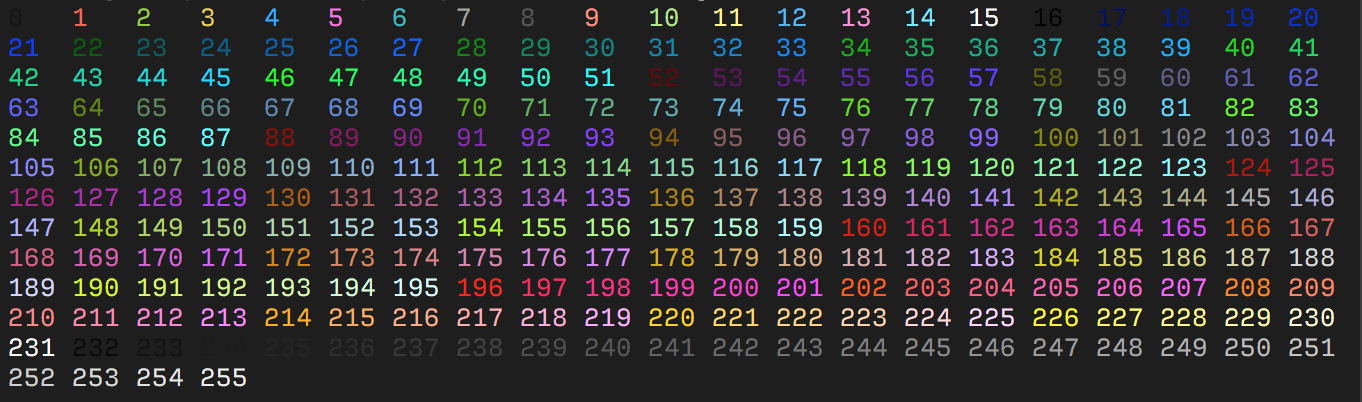
All of the information was used from ANSI Escape Sequences