See Youtube video OpenAI Assistants API + Node.js 🚀 How to get Started? by Mervin Praison and the blog post. This was the starting point for this repo.
➜  assistant-mervin-praison git:(main) ✗ node --version
v20.5.0
- To learn how to use the OpenAI API to create an assistant, a thread, a message and a run
- How to check the status of the run and recover the result or error.
- No tools, no files, no retrieval
-
Assistants can call OpenAI’s models with specific instructions to tune their personality and capabilities.
-
Assistants can access multiple tools in parallel. These can be both OpenAI-hosted tools — like
- Code interpreter and
- Knowledge retrieval
- or tools you build / host (via Function calling).
-
Assistants can access persistent Threads. Threads simplify AI application development by
- storing message history and
- truncating it when the conversation gets too long for the model’s context length.
You create a Thread once, and simply append Messages to it as your users reply.
-
Assistants can access Files in several formats — either as
- part of their creation or
- as part of Threads between Assistants and users.
- When using tools, Assistants can also create files (e.g., images, spreadsheets, etc) and cite files they reference in the Messages they create.
| Components | Phases |
|---|---|
 |
 |
To get started, creating an Assistant only requires specifying the model to use. But you can further customize the behavior of the Assistant.
Use the instructions parameter to guide the personality of the Assistant and define it’s goals. Instructions are similar to system messages in the Chat Completions API. We can also
use openai.beta.assistants.retrieve(assistantId) to retrieve an existing Assistant.
const assistantIds = JSON.parse(fs.readFileSync("assistant.json", "utf8"));
import OpenAI from "openai";
const openai = new OpenAI();

let assistant = null;
if (assistantIds.assistant) {
    try {
        console.log("Retrieving assistant from assistantIds: ", assistantIds.assistant);
        assistant = await openai.beta.assistants.retrieve(assistantIds.assistant);
    } catch (e) {
        console.log(red("Error retrieving assistant: "), red(e));
        assistant = null;
    }
}
if (!assistant) {
    assistant = await openai.beta.assistants.create({
        name: assistantIds.name || "Math Tutor",
        instructions: assistantIds.instructions || "You are a personal math tutor. Write and run code to answer math questions.",
        tools: [] /* assistantIds.tools */,
        model: assistantIds.model,
    });
    assistantIds.assistant = assistant.id;
}
See the file assistant.json for the values of the parameters.
Use the tools parameter to give the Assistant access to up to 128 tools. You can give it access to OpenAI-hosted tools like
code_interpreterandretrieval, or- call a third-party tools via a
function calling.
Use the file_ids parameter to give the tools like code_interpreter and retrieval access to files. Files are uploaded using the File upload endpoint and must have the purpose set to assistants to be used with this API.
See the example at repo ULL-prompt-engineering/assistant-file-retrieval-ralf
const fileName = await askQuestion("Enter the filename to upload: ");

// Upload the file
const file = await openai.files.create({
    file: fs.createReadStream(fileName),
    purpose: "assistants",
});

// Retrieve existing file IDs from assistant.json to not overwrite
let existingFileIds = assistantDetails.file_ids || [];

// Update the assistant with the new file ID
await openai.beta.assistants.update(assistantId, {
    file_ids: [...existingFileIds, file.id],
});

// Update local assistantDetails and save to assistant.json
assistantDetails.file_ids = [...existingFileIds, file.id];
await fsPromises.writeFile(
    assistantFilePath,
    JSON.stringify(assistantDetails, null, 2)
);

console.log("File uploaded and successfully added to assistant\n");A Thread represents a conversation. We recommend creating one Thread per user as soon as the user initiates the conversation. Pass any user-specific context and files in this thread by creating Messages.
let thread = null;
if (assistantIds.thread) {
    try {
        console.log("Retrieving thread from assistantIds: ", assistantIds.thread);
        thread = await openai.beta.threads.retrieve(assistantIds.thread);
    } catch (e) {
        console.log(red("Error retrieving thread: "), red(e));
        thread = null;
    }
}
if (!thread) {
    thread = await openai.beta.threads.create();
    assistantIds.thread = thread.id;
}
Threads don’t have a size limit. We can add as many Messages as we want to a Thread.
The Assistant will ensure that requests to the model fit within the maximum 1, using relevant optimization techniques such as truncation.
When we use the Assistants API, we delegate control over how many input tokens are passed to the model for any given Run, this means we have less control over the cost of running our Assistant but we do not have to deal with the complexity of managing the context window.
A Message contains text, and optionally any files that you allow the user to upload. Messages need to be added to a specific Thread2
const message = await openai.beta.threads.messages.create(
  thread.id,
  {
    role: "user",
    content: "I need to solve the equation `3x + 11 = 14`. Can you help me?"
  }
);
Now if you list the Messages in a Thread, you will see that this message has been appended.
{
  "object": "list",
  "data": [
    {
      "created_at": 1696995451,
      "id": "msg_abc123",
      "object": "thread.message",
      "thread_id": "thread_abc123",
      "role": "user",
      "content": [{
        "type": "text",
        "text": {
          "value": "I need to solve the equation `3x + 11 = 14`. Can you help me?",
          "annotations": []
        }
          }],
...For the Assistant to respond to the user message, you need to create a Run. This makes
- The Assistant read the Thread and decide whether
- to call tools (if they are enabled) or
- simply use the model to best answer the query.
- As the run progresses, the assistant appends Messages to the thread with the
role="assistant". - The Assistant will also automatically decide what previous Messages to include in the context window for the model3.
You can optionally pass additional instructions to the Assistant while creating the Run but note that these instructions override the default instructions of the Assistant.
const run = await openai.beta.threads.runs.create(
  thread.id,
  {
    assistant_id: assistant.id,
    instructions: "Please address the user as Jane Doe. The user has a premium account."
  }
);By default, a Run goes into the queued state. You can periodically retrieve the Run to check on its status to see if it has moved to completed.
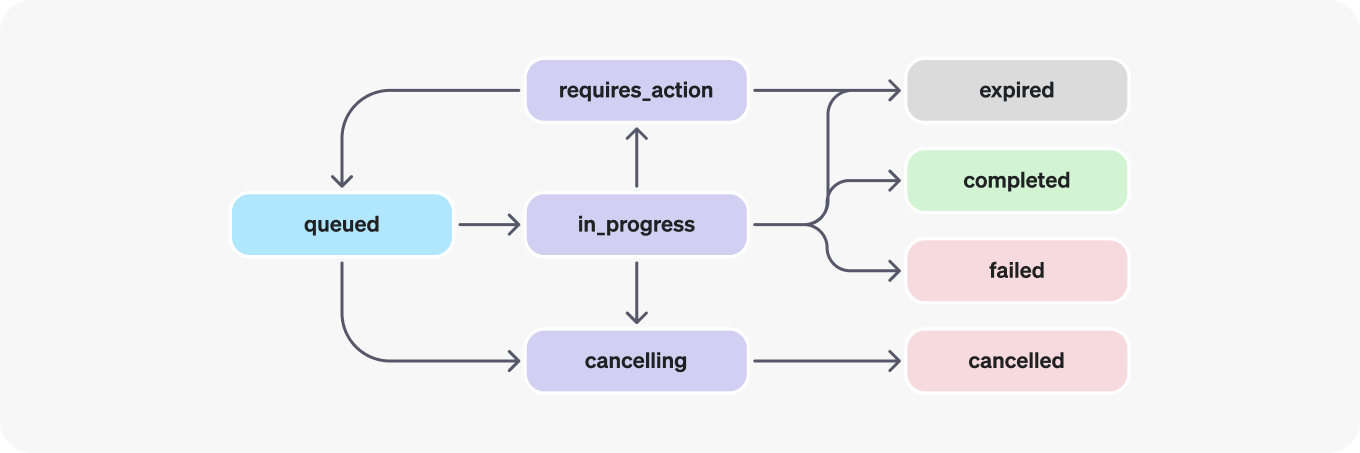
In order to keep the status of your run up to date, you will have to periodically retrieve the Run object. You can check the status of the run each time you retrieve the object to determine what your application should do next.
s    let runStatus = await openai.beta.threads.runs.retrieve(threadId, runId);

    if (runStatus.status === "completed") {
        let lastMessageForRun = await getLastMessageForRun(openai, runId, threadId)
        console.log(purple("Last message for run: "+lastMessageForRun.content[0].text.value));
        process.exit(0);
    } else if (["failed", "cancelled", "expired"].includes(runStatus.status)) {
        console.error(
            red(`Run status is '${runStatus.status}'. Unable to complete the request.`)
        );
        process.exit(1);
    }
    else {
        console.log("Run is not completed yet.", blue(inspect(runStatus.status)));
        setTimeout(async () => { await checkStatusAndPrintMessages(thread.id, run.id) },
          assistantIds.delay || 9000);
    }
};

await checkStatusAndPrintMessages(thread.id, run.id);
Once the Run completes, you can list the Messages added to the Thread by the Assistant.
Here is the code for the function getLastMessageForRun:
async function getLastMessageForRun(openai, runId, threadId) {
    let messages = await openai.beta.threads.messages.list(threadId);
    const lastMessageForRun = messages.data
        .filter(
            (message) =>
                message.run_id === runId && message.role === "assistant"
        )
        .pop();
    return lastMessageForRun;
}
OpenAI plans to add support for streaming to make this simpler in the near future4.
You can also retrieve the Run Steps of this Run if you'd like to explore or display the inner workings of the Assistant and its tools.
Footnotes
-
The term "context window" refers to the amount of input text the model can consider at once, directly impacting its ability to generate coherent and contextually appropriate responses ↩
-
Adding images via message objects like in Chat Completions using GPT-4 with Vision is not supported today, but there is plan to add support for them in the future. We can still upload images and have them processes via retrieval. ↩
-
This has both an impact on pricing as well as model performance. The current approach has been optimized based on what we learned building ChatGPT and will likely evolve over time. ↩
-
Setting
stream: truein a request makes the model start returning tokens as soon as they are available, instead of waiting for the full sequence of tokens to be generated ↩