Python is one of the most popular programming languages. It’s simple to use, packed with features and supported by a wide range of libraries and frameworks. Its clean syntax makes it beginner-friendly.
Python was created in 1991 with a focus on code readability and its ability to express concepts in fewer lines of code.
- A high-level language, used in web development, data science, automation, AI and more.
- Known for its readability, which means code is easier to write, understand and maintain.
- Backed by library support, so we don’t have to build everything from scratch
- Variable types are determined automatically at runtime, simplifying code writing.
- Supports multiple programming paradigms, including object-oriented, functional and procedural programming.
The following is a simple program that displays the message “Hello, World!” on the screen.
print ("Hello World")
How does this work:

- print() is a built-in Python function that instructs the computer to display text on the screen.
- "Hello, World!" is a string, which is a sequence of text. In Python, strings are enclosed in quotes (either single ' or double ").
- Anything after a # symbol is a comment. Python ignores comments, but they are useful for explaining code to human readers.
- We can also write multi-line comments using triple quotes: eg """ this is a comment"""
In Python, Indentation is used to define blocks of code. It tells the Python interpreter that a group of statements belongs to a specific block. All statements with the same level of indentation are considered part of the same block. Indentation is achieved using whitespace (spaces or tabs) at the beginning of each line. The most common convention is to use 4 spaces or a tab, per level of indentation.
print("I have no Indentation ")
    print("I have tab Indentation ")
Explanation: of Error when we run above code
- first ****print ****statement has no indentation, so it is correctly executed.
- second ****print ****statement has tab indentation , but it doesn't belong to a new block of code. Python expects the indentation level to be consistent within the same block. This inconsistency causes an IndentationError .
Python Introduction
Python is one of the most popular programming languages. It’s simple to use, packed with features and supported by a wide range of libraries and frameworks. Its clean syntax makes it beginner-friendly.
- A high-level language, used in web development, data science, automation, AI and more.
- Known for its readability, which means code is easier to write, understand and maintain.
- Backed by library support, so we don’t have to build everything from scratch, there’s probably a library that already does what we need.
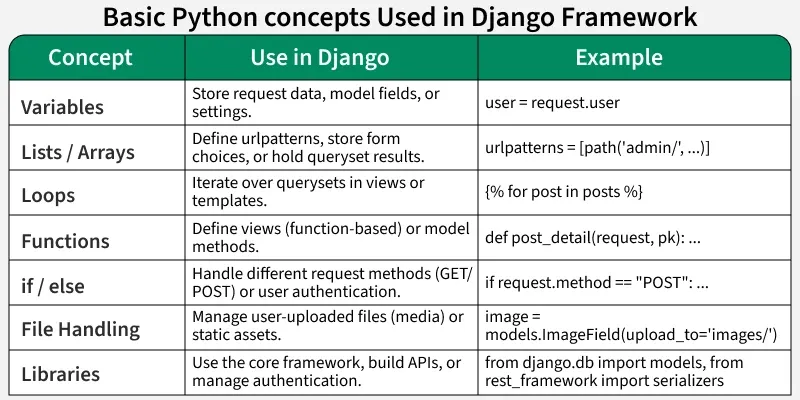
Python needs to be installed before writing programs. Once installed, the print() function is used to display output and the input() function to take user input. Variables act as storage for values while keywords are reserved words that define Python’s structure.
- Download and Install Python 3
- Input and Output in Python
- Python Variables
- Python Keywords
- Introduction to Virtual Environments (venv and pip)
- Setting up Virtual Environments
Python provides multiple data types like numbers, strings, booleans, tuples, lists and dictionaries. Operators are symbols used to perform calculations or comparisons. Conditional statements such as if, elif and else help programs make decisions based on conditions.
Loops repeat a block of code until a condition is met, making programs more efficient. Functions are reusable pieces of code that perform specific tasks, helping in writing cleaner and modular programs.
Strings are sequences of characters used to handle text. Lists are ordered collections that can store multiple items making them useful for working with groups of data.
Dictionaries store data as key-value pairs for fast lookups. Tuples are ordered but immutable collections while sets store unique items and are helpful when duplicates need to be removed.
File handling is crucial in Django for managing media uploads, static files, and configuration data. Modules allow code reusability across different Django apps and views.
The collections module provides advanced data structures like Counter, defaultdict, and deque. Comprehensions simplify list or dictionary creation, while Object-Oriented Programming (OOP) is the foundation for Django models and views — defining classes, methods, and inheritance.
Handling exceptions gracefully is vital in Django applications to prevent server crashes. Python’s advanced concepts such as decorators, context managers, and generators are also used internally in Django for tasks like middleware processing, resource management, and database query optimization.
In Python, you can comment in two main ways:
Use the # symbol.
Everything after # on that line is ignored by Python.
# This is a single-line comment
x = 10 # You can also comment after codePython doesn’t have a special multi-line comment syntax like other languages, but developers use triple quotes ''' or """ to create block comments.
'''
This is a multi-line comment
It spans multiple lines
'''
or
"""
This is also a valid multi-line comment
"""
Note:
Technically, these are multi-line strings , but if not assigned to a variable, Python ignores them so we use them as comments.
Triple quotes used at the start of a function/class/module become documentation strings.
def add(a, b):
    """This function adds two numbers."""
return a + b| Type | Syntax | Use |
|---|---|---|
| Single-line | # comment |
Quick explanation |
| Multi-line | ''' comment ''' |
Long explanations / block comments |
| Docstring | """ description """ |
Describe functions, classes, modules |
If you want, I can show you good commenting practices , how to write docstrings (PEP-257) , or turn comments into auto-documentation .