Home | Development Standards/Practices
Follow these guidelines to contribute to a repository, whether is a code update, commit message, branch, issue, pull request, or git tactics.
Branches keep the code organized. Following the convention branch-per-feature, create a new branch whether you are developing and pushing a WIP, feature, bug fix, or an experiment.
Git branches must follow the next conventions when working or developing over them.
- Start the branch name with a Grouping Token
- Add the Issue Tracker Number after the Grouping Token, if available
- End the branch name with Description Tokens
- Separate branch parts by slashes (
/) - Don't use numbers to start your branch name
- Use short nouns for Grouping and Description Tokens
<grouping-token>/<tracker-number>/<description-tokens>
Examples:
group1/XXXX/lead-foo
group1/YYYY/lead-baz
group2/lead-bar
group3/lead-foo
Grouping Tokens are the ones in front of the branch name. Use one of the next defined tokens to group the branches.
feat- Feature, I'm adding or expandingbug- Bug fix, experiment or monkey patchtest- Integration of testsjunk- Throwaway branch for experimentsdoc- README and/or documentation only
Issue Tracker Number is the one after the Grouping Token, if exists. It is the issue number assigned to the feature or bug in the project's issue tracking tool.
Examples:
feat/RSSI-12/order-blueprints
bug/RSEM-10/sticky-navbar
test/RCMY-9/post-model-attributes
junk/RUMS-49/login-bug-test
Description Tokens are the ones at the end of the branch name. These tokens must match your flow and are personalized depending of your code addition or subtraction.
Examples:
feat/order-blueprints
bug/sticky-navbar
test/post-model-attributes
junk/login-bug-test
Avoid this
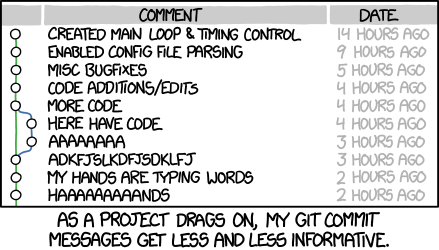
Commit messages must be understandable for future reference, bug tracking, or code history. The ideal commit message consists of two parts, reviewed below. First, let's take a look at the following commit model.
Capitalized, short (50 chars or less) summary

More detailed explanatory text, if necessary.  Wrap it to about 72
characters or so.  In some contexts, the first line is treated as the
subject of an email and the rest of the text as the body.  The blank
line separating the summary from the body is critical, unless you omit
the body entirely; tools like rebase can get confused if you run the
two together.

Write your commit message in the imperative: "Fix bug" and not "Fixed bug"
or "Fixes bug."  This convention matches up with commit messages generated
by commands like git merge and git revert.

Further paragraphs come after blank lines.

- Bullet points are okay, too

- Typically a hyphen or asterisk is used for the bullet, followed by a
  single space, with blank lines in between, but conventions vary here

- Use a hanging indent
Use the following established conventions for writing commit messages.
- Separate subject from body with a blank line
- Limit the subject line to 50 characters
- Start the subject line with a capital letter
- Don't end the subject line with a period
- Use the imperative mood in the subject line
- Wrap the body at 72 characters
- Use the body to explain what and why vs. how
To achieve this workflow when writing a commit message, avoid using the message flag for the git command and use the commit method alone to open up your default text editor.
Incorrect use
git add file
git commit --message 'My commit message'
Correct use
git add file
git commit
Configure your text editor to wrap the commit message text in 72 columns so it shows correctly with git log and less -S.
For Vim users, set it up with:
:set textwidth=72But if you are already using Vim:
- You might like fugitive — it helps you follow those line-length limits (and has lots of other great features, too)
- If you use fugitive, you might as well get it via Janus, along with all the goodies it brings.
For more information about commit messages, read How to Write a Git Commit Message.
Before making a Pull Request, check that the correct base branch is selected, it usually is development.
To have a more organized, documented, and easy to review Pull Requests, follow the next convention for Pull Request titles and description.
Title must be clear and up to 75 characters. It should include the Grouping Token, as the branch specifies, the Issue Tracking Number, if available, and a short description of the PR.
<grouping-token> - <tracker-number> - <Short description>
If a PR is not completed, add the tag [WIP] at the beginning of its title.
[WIP] <grouping-token> - <tracker-number> - <Short description>
The PR description template is written in Markdown to match the format from GitHub.
<!-- PR title format: `<Feat|Bug|Test|Junk|Doc> - <tracker-number> - <Short description>` -->
<!-- Fill out this PR template to make it easier for reviewers to understand your code. Remove this comment and any unnecessary section. -->

#### What does this PR do?

<!-- Briefly synthesize the feature, bug, or fix -->

#### Where should the reviewer start?

<!-- Point out where the reviewer should start to review the code additions or subtractions. -->

#### How should this be manually tested?

<!-- List the steps to reproduce, corroborate, or tests to run. Write this section clear enough so that external users can also follow it and test the fix. -->

#### Any background context you want to provide?

<!-- Any information regarding the PR that the reviewers should know. -->

#### What are the relevant tickets?

<!-- Link to issues, related PR, JIRA issues, etc. -->

#### Screenshots

<!-- Before and after screenshots of the feature, if available. -->

#### Questions

<!-- For another developer or reviewer, if available. -->

#### Checklist

<!-- Verify that you have done all of the following and mark them as done. -->

- [ ] I added the necessary documentation, if appropriate.
- [ ] I added tests to prove that my fix is effective or my feature works.
- [ ] I reviewed existing Pull Requests before submitting mine.
To automatically fill any new Pull Request with this template, add this template to your repository.
To merge a Pull Request, it should have at least two positive reviews and no pending change or fix requests.
It is responsibility of the PR author to ask for reviews if nobody has taken a look at the PR, but it is also responsibility of the team to be responsive to these requests.
PRs shouldn't last more than 3 days without activity, either have comments and change requests or get merged.
Each project or repository should have:
- One Primary Merge Master in charge of merging PRs
- At least one Interim Merge Master for when the Primary is unavailable
The Merge Masters should be identified in the repository's CONTRIBUTING. If a repository has
only a Primary and a Interim becomes necessary, a project's team may decide
that simply advertising the Interim via Slack, e-mail, etc., will suffice
rather than requiring updateing the the CONTRIBUTING.
To have a more organized commit history and log use the following git tactics to pull and manage branches.
To ensure a clean main branch log, pull remote references using the rebase flag.
$ git pull --rebaseTo merge a branch into a base branch, follow the next steps.
- Pull all
originbranches from the remote.
git fetch origin- Checkout into a new branch and sincronize it with the remote.
git checkout -b <branch_name> origin/<branch_name>- Merge the base branch into the new branch.
git merge <base_branch>- Solve any conflict.
- Checkout the base branch.
git checkout <base_branch>- Merge the desired branch with the
non-fast-forwardflag.
git merge --no-ff <branch_name>- Push to the remote.
git push origin <base_branch>