UI 디자인: 캐릭터 선택창 #139

Replies: 3 comments 3 replies

-
2차 구현
characters2.mp4 |
Beta Was this translation helpful? Give feedback.

-
|
깔끔하네 ㅋㅋㅋ 기존 씬이랑 연결시키면 될 듯 |
Beta Was this translation helpful? Give feedback.

-
|
슬랙에 3D 모델 링크 새로 보내놨으니까 한 번 체크해주세용 - 방법은 1) 애니메이션이 있는 모델로 교체하거나 2) 애니메이션 직접 만들거나 2개일 듯 고민해본다음에 얘기해주세요 |
Beta Was this translation helpful? Give feedback.

-
새로운 플레이어 모델 캐릭터 선택화면에 배치#163 에서 제안했던 플레이어 모델 프리팹 배치
CharacterSelection.cs void Start()
{
loadObjects();
for (int i = 0; i < characters.Length; i++)
{
switchCharactersComponents(i, false);
}
...
}
public void switchCharactersComponents(int _index, bool _bool)
{
characters[_index].gameObject.GetComponent<Player>().enabled = _bool;
characters[_index].gameObject.GetComponent<Rigidbody>().isKinematic = _bool;
characters[_index].gameObject.GetComponent<Rigidbody>().detectCollisions = _bool;
characters[_index].gameObject.GetComponent<BoxCollider>().enabled = _bool;
}
private void rotateCharacters()
{
    this.transform.rotation = Quaternion.Lerp(this.transform.rotation, spawnPoint.transform.rotation, Time.deltaTime);
}

IEnumerator changeRotateY()
{
    while (true)
    {
        yield return changeCycle;
        rotationY *= -1f;
        spawnPoint.transform.eulerAngles = new Vector3(0, rotationY, 0);
    }
}

void Update()
{
    rotateCharacters();
}
character.select.mp4 |
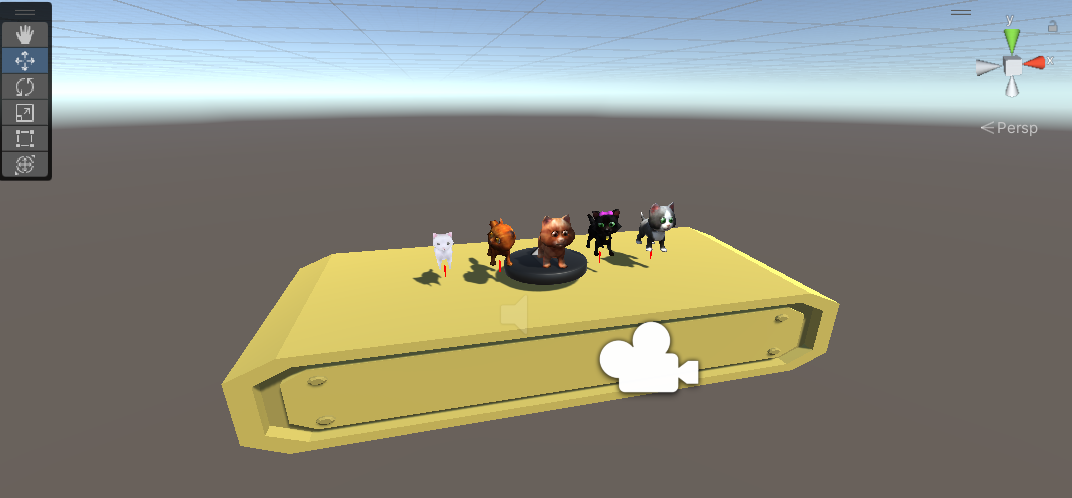
Beta Was this translation helpful? Give feedback.
-
|
기존에 너무 빠르게 회전한다는 느낌이 있긴 했죠 ㅇㅇ 결과물이 이게 더 나은 듯 |
Beta Was this translation helpful? Give feedback.
-
캐릭터 선택화면과 플레이 씬 연결선택한 캐릭터를 플레이 씬에서 플레이할 수 있도록 구현
public void StartGame()
{
    selectedCaracterName = characterSelection.characters[characterSelection.currentIndex].name;

    StartCoroutine(resetPlaySceneCoroutine());
}

//플레이어가 죽으면 Player 스크립트에서 호출됨
//씬을 새로 로드하고 스크립트 재탐색
public void resetPlayScene()
{
    StartCoroutine(resetPlaySceneCoroutine());
}

IEnumerator resetPlaySceneCoroutine()
{
    SceneManager.LoadScene(playScene);

    yield return null;

    player = FindObjectOfType<Player>();
    lifeManager = FindObjectOfType<LifeManager>();

    currentLife = TotalLife;
}
ActiveCharacters.cs //logic flow
//1. CharacterSelection에서 선택된 플레이어의 이름을 Game Manager에서 가져옴
//2. 일치하는 자식 오브젝트의 캐릭터 프리팹 활성화(선택한 캐릭터 플레이)
public class ActiveCharacters : MonoBehaviour
{
[SerializeField] GameObject[] characters;
[SerializeField] GameManager gameManager;
//Awake로 우선순위를 제일 높게 잡음
//여기서 활성화된 Player 프리팹을 기준으로 다른 스크립트에서 FindObjectOfType을 사용하기 때문
void Awake()
{
gameManager = FindObjectOfType<GameManager>();
characters = new GameObject[this.transform.childCount];
for (int i = 0; i < characters.Length; i++)
{
characters[i] = this.transform.GetChild(i).gameObject;
if(characters[i].name == gameManager.selectedCaracterName)
{
characters[i].SetActive(true);
}
}
}
}
selected.character.play.mp4 |
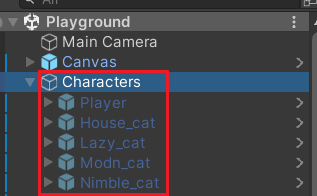
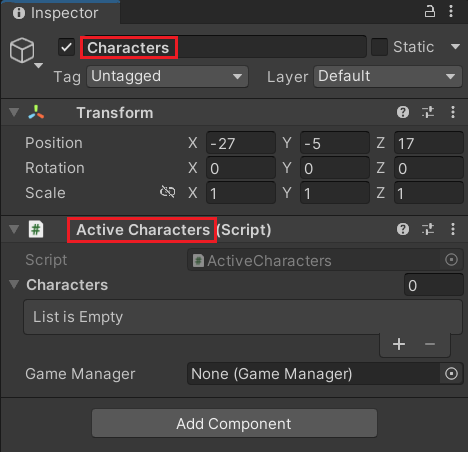
Beta Was this translation helpful? Give feedback.


Uh oh!
There was an error while loading. Please reload this page.
Uh oh!
There was an error while loading. Please reload this page.
-
게임 시작 캐릭터 선택화면 UI 추가
UI 레퍼런스
Unity 3D game - Trash Dash: Endless Runner
1차 구현
characters.mp4
Beta Was this translation helpful? Give feedback.
All reactions