Unity: Enemy 로직 설계 #4

Replies: 14 comments 2 replies

-
진행 : enemies 브랜치 생성 후 작업 예정디렉토리 구성
|
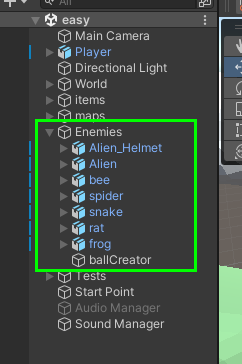
Beta Was this translation helpful? Give feedback.
-
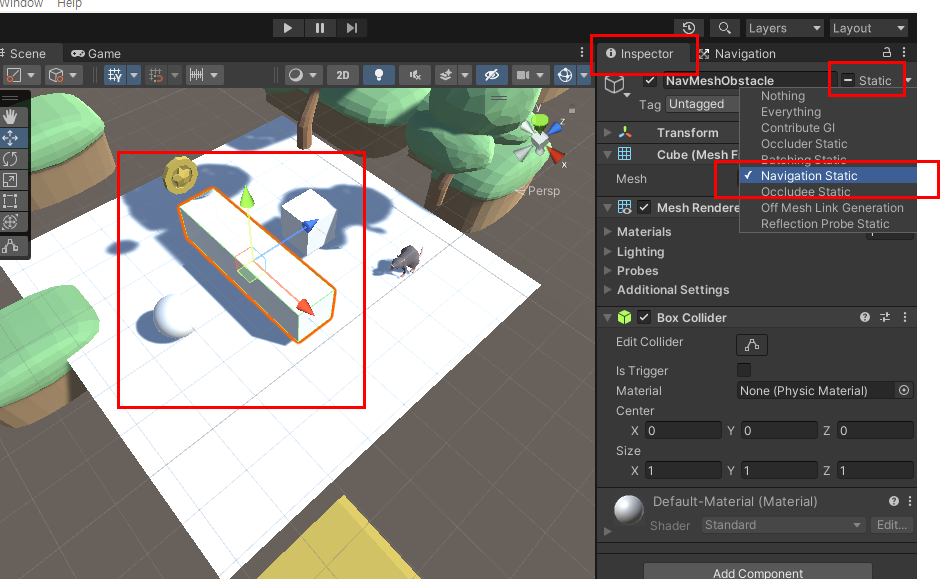
enemy 인공지능 구현 1차 : NavMesh, NavMeshAgent
NavMesh와 NavMeshAgnet의 차이와 설정하는 법을 몰라 좀 헤맸네용
NavMesh and NavMeshAgentset NavMesh and obstacle
Agent setting in Navigation tab (Unity editor)
set NavMeshAgent with scriptusing System.Collections;
using System.Collections.Generic;
using UnityEngine;
using UnityEngine.AI;
public class agent : MonoBehaviour
{
[SerializeField] Transform target;
private NavMeshAgent _agent;
void Awake()
{
_agent = GetComponent<NavMeshAgent>();
}
// Update is called once per frame
void Update()
{
if (Input.GetKeyDown(KeyCode.Space))
{
_agent.destination = target.position;
}
}
} |


Beta Was this translation helpful? Give feedback.
-
Enemy script 업데이트 공유public class E_rat : MonoBehaviour, IEnemyBehavior
{
private Player player;
public IEnemyBehavior.enemyState current; // enemy 상태
public IEnemyBehavior.playerDistanceState isDetected; // enemy의 player 탐지
public NavMeshAgent _agent; // enemy 인공지능 인스턴스
public float distance; // Player ~ enemy 사이 거리
public float detectLimit = 200f; // enemy 감지 거리 한계
// ============== Object initialization and update ============== //
void Awake()
{
current = IEnemyBehavior.enemyState.Idle; // awake시 상태는 idle
player = FindObjectOfType<Player>();
_agent = FindObjectOfType<NavMeshAgent>();
print($"player is at : {player.transform.position}");
}
void Update()
{
updateState();
updateBehavior();
// Track();
}
// ============== Object initialization and update ============== //
// ============== Enemy state and behavior ============== //
public void updateBehavior()
{
switch(current)
{
case IEnemyBehavior.enemyState.Idle :
Idle();
break;
case IEnemyBehavior.enemyState.Track :
// TO DO : enemy에 작은 신호등 붙이기(track state 표시용)
GetComponent<Renderer>().material.color = Color.red;
Track();
break;
case IEnemyBehavior.enemyState.Fire :
Fire();
break;
case IEnemyBehavior.enemyState.Die :
Die();
break;
default :
Idle();
break;
}
}
public void updateState()
{
switch (isDetected) {
case IEnemyBehavior.playerDistanceState.TooFar :
current = IEnemyBehavior.enemyState.Idle;
break;
case IEnemyBehavior.playerDistanceState.Within :
current = IEnemyBehavior.enemyState.Track;
break;
default :
current = IEnemyBehavior.enemyState.Idle;
break;
}
}
// ============== Enemy state and behavior ============== //
// ============== IEnemyBehavior implementation ============== //
public void Idle()
{
// TO DO : 플레이어가 탐지 거리 바깥이면 주변 패트롤
print("Enemy being idle");
}
public void Track()
{
// 플레이어가 일정 거리 이상 좁혀지면 추적 시작
distance = Vector3.Distance(player.transform.position, this.transform.position);
if (current == IEnemyBehavior.enemyState.Track && distance < detectLimit)
{
print("Enemy detected a player, starting tracking");
_agent.destination = player.transform.position;
}
}
public void Fire()
{
print("Enemy found a player, starting to shoot");
}
public void Die()
{
// TO DO : 플레이어가 밟고 지나가면 죽음
print("Enemy died by a player");
Destroy(this.gameObject);
}
// ============== IEnemyBehavior implementation ============== //
} |
Beta Was this translation helpful? Give feedback.
-
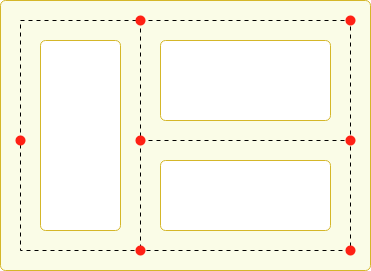
인공지능 적 구현 2차Making an Agent Patrol Between a Set of Points
    // Patrol.cs
    using UnityEngine;
    using UnityEngine.AI;
    using System.Collections;


    public class Patrol : MonoBehaviour {

        public Transform[] points;
        private int destPoint = 0;
        private NavMeshAgent agent;


        void Start () {
            agent = GetComponent<NavMeshAgent>();

            // Disabling auto-braking allows for continuous movement
            // between points (ie, the agent doesn't slow down as it
            // approaches a destination point).
            agent.autoBraking = false;

            GotoNextPoint();
        }


        void GotoNextPoint() {
            // Returns if no points have been set up
            if (points.Length == 0)
                return;

            // Set the agent to go to the currently selected destination.
            agent.destination = points[destPoint].position;

            // Choose the next point in the array as the destination,
            // cycling to the start if necessary.
            destPoint = (destPoint + 1) % points.Length;
        }


        void Update () {
            // Choose the next destination point when the agent gets
            // close to the current one.
            if (!agent.pathPending && agent.remainingDistance < 0.5f)
                GotoNextPoint();
        }
    }
reference |
Beta Was this translation helpful? Give feedback.
-
Enemy type : rat 2차 구현 끝rat.mp4 |
Beta Was this translation helpful? Give feedback.
-
중간/어려움 난이도 Enemy 설계플레이어를 추적하고 발사 가능 범위면 오브젝트를 발사. Raycast와 Particle sytem을 활용한 Enemy fire 로직 설계 중. Raycast 발사 시 particle system 작동, raycast hit가 유효할 경우 오브젝트의 health를 감소시키고 파괴함. raycastAndShoot.mp4// Raycast 발사
using System.Collections;
using System.Collections.Generic;
using UnityEngine;
public class shoot : MonoBehaviour
{
public float damage = 10f;
public float range = 100f;
private Rigidbody rb;
public float speed = 4;
// public Camera fpsCam;
public ParticleSystem muzzleFlash;
void Start()
{
rb = this.GetComponent<Rigidbody>();
}
void Move()
{
float h = Input.GetAxis("Horizontal");
float v = Input.GetAxis("Vertical");
// Rigidbody.velocity : change of Rigidbody position.
rb.velocity = new Vector3(h * speed,0,v*speed);
}
// Update is called once per frame
void Update()
{
Move();
if (Input.GetKeyDown(KeyCode.Space))
{
Fire();
}
}
void Fire()
{
// ParticleSystem.Play : Starts the Particle System.
muzzleFlash.Play();
RaycastHit hit; // RaycastHit : struct type
bool isHit = Physics.Raycast(
this.transform.position,
this.transform.forward,
out hit, // no explicit return but value is updated.
range
); // Physics : class type, Raycast : 1) origin 2) direction
if (isHit)
{
print($" target : {hit.transform.name}");
gunTarget target = hit.transform.GetComponent<gunTarget>();
if (target != null)
{
target.TakeDamage(10f);
}
// print();
} else {
print("no ray cast hit");
}
}
}
// Raycast 맞음
public class gunTarget : MonoBehaviour
{
public float health = 50f;
public void TakeDamage(float amount)
{
health -= amount;
this.gameObject.GetComponent<MeshRenderer>().material.color = Color.black;
if (health < 30)
{
this.gameObject.GetComponent<MeshRenderer>().material.color = Color.blue;
}
if (health < 0) {
Destroy(gameObject);
}
}
}
|
Beta Was this translation helpful? Give feedback.
-
intermediate enemy 로직 구현 1차구현 방법 : Raycast로 플레이어 체킹, instantiate로 오브젝트 생성, Coroutine E_intermediate.mp4 |
Beta Was this translation helpful? Give feedback.
-
Particle system 1차 구현
particleSys.mp4 |
Beta Was this translation helpful? Give feedback.
-
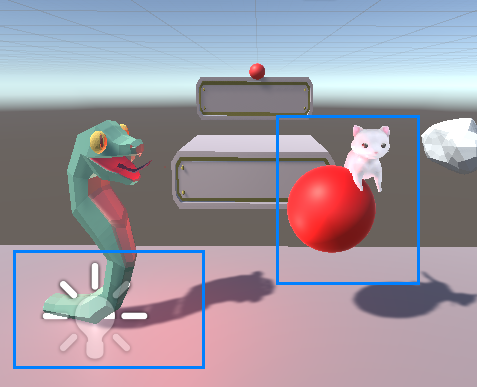
intermediate enemy 로직 구현 2차
동영상intermediate.mp4 |
Beta Was this translation helpful? Give feedback.
-
difficult 난이도 enemy 구현 1차
void ShouldLookAtPlayer()
    {
        Vector3 playerPosWithLockedYAxis = new Vector3(
            player.transform.position.x,
            transform.position.y,
            player.transform.position.z
        );

        transform.LookAt(playerPosWithLockedYAxis); // fix y axis
        transform.Rotate( 0, 90, 0 ); // rotate enemy 90 degree in Y axis to correct direction
    }
동영상beeDone.mp4 |
Beta Was this translation helpful? Give feedback.
-
중간 점검 : 현재 남아있는 tasks
|
Beta Was this translation helpful? Give feedback.
-
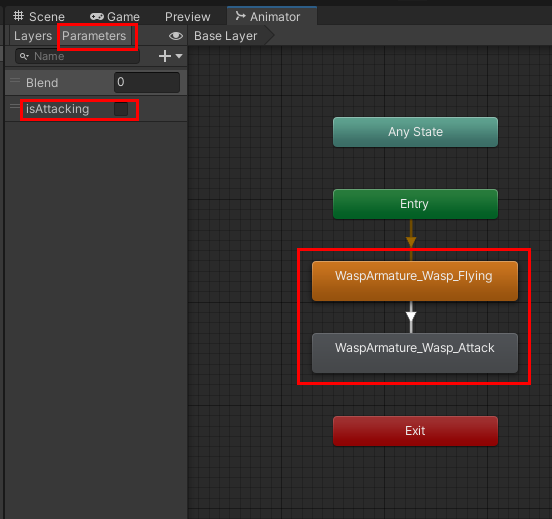
애니메이션 구현 1차자료 조사 및 애니메이션 튜토리얼3D 모델 애니메이션 확인 및 추출beeAnim.mp4애니메이션 컨트롤러 parameters/states 지정
|
Beta Was this translation helpful? Give feedback.
-
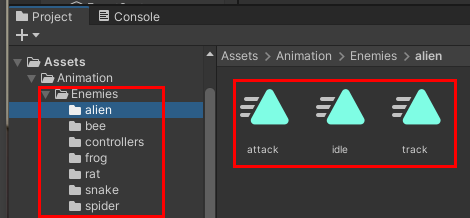
애니메이션 종류 지정기존 enemy state에 맞춰
기본 3종류로 지정, 적절한 애니메이션이 없을 경우 idle을 track으로 활용(idleTrack 애니메이션 파라미터 지정enemy type에 맞춰 서로 다른 파라미터 지정 및 제네릭 함수 사용
    public void AnimationSetter<T>(string _name, T _condition)
    {
        if (_condition.GetType() == typeof(int))
        {
            animator.SetInteger(_name, (int.Parse(_condition.ToString())));
        }
    }
    public void AnimationSetter<T>(string _name, T _condition)
    {
        if (_condition.GetType() == typeof(bool))
        {
            animator.SetBool(_name, bool.Parse(_condition.ToString()));
        }
} |
Beta Was this translation helpful? Give feedback.
-
enemy 애니메이션 구현 2차enemy-idle.mp4 |
Beta Was this translation helpful? Give feedback.

-
|
자체 애니메이션이 있다는 게 천만다행이네 ㅋㅋㅋ |
Beta Was this translation helpful? Give feedback.

-
|
애초에 3D 모델 가지고 올 때 애니메이션 있는 걸로 가지고 오는 게 중요한 거 같아영 애니메이션 튜토리얼 진행해보니까 애니메이션 실제로 만드는 건 애니메이터라고 아예 따로 직종이 있는 거 같더라구 |
Beta Was this translation helpful? Give feedback.


Uh oh!
There was an error while loading. Please reload this page.
Uh oh!
There was an error while loading. Please reload this page.
-
기존 3D 모델을 3가지로 분류
Beta Was this translation helpful? Give feedback.
All reactions