implementing a database interface #24

Description

the issue
ScaleWiz currently manages data storage by looking for JSON files.
It performs some bulk data mutation and serialization occasionally.
When updates to data do occur, the entire data file must be written and read from again. This is inefficient.
Further, the lack of a centralized store means data can be duplicated 2-3 times in memory (TestHandler, ProjectEditor, EvaluationWindow) , with each copy pending being mutated by some UI widget. Problematic operations like this are currently disabled on the GUI layer.
Competing edits could result in data loss, so it would be better to just use a real database.
Data security here should be worth the overhead of having to make database retrievals/insertions.
possible solutions
The two best options appear to be MongoDB, and TinyDB.
MongoDB would be the more comprehensive, robust option. However, it requires talking to an actual instance of MongoDB either locally or remotely. This makes ScaleWiz harder to install/setup initially, with some potential long term benefits.
TinyDB is a less comprehensive option, but is user-friendly and easily extensible. It is pure Python, and doesn't require talking to a external process / server instance. ScaleWiz could still simply be pip installed.
Both options work by serializing data in a very dict-compatible format. MongoDB uses BSON and TinyDB uses JSON (or YAML, etc.) ScaleWiz models are already stored in JSON so migrating to it should be pretty easy. Migrating from TinyDB to something like MongoDB should be similarly easy if the need arises.
the work
Resolving this issue has a couple implementation goals
- structuring the database
- hooking up to the database
- port the existing data to the new database
structure
One of the first and most important implementation details to sort out will be how to actually find the documents once they are in the database. Right now we rely on the user navigating the filesystem to show us where the relevant chunk of JSON is. This file's path is effectively its 'universal identifier'.
A possible solution is to add to each Project a uuid, which could be stored as a hex string such as
1d849bddb8d14f4da6743770033e463f
We can generate these on the fly relatively cheaply. they are almost guaranteed to be collision free.
A TinyDB instance could be defined in the init.py of the package for easy access. All modifications to it should be passed through the main tkinter thread though (much like the GUI updates)
getting started will be kind of awkward. right now we rely on the user to navigate the filesystem to point us to the data. instead we will need to be able to query for it reliably. we also need to be able to relay the visual representation of the available data to the user. probably with something like a treeview
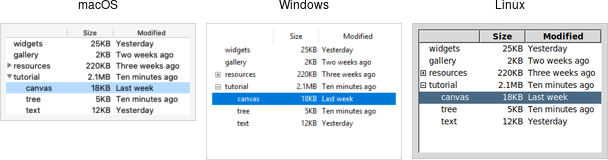
also see the difference between these possible schemas
hooking up
the current data cycle is like
JSON file -> Python dict -> Python object (tkinter variable model) -> Python dict -> JSON
this isn't very elegant, but the tkinter variables are easy to add traces to (fire a callback when the variable is updated).
this affords some nice functionality
- makes it easier to keep certain properties up to date (eg.
Test.nameandProject.name) - it is easy to update chunks of the underlying data based in UI inputs (eg. updating scores when adding blanks to a report)
related #21
a possibly better two-way flow might be like
database (manages its own file, we don't care what kind) <-> Python object (tkinter vars)
a pain point in the UI previously has been keeping multiple copies of the same Project in memory, each with their own view, and having to do lots of file read/writing to rebuild the UI
- the
TestHandlerwhich must read experiment params from theProject- it occasionally appends
Teststo theProject, and can create newProjects but never independently mutates the metadata on theProjectnor its existingTests
- it occasionally appends
- the
ProjectEditorcan make newProjects and read/write all of aProjectmetadata. cannot mutate existingTests - the
EvaluationWindowcan read/write to the list ofTests in aProject, read/write a coupleProjectmetadata fields (plotandpathiirc)
the new database implementation should
- avoid having to duplicate the
Projectobject in this way - read from the database to
buildthe GUI - update the database when appropriate
updates could be done immediately, or in batches by keeping a memo of update operations and sending them all off when the user clicks save etc. often it makes sense to let the user preview changes before persisting them
porting
Whatever the implementation ends up being, it must provide a path to migrate older data. There seems to be two options here
- migrate all the data up front, using a custom GUI/CLI tool to dynamically build a database from old JSON files. kind of a pain but not really hard to do. more work upfront, but overall a cleaner solution.
- try to patch over pieces of JSON on the fly somehow, maybe adding an 'Import' style button/feature to ScaleWiz. this would require less work up front but would certainly be tacky and add bloat.
The data as it is currently stored doesn't use a specific JSON schema. At the Python/tkinter layer we just hope the right fields are there, using the dict's get method to try to find the right key while offering fallbacks. eg.
data = json.load('my_data.json')
self.property.set(data.get('my_key', data.get('myKey'))
This is somewhat useful for kind-of correcting old JSON files on the fly, but also cumbersome. Especially as each undocumented change to the non-existent schema has to be added in as extra Python logic.