JavaScript has 4 ways to declare a variables: var, const, let, just use the name:
var a = 10
const a = 10
let a = 10
a=10
The syntax for const and let are part of the ES6 syntax and can be used in node or in browser and are preferred. Using var and no syntax for declaration have similar effect and make the variable global in it's function space, or lexically scoped. This is more confusing for programmers and is generally avoided although you'll still see it used a lot. A variable declared with const can not be set to another value, although, when we were with object, you'll see that properties within a const object can be reset. A variable declared with let can be reset and is block scoped. Block scoping means the variable is only know within the block (pair of curly braces or page if not within curly braces) in which it is declared.
JavaScript is a loosely typed language, but it recognizes the types referenced in its variables. There is a typeof operator that can return the type of a variable; for example
let n = 3
typeof n  //returns "number"
There are 7 types in JavaScript
- number which includes integer (no decimal places) and floating-point (decimal places)
- string which are used for text and you can picture of strings as a string of characters
- boolean which hold values of true or false
- null which can hold a single value of null
- undefined which holds a single value of undefined
Null and Undefined are differentiated in the fact that null is a value that you must assign to a variable, whereas undefined is the default value of a variable for which you don't assign anything.
The types associated with numbers, strings, booleans, null, undefined types as discussed above are referred to as primitive. We'll be learning about Object in a future module. Objects can encapsulate (contain) primitive values. The main difference between primitive and object types from a programming point of view is that primitives are immutable. For example if if I have a string decalred as let s = "hello", I can't change the "e" to an "a" in "hello". I can create a new string s = "hallo", but I can't do something like s[0] = "a". That is I can't go into the contents of the string and change it.
Objects are mutable. If I have an object let obj = {a:1} I can change the value of a in the object like this: obj.a = 2.
In JavaScript there are "wrapper" objects for the primitive types: String, Number, Boolean which provide some functionality. Notice that the object wrapper names are capitalized. This is a common convention to refer to primitive types with lower case names and object types with upper case names. In this module, we're working with primitives to understand the types of data they can hold, and we'll look at some methods provided by some of the wrapper object types.
We're not writing functions and objects in this assignment, but we're using them in the form of type methods. The term method is sometimes used interchangeably with function. There are many string methods. In this assignment you'll use the indexOf function to determine if a string contains a substring. This function is called as follows:
let s = "string"
s.indexOf("s")
The call to indexOf above would return the value 0 because the letter s is found in the 0th position. Counting starts at 0.
let s = "string"
s.indexOf("Q")
The call to indexOf above would return the value -1 because that it what the function returns when the value can't be found. That means a good logical test for the existence of a character in a string is s.indexOf("Q") > -1.
Like strings, numbers have number methods. The toFixed() method helps us to provide decimal places to a number with decimals. When you use division \, even on integers, you can get decimals places. Notice, in the example below that toFixed returns a string and will apply rounding rules.
let n = 1
n/6 //returns 0.16666666666666666
(n/6).toFixed(2) //returns "0.17"
Operators are functions that have a symbolic shorthand; for example instead of saying "add" we have a plus sign "+" operator.
Every type has a set of operators that can be applied to a variable of that type.
In an imperative language, like JavaScript, the flow of the instructions is often linear in nature. In other words, when one command is complete, the next line of code is executed. Sometimes we want to change the flow of the code based on the status of certain variables. Variable contain the data, or state, of the program. We are often writing data driven applications. One of the ways to change the flow of the program is to use logic. We can create logical expressions by using logical operators.
Whereas variables with a boolean type will always return true or false, we can create expressions which return true or false using logical operators. We can also use AND && and OR || to combine logical expression, thereby creating more complex logical tests. Program flow is often described visually using flowcharts like this flowchart that looks at the value of temperature 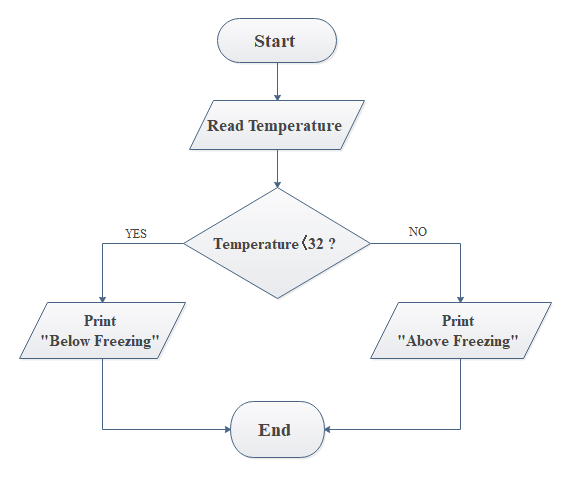
You can use the if/else if/else syntax to test logical expressions and change the code that is executed based on the results of evaluating the expression.
The syntax for if/else if/else includes a logical expression surrounded by parentheses. For each if, else if or else a block expression follows. If there is only one statement in the block you don't need curly braces, but using curly braces is required if there are multiple statements.
The code for the flowchart in the image above might look like this:
let temperature = 15 //degrees
if (temperature < 32){
  console.log("Below Freezing")
} else if (temperature === 32){
  console.log("Freezing")
}
} else {
  console.log("Above Freezing)
}You can use ternary operators to test the value of a logical operator and return a value of true or false depending on whether the logical operator evaluates to true or false. The syntax is:
<logical operator> ? <value if true> : <value if false>
You can see that it's a shorthand for if/else
if (<logical expression>) <value if true> else <value if false>
Here's an example:
let a = 1
let b = 2
let c = a < b ? "a is less than b" : "a is greater than b"
At the end of the above code c would equal "a is less than b"
You'll learn that you can concatenate strings with other string and numbers to create new strings. However, with ES6, we have literal templates to create string composed of literals and variables. The syntax uses a pair backtick characters ` (key to the left of the 1 on most keyboards) to enclose a set of strings and variables. Variables are enclosed in ${} within the backticks to show the value of the variable.
let s = "Hello"
let name = "Sally"
`${s} ${name}, how are you today?` // returns "Hello Sally, how are you today?
The ability to combine literals and variables can be use to create new strings or to log data using the console.log() function. We call the placing of string within the template literal "interpolation". A template literal may span multiple lines of text.
It might be helpful to review some additional resources as you work through this project: