C6 SecOps AI Agent is a 24/7 resident security operations agent deployed on AWS, designed to automate security event analysis, triage, escalation, and defense.
⚠️ NOTICE: This repository is currently frozen for the AWS Hackathon submission and will not be updated until the hackathon results are published. Thank you for your understanding!
Web applications are subjected to tons of cyberattack events daily. AWS provides robust security systems to help protect web apps and backend APIs, but these systems generate a massive volume of security alerts that must be reviewed by security analysts.
The Challenge: Not all AWS customers have the budget to hire dedicated security analysts to monitor and analyze these security alerts around the clock. This is a critical pain point—even with sophisticated security systems in place, the alerts still require human review.
The Solution: I created this project for the hackathon to leverage AWS AI technologies and develop autonomous AI agents that run on AWS to perform first-tier security event review and analysis. The goal is to offload tedious and routine security alert review tasks, improve security escalation workflows, and enable faster incident response—all without requiring a full-time security operations team.

AWS WAF Integration (Auto Update Block List)

ServiceNow Integration (Auto create incident)

soc-lite/
├── apps/
│   ├── backend/              # Node.js 22.x + TypeScript + Express API
│   └── frontend/             # React 19.x + Vite 7 + TypeScript + Tailwind CSS
├── agentcore/
│   ├── gateways/             # API Gateway definitions for agent actions
│   └── runtime/              # Bedrock AgentCore agents (Python)
│       ├── secops-agent/     # Multi-agent security operations
│       └── bulk-analysis-agent/  # Bulk event analysis
├── lambda/                   # AWS Lambda functions
│   ├── get-waf-alert/        # WAF event ingestion
│   ├── smart-analysis-worker/  # Bulk AI analysis processor
│   ├── smart-analysis-task-generator/  # Event grouping
│   ├── manual-analysis-worker/  # User-triggered analysis
│   ├── escalation-processor/  # Escalation notifications
│   ├── escalation-plugin-waf-blocklist/  # WAF IP blocking
│   ├── escalation-plugin-servicenow/  # ServiceNow integration
│   ├── monitoring-trigger/   # Daily monitoring
│   └── daily-monitoring-trigger/  # Scheduled monitoring
├── database/
│   ├── migrations/           # SQL migration files
│   ├── rds/                  # RDS management scripts
│   └── scripts/              # Database helper scripts
├── infrastructure/           # AWS deployment scripts
│   ├── compute/              # Lambda, API Gateway
│   ├── storage/              # S3, RDS
│   ├── networking/           # CloudFront, DNS
│   ├── security/             # WAF, IAM
│   ├── monitoring/           # CloudWatch, EventBridge, SNS
│   ├── deployment/           # Orchestration scripts
│   └── config/               # Centralized configuration
├── config/                   # Shared configuration templates
├── scripts/                  # Deployment automation
└── DEPLOY_AWS.md             # AWS deployment guide

- ✅ WAF event ingestion from CloudWatch Logs
- ✅ Real-time event monitoring and analysis
- ✅ Smart event grouping by source IP and time
- ✅ Automated threat severity rating (0-5 scale)
- ✅ Event timeline and pattern detection
- ✅ AWS Bedrock AgentCore integration
- ✅ Amazon Nova Micro model for threat analysis
- ✅ Multi-agent security operations (analyze, triage, monitor)
- ✅ Bulk analysis for grouped events
- ✅ Manual analysis for individual events
- ✅ Automated security recommendations
- ✅ Automated escalation for high-severity threats (4-5)
- ✅ SNS email notifications for critical alerts
- ✅ WAF IP blocklist integration
- ✅ ServiceNow incident creation
- ✅ Escalation tracking and management
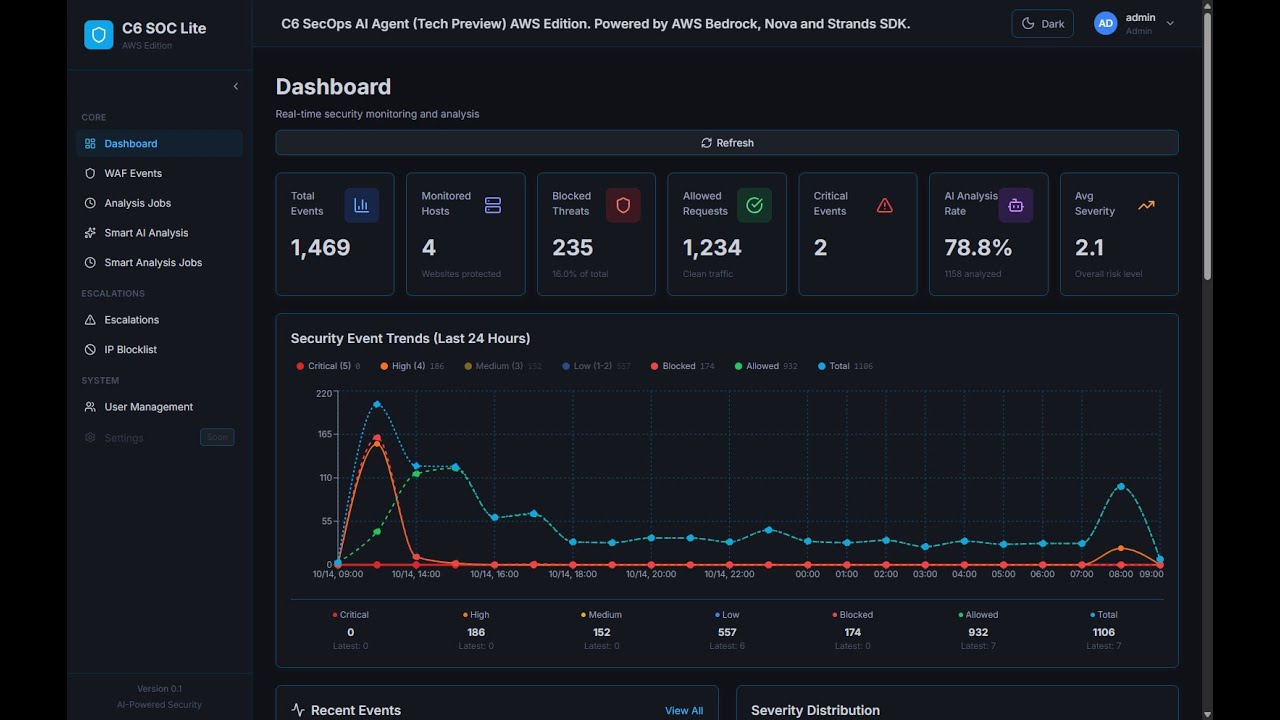
- ✅ Real-time security metrics
- ✅ Event trends and statistics
- ✅ Attack source visualization (geographic maps)
- ✅ Severity distribution charts
- ✅ Event timeline view
- ✅ JWT authentication (7-day expiry)
- ✅ Role-based access control
- ✅ Secure password hashing (bcrypt)
- ✅ User activity tracking
- Node.js 22.x
- Python 3.8+
- PostgreSQL client (psql)
- AWS CLI v2 configured
- AWS account with Bedrock AgentCore access
-
Clone and configure
git clone <repository-url>
cd soc-lite
cp config/.env.example apps/backend/.env
# Edit apps/backend/.env with your AWS and database credentials
-
Deploy to AWS
# See DEPLOY_AWS.md for complete deployment guide
./scripts/deploy.sh
Backend:
cd apps/backend
npm install
npm run dev  # Runs on http://localhost:3000
Frontend:
cd apps/frontend
npm install
npm run dev  # Runs on http://localhost:5173
Database:
cd database/rds/scripts
./start-db.sh   # Start RDS instance
./test-db.sh    # Test connection
./stop-db.sh # Stop to save costs┌─────────────────────────────────────────────────────────┐
│ Internet │
└────────────────────┬────────────────────────────────────┘
│
┌───────────┴──────────┐
│ │
▼ ▼
┌────────────────┐ ┌────────────────┐
│ CloudFront │ │ API Gateway │
│ (Frontend) │ │ (Backend) │
│ + WAF │ │ │
└────────┬───────┘ └────────┬───────┘
│ │
▼ ▼
┌────────────────┐ ┌────────────────┐
│ S3 Bucket │ │ Lambda │
│ (React App) │ │ (Node.js) │
└────────────────┘ └────────┬───────┘
│
┌─────────────────────┼─────────────────┐
│ │ │
▼ ▼ ▼
┌────────────────┐ ┌────────────────┐ ┌──────────┐
│ RDS Postgres │ │ Bedrock │ │ SNS │
│ (Database) │ │ AgentCore │ │ (Alerts) │
└────────────────┘ └────────────────┘ └──────────┘
▲ ▲ ▲
│ │ │
└─────────────────────┴─────────────────┘
EventBridge
(Scheduled Triggers)
- Ingestion: CloudWatch Logs →
get-waf-alertLambda → RDS - Grouping:
smart-analysis-task-generator→ Groups events by IP+time - Analysis:
smart-analysis-worker→ Bedrock AgentCore → AI analysis - Escalation: High-severity events →
escalation-processor→ SNS/WAF/ServiceNow - Monitoring: EventBridge →
monitoring-trigger→ Pattern detection
See config/.env.example for full configuration template.
Required settings:
# Database (RDS PostgreSQL)
DB_HOST=your-rds-endpoint.us-east-1.rds.amazonaws.com
DB_PORT=5432
DB_NAME=agentdb
DB_USER=agenticsoc
DB_PASSWORD=your-secure-password
DB_SSL=true

# JWT Authentication
JWT_SECRET=$(openssl rand -base64 64)
JWT_EXPIRY=7d

# AWS Configuration
AWS_REGION=us-east-1
AWS_ACCOUNT_ID=123456789012

# Bedrock AgentCore (filled after agent deployment)
BEDROCK_AGENTCORE_SECOPS_AGENT_ARN=arn:aws:bedrock-agentcore:...
BEDROCK_AGENTCORE_BULK_ANALYSIS_AGENT_ARN=arn:aws:bedrock-agentcore:...

# SNS Topics
SNS_TOPIC_ARN_CRITICAL=arn:aws:sns:us-east-1:ACCOUNT:soc-lite-critical-alerts
SNS_TOPIC_ARN_MONITORING=arn:aws:sns:us-east-1:ACCOUNT:soc-lite-monitoring

# Email Alerts
ALERT_EMAIL=your-email@example.com

# CORS
CORS_ORIGIN=https://your-domain.com,http://localhost:5173# Development
VITE_API_URL=http://localhost:3000/api
# Production
VITE_API_URL=https://your-domain.com/apiPOST /api/auth/login- User loginPOST /api/auth/logout- User logoutGET /api/auth/me- Get current userPOST /api/auth/refresh- Refresh JWT token
GET /api/events- List WAF events (paginated, filterable)GET /api/events/stats- Event statisticsGET /api/events/:id- Get single eventPOST /api/events- Create eventPUT /api/events/:id- Update eventDELETE /api/events/:id- Delete eventPOST /api/events/:id/analyze- Trigger manual AI analysis
GET /api/escalations- List escalationsGET /api/escalations/:id- Get escalation detailsPOST /api/escalations- Create escalationPUT /api/escalations/:id- Update escalation status
GET /api/analysis-jobs- List analysis jobsGET /api/analysis-jobs/:id- Get job details
POST /api/agent-actions/update-event- Update event from agentPOST /api/agent-actions/create-escalation- Create escalation from agentPOST /api/agent-actions/bulk-update-events- Bulk update events
user_accts - User authentication and management
id,username,password_hash,full_name,email,role,is_activecreated_at,updated_at,last_login
waf_log - WAF security events
id,timestamp,source_ip,action,uri,http_method,countrystatus,severity_rating,attack_type,security_analysisanalyzed_by,analyzed_at,recommendations
analysis_jobs - Manual analysis job queue
id,event_id,status,created_at,completed_at
smart_analysis_tasks - Grouped event analysis tasks
id,source_ip,time_bucket,event_count,statuscreated_at,processed_at
smart_analysis_jobs - Bulk analysis job tracking
id,task_id,status,result,created_at,completed_at
escalation_events - Security escalations
id,event_id,severity,status,escalation_typecreated_at,resolved_at,notes
event_timeline - Event history tracking
id,event_id,action,details,created_at
blocklist_ip - Blocked IP addresses
id,ip_address,reason,blocked_at,expires_at
See database/migrations/ for complete schema definitions.
For complete AWS deployment instructions, see DEPLOY_AWS.md.
# Full deployment
./scripts/deploy.sh

# Partial deployments
./scripts/deploy.sh --backend-only
./scripts/deploy.sh --frontend-only
The deployment guide includes:
- Prerequisites and AWS account setup
- Step-by-step deployment order
- Infrastructure provisioning
- Database setup and migrations
- Bedrock AgentCore agent deployment
- Lambda function deployment
- Frontend deployment to S3/CloudFront
- Post-deployment configuration
- Troubleshooting and monitoring
# Health check
curl https://your-api-endpoint/health

# Login
curl -X POST https://your-api-endpoint/api/auth/login \
  -H "Content-Type: application/json" \
  -d '{"username":"admin","password":"your-password"}'

# Get events (with token)
curl https://your-api-endpoint/api/events \
-H "Authorization: Bearer YOUR_TOKEN"# Test secops-agent
aws bedrock-agentcore invoke-agent \
--agent-id secops_agent-ID \
--agent-alias-id TSTALIASID \
--session-id test-session \
--input-text "Test connection" \
--region us-east-1cd database/rds/scripts
./test-db.sh# Backend Lambda
aws logs tail /aws/lambda/soc-lite-backend --follow
# Agent logs
aws logs tail /aws/bedrock-agentcore/runtimes/secops_agent-ID-DEFAULT --follow
# WAF logs
aws logs tail /aws/wafv2/cloudfront/soc-lite --follow# Event statistics
curl https://your-api-endpoint/api/events/stats \
-H "Authorization: Bearer YOUR_TOKEN"
# Analysis job status
curl https://your-api-endpoint/api/analysis-jobs \
-H "Authorization: Bearer YOUR_TOKEN"- JWT tokens with 7-day expiry
- Bcrypt password hashing (10 rounds)
- Role-based access control (admin, user)
- SSL/TLS for all connections
- CORS configured for specific origins
- WAF protection on CloudFront
- RDS in private VPC (Lambda access only)
Username: admin
Password: Set during database migration
- Change the default admin password immediately after first login
- Use strong passwords (12+ characters)
- Rotate JWT secrets regularly
- Enable MFA for AWS console access
- Review IAM policies regularly
- Region: us-east-1
- RDS: PostgreSQL 17.x (db.t3.micro)
- Lambda: Node.js 22.x runtime
- Bedrock: AgentCore with Amazon Nova Micro
- S3: Frontend hosting
- CloudFront: CDN with SSL
- WAF: Web Application Firewall
- SNS: Email notifications
- EventBridge: Scheduled triggers
- DEPLOY_AWS.md - Complete AWS deployment guide
- agentcore/README.md - Bedrock AgentCore agents documentation
- lambda/README.md - Lambda functions documentation
- infrastructure/README.md - Infrastructure scripts documentation
- config/README.md - Configuration guide
Database connection fails:
cd database/rds/scripts
./status-db.sh  # Check RDS status
./start-db.sh   # Start if stopped
./test-db.sh    # Test connection
Lambda deployment fails:
# Check build
cd apps/backend
npm run build
ls -la dist/

# Check package size (should be < 50MB)
ls -lh soc-lite-backend.zip
Agent invocation errors:
# Check agent status
aws bedrock-agentcore describe-runtime --runtime-id secops_agent-ID

# View agent logs
aws logs tail /aws/bedrock-agentcore/runtimes/secops_agent-ID-DEFAULT --follow
Frontend not updating:
# Invalidate CloudFront cache
aws cloudfront create-invalidation \
  --distribution-id YOUR_DIST_ID \
  --paths "/*"
See DEPLOY_AWS.md for detailed troubleshooting guide.
Found a bug or have a feature request? Please log an issue on GitHub:
- GitHub Issues: Report a bug or request a feature
For questions, collaboration, or professional inquiries:
- LinkedIn: Victor Tong
For technical issues:
- Check CloudWatch logs for detailed error messages
- Review documentation in respective component directories
- Verify AWS credentials and permissions
- Check environment variables configuration
This project is part of the C6 Agentic SOC platform.