

Understand what your AI coding agents are actually doing.
Agent Lens gives you visibility into your GitHub Copilot, Claude Code, and OpenAI Codex CLI sessions — which agents ran, what models they used, how many tokens they consumed, and how your agent workflows connect.
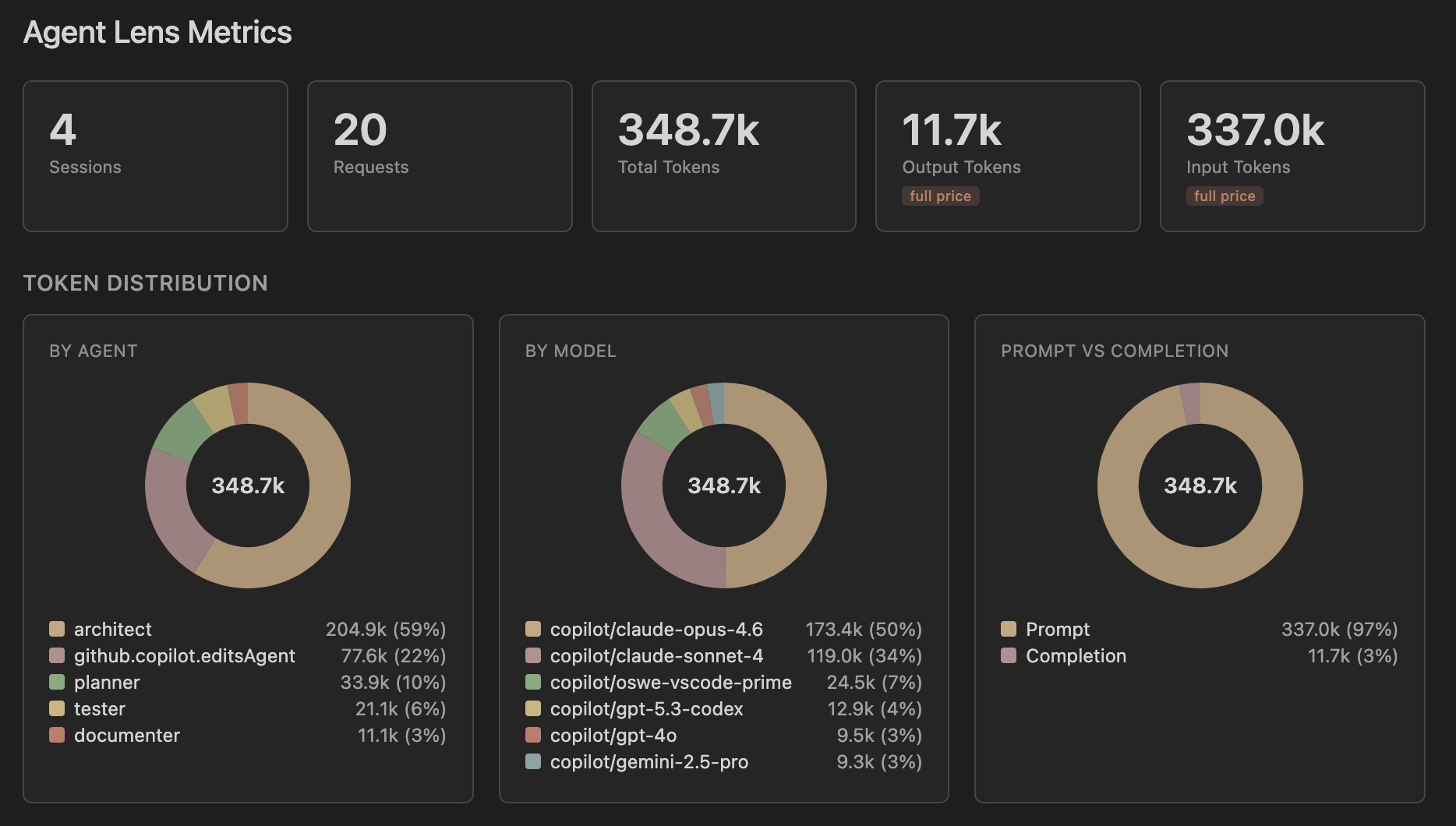
AI coding agents are powerful but opaque. When you use custom agents in GitHub Copilot or sub-agents in Claude Code, it's hard to know:
- Which agents are doing the most work?
- How are tokens distributed across models?
- Are your custom agents and skills actually being used?
- How do your agents hand off work to each other?
Agent Lens answers these questions by parsing your local session data and presenting it visually — right inside VS Code.
See token usage, model distribution, agent activity, tool calls, and skill usage at a glance. Filter by provider (Copilot, Claude, Codex, or all). Spot unused agents and skills that might need attention.
Browse your agents and skills in the sidebar. See their tools, models, and handoff chains. Click to open the source file.
Interactive DAG visualization of your agents, skills, and handoff connections. Zoom, pan, and hover for details.
Replay individual sessions as a timeline. See each request's agent, model, tokens, tool calls, and timing. Spot agent switches and model changes.
For Claude Code sessions: see cache read tokens, cache creation tokens, cache hit ratio, and an input token breakdown showing cached vs non-cached input.
| Tool | What Agent Lens reads |
|---|---|
| GitHub Copilot | Chat session JSONL files from VS Code workspace storage. Detects custom agents (from .github/agents/) and skills (from .github/skills/). |
| Claude Code | Session JSONL files from ~/.claude/projects/. Detects custom agents and skills, parses sub-agent sessions and prompt caching metrics. |
| OpenAI Codex CLI | Rollout JSONL files from ~/.codex/sessions/. Parses turn-level token usage with cumulative delta computation, tool calls, and model tracking. |
Session data stays local — Agent Lens only reads files already on your machine.
- Install Agent Lens from the VS Code Marketplace
- Open a project where you've used GitHub Copilot or Claude Code
- Look for the Agent Lens icon in the activity bar
- Click Show Metrics Dashboard or Session Explorer to explore your sessions
Agent Lens automatically discovers sessions for your current workspace. No configuration needed in most cases.
If your sessions live on a mounted host path, configure the directory manually:
| Setting | Description |
|---|---|
agentLens.sessionDir |
Path to Copilot chat session files (or a workspaceStorage root) |
agentLens.claudeDir |
Path to Claude Code project files (e.g., a mounted ~/.claude/projects) |
agentLens.codexDir |
Path to Codex CLI sessions directory (e.g., a mounted ~/.codex/sessions) |
Use the Agent Lens: Container Setup Guide command for step-by-step instructions.
Found a bug or have an idea? Open an issue or submit a pull request.