The Future of Decentralized Communication
A revolutionary peer-to-peer messaging platform built on Solana blockchain featuring end-to-end encryption, real-time communication, username NFTs, and world-class user experience.
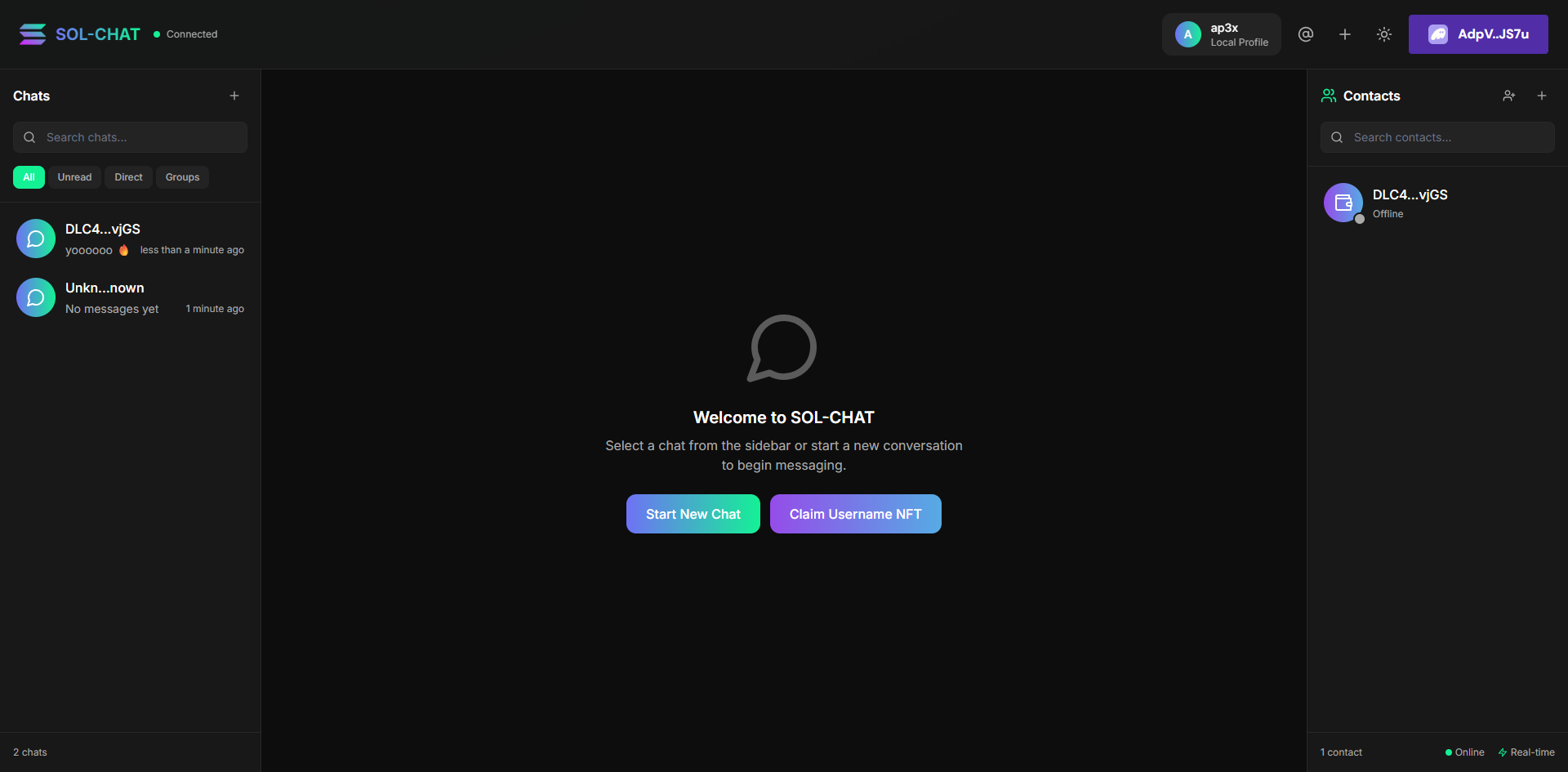


SOL-CHAT has been completely transformed into a next-generation decentralized messaging platform that rivals Discord, Telegram, and WhatsApp while maintaining true Web3 principles. With revolutionary features like username NFTs, real-time communication, advanced encryption, and a stunning user interface, SOL-CHAT represents the future of digital communication.
- End-to-End Encryption: Advanced encryption with forward secrecy
- Message Signing: Cryptographic verification of message authenticity
- Ephemeral Keys: New encryption keys for every message
- Zero-Knowledge: Your private keys never leave your device
- Real-time Communication: Instant message delivery via WebSocket
- 1-1 & Group Chats: Direct messaging and group conversations
- Rich Media: Send text, images, files, and voice messages
- Message Reactions: Express yourself with emoji reactions
- Threading: Reply to specific messages with context
- Typing Indicators: See when others are typing
- Read Receipts: Know when messages are delivered and read
- Claim Your Identity: Register unique usernames as NFTs
- Solana Name Service: Full SNS integration and compatibility
- Tradeable Assets: Username NFTs can be bought, sold, and transferred
- Verification System: Verified badges for authenticated users
- Rarity Tiers: Legendary, Epic, Rare, and Common usernames
- Modern Design: Beautiful glassmorphism effects and Solana gradients
- Smooth Animations: 60fps animations powered by Framer Motion
- Three-Panel Layout: Chat sidebar, main chat, and persistent peer list
- Dark/Light Themes: Stunning themes that adapt to your preference
- Mobile Responsive: Perfect experience on all devices
- Accessibility: Full keyboard navigation and screen reader support
- Virtual Scrolling: Handle thousands of messages smoothly
- Message Caching: Lightning-fast loading of conversations
- Optimistic Updates: Instant UI feedback for better UX
- Offline Support: Queue messages when disconnected
- Real-time Sync: Seamless synchronization across devices
-
Frontend
- React 18 with TypeScript for a robust component-based architecture
- Tailwind CSS for responsive and customized styling
- Lucide React for consistent, high-quality icons
- Vite for fast development and optimized builds
-
Blockchain Integration
- Solana Web3.js for blockchain interactions
- Wallet Adapter for seamless Phantom wallet integration
- Public key-based user identification
-
Security & Storage
- TweetNaCl for military-grade end-to-end encryption
- IPFS/Helia for decentralized file storage
- LocalStorage for efficient message persistence and offline access
- Message signing for authentication and integrity verification
- Node.js 18 or higher
- A Solana wallet (e.g., Phantom)
- Git (optional)
- Clone the repository:
git clone https://github.com/AP3X-Dev/SOL-CHAT.git
cd SOL-CHAT- Install dependencies:
npm install- Start the development server:
npm run dev- Open your browser and navigate to
http://localhost:5173(or the port shown in your terminal)
For IPFS integration, create a .env file in the root directory:
VITE_WEB3_STORAGE_EMAIL=your_email@example.com
VITE_WEB3_STORAGE_SPACE=your_space_did
Note: The application works without IPFS configuration, but file storage will be limited to local storage.
-
Connect Wallet
- Click the "Select Wallet" button on the welcome screen
- Approve the connection in your Phantom wallet
- Set up your username when prompted to complete your profile
-
Navigate the Interface
- View your recent conversations in the main panel
- Browse quick actions for upcoming features (marked with "Soon" indicators)
- See your recent peers in the side panel (open by default)
- Toggle dark/light mode with the theme button in the header
-
Send Messages
- Enter recipient's Solana address or select from recent peers
- Type your message in the input field
- Click the send button (gradient arrow) to encrypt and transmit
- View message status indicators for sent messages
-
Manage Contacts
- Browse your recent peers in the side panel
- Set nicknames for easy identification by clicking the edit icon
- Monitor peer activity status with the status indicators
- Click on a peer to start a new conversation
-
Share Files
- Click the paperclip icon to attach files
- Supported formats: images, PDFs, documents, text files
- Preview images directly in the chat
- Click on images to view them in the full-screen modal
- End-to-End Encryption: All messages are encrypted using TweetNaCl's box encryption with public/private key pairs
- Blockchain Authentication: Wallet-based authentication ensures message integrity and sender verification
- Decentralized Storage: Messages are stored locally with optional IPFS backup for enhanced privacy
- No Central Server: Direct peer-to-peer communication model eliminates central points of failure
- Message Signing: Digital signatures verify the authenticity of each message
- Local Data: Sensitive information never leaves your device without encryption
SOL-CHAT/
├── public/                # Static assets
│   ├── logo.png           # Application logo
│   └── solana-icon.svg    # Solana icon
├── src/
│   ├── components/        # React components
│   │   ├── MessageInput.tsx    # Message composition
│   │   ├── MessageList.tsx     # Conversation display
│   │   ├── PeerList.tsx        # Contact management
│   │   ├── ProfileSetup.tsx    # User onboarding
│   │   ├── RecipientInput.tsx  # Address selection
│   │   ├── ThemeProvider.tsx   # Dark/light mode
│   │   └── WalletContextProvider.tsx  # Wallet integration
│   ├── lib/               # Core functionality
│   │   ├── crypto.ts      # Encryption utilities
│   │   ├── ipfs.ts        # IPFS integration
│   │   ├── peers.ts       # Peer management
│   │   ├── profile.ts     # User profiles
│   │   └── storage.ts     # Data persistence
│   ├── types/             # TypeScript definitions
│   ├── App.tsx            # Main application
│   ├── index.css          # Global styles
│   └── main.tsx           # Application entry point
└── tailwind.config.js     # Tailwind CSS configuration
npm run buildThe optimized production build will be generated in the dist directory, ready for deployment to your preferred hosting service.
- Dark Mode: Sleek dark theme with Solana-inspired gradient accents
- Responsive Design: Fully responsive layout that works on desktop and mobile devices
- Interactive Elements: Smooth animations and transitions for a polished user experience
- Accessibility: High contrast text and interactive elements for better readability
- Intuitive Navigation: Clear visual hierarchy and consistent UI patterns
The following features are planned for future development:
- New Chat: Streamlined interface for starting new conversations with any Solana address
- Contacts Management: Advanced contact organization with groups and favorites
- Message Archive: Searchable history of all conversations with filtering options
- Group Messaging: Create chat rooms with multiple participants
- Enhanced File Sharing: Support for larger files and more formats
- Profile Customization: Additional profile settings and avatar support
- Fork the repository
- Create your feature branch (
git checkout -b feature/amazing-feature) - Commit your changes (
git commit -m 'Add amazing feature') - Push to the branch (
git push origin feature/amazing-feature) - Open a Pull Request
This project is licensed under the MIT License - see the LICENSE file for details.
- Solana Foundation for blockchain infrastructure and inspiration
- IPFS for decentralized storage capabilities
- TailwindCSS team for the excellent styling framework
- Lucide for the beautiful icon set
- The Web3 community for ongoing support and innovation
For support, please open an issue in the GitHub repository or reach out to the maintainers.
Built with ❤️ by AP3X-Dev