ExtractNow is an application that extracts archives instantly without displaying additional windows. It comes bundled with 7-Zip and provides self-contained builds for both Windows x86 and ARM.
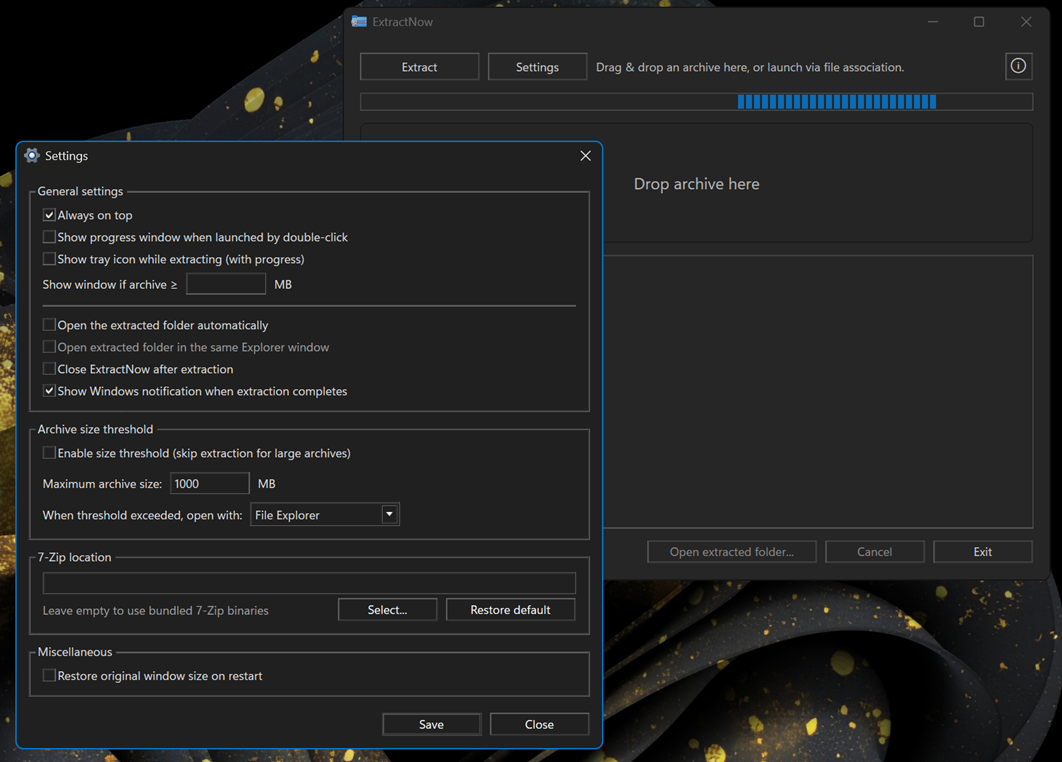
- Open with double-click via file association or by drag & drop.
- Extracts to a sibling folder named after the archive (e.g.,
file.zip→file/). - Resizable main window with automatic size persistence (optional restore-to-default on restart).
- Progress with live log and confirmation prompt before cancel.
- Settings window:
- Choose bundled or custom 7-Zip path.
WIPEnable tray icon with live progress indicator during extraction.- Control window visibility on association launch and file size threshold.
- Optionally open extracted folder automatically on completion.
- Optionally close the app after successful extraction.
- Set threshold for archives size to be ignored by ExtractNow, and to be opened in alternative ways instead - either File Explorer or 7-Zip.
- Restore original window size on restart.
- "Open extracted folder…" button enabled after success.
- Always on top and Show notifications options.
- Keyboard shortcuts for quick access (Settings, Extract, Open Folder, Cancel, Exit).
- Windows 10/11 (x64 or ARM64)
- No separate .NET install required (self-contained portable build)
- Run the app and drag & drop an archive or click Extract.
- To integrate with Explorer, use Settings to register per-user "Open with" for
.zip,.7z,.rar(no default handler changes).
- ctrl + , → Settings
- ctrl + o → Select archive
- ctrl + e → Open extracted folder
- ctrl + c → Cancel extraction
- ctrl + w → Exit
- esc → Close About or Settings window
The repo includes a 7zip/ directory that’s copied next to the executable at publish time. The app auto-detects 7z.exe there. You can instead set a system 7-Zip path in Settings. When redistributing, keep the 7-Zip license/readme files intact.
- Portable builds include the .NET runtime; no install required.
- If an archive is corrupt or unsupported, 7-Zip returns non-zero; the app surfaces this in the log.