

The Brafton WordPress Theme
Designed by Yvonne Tse
https://github.com/BraftonSupport/braftonium
License: WTFPL
License URI: http://sam.zoy.org/wtfpl/
- ACF Pro
- Braftonium
Add Google Analytics - Install Braftonium plugin. Add GA code. Save.
Add Another Widget Area - Install Braftonium plugin. Choose your widget areas, or add your own. Save.
Add Custom Post Types - Same as the above.
General Settings - These should be self explanatory.
Blog Layout -
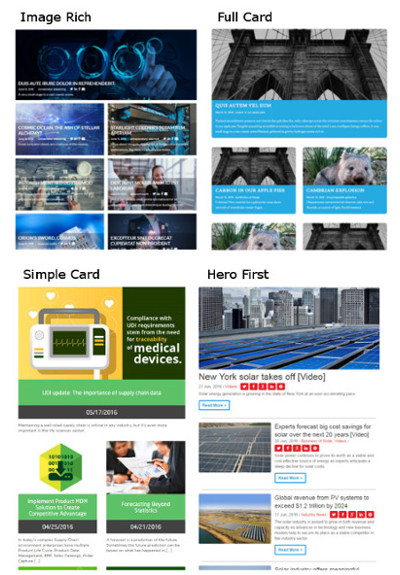
Changes theme Colors - Appearance -> Customize
** Build a Page** - Use page template "Full Width". Add rows and fill them out. Save + publish.
You can add custom layout blocks in your child theme by using the filter braftonium_add_layout_block, you must return an array with 1 or more arrays each with a unique key that must also match a key value pair in key => id. follow the below example and/or see the array structure under /library/custom-fields/components//.block.php.
function my_custom_block_1($blocks){
    /**
     * You can modify add/remove layout blocks by using a filter.
     * */
    //the array key and the key => value pair must be completely unique or this block may replace an existing block.
   $blocks['5a4d605324b0312'] = array(
            'key' => '5a4d605324b0312', //this value must match the array key just above.
            'name' => 'bew_block',
            'label' => 'something cool',
            'display' => 'block',
            'sub_fields' => array(
                array(
                    'key' => 'field_5a4d605b24b04',
                    'label' => __( 'Title', 'braftonium' ),
                    'name' => 'title',
                    'type' => 'text',
                    'instructions' => '',
                    'required' => 0,
                    'conditional_logic' => 0,
                    'wrapper' => array(
              ...
              ...
              ...
                    'wrapper' => array(
                        'width' => '',
                        'class' => '',
                        'id' => '',
                    ),
                    'return_format' => 'array',
                ),
                array(
                    'key' => 'field_5a4d609024b07',
                    'label' => __( 'Style', 'braftonium' ),
                    'name' => 'style',
                    'type' => 'clone',
                    'instructions' => '',
                    'required' => 0,
                    'conditional_logic' => 0,
                    'wrapper' => array(
                        'width' => '',
                        'class' => '',
                        'id' => '',
                    ),
                    'clone' => array(
                        0 => 'group_5a4d3902e55eb',
                    ),
                    'display' => 'seamless',
                    'layout' => 'block',
                    'prefix_label' => 0,
                    'prefix_name' => 0,
                ),
            ),
            'min' => '',
            'max' => '',
        );
        // be sure to return the blocks array
        return $blocks;
}
add_filter('braftonium_add_layout_block', 'my_custom_block_1');
When creating a new layout block you must provide an html template to display your new layout block. A template must be in the following folder structure.
- library
    - blocks
        - full-width
            - components
                - {Your new block}
                    - content-{Your new block}.html.php
ou can add custom gutenberg layout blocks in your child theme by using the filter braftonium_add_block, it accepts 1 parameter which is the full array of braftonium blocks which you can modify and add to. Follow the below example and/or see the array structure under /library/blocks/guten//.block.php.
When creating a new layout block you must provide an html template to display your new layout block. A template must be in the following folder structure.
- library
    - blocks
        - guten
            - {Your new block}
                - block-{Your new block}.html.php
<?php
function my_custom_guten_block($blocks);
 $blocks[] = array(
     'register' => array(
        'name'              => 'my_custom_block', // change this
        'title'             => __('My Custom Block'), // Change this
        'description'       => __('description'), //change this
        'category'          => 'braftonium', // Do not change this.
        'icon'              => 'id', // You can change this
        'keywords'          => array( 'testimonial', 'quote' ), // You should change this
     ),
    'fields' => array(
        'key' => 'group_5a4d605324b03548', // Must be unique
        'title' => 'float-fields', // Must be unique
        'fields' => array(
            array(
                'key' => 'field_5a4d5f297ac9885_fwir',
                'label' => __( 'Title', 'braftonium' ),
                'name' => 'title',
                'type' => 'text',
                'instructions' => '',
                'required' => 0,
                'conditional_logic' => 0,
                'wrapper' => array(
                    'width' => '',
                    'class' => '',
                    'id' => '',
                ),
                'default_value' => '',
                'placeholder' => '',
                'prepend' => '',
                'append' => '',
                'maxlength' => '',
            ),

            array( // Ensure that you include this array to include the styles fields
                'key' => 'field_5a4d39e5805477_fwir', // Change this it needs to be unique but change nothing else.
                'label' => __( 'Style', 'braftonium' ),
                'name' => 'style',
                'type' => 'clone',
                'instructions' => 'This row does not support video backgrounds',
                'required' => 0,
                'conditional_logic' => 0,
                'wrapper' => array(
                    'width' => '',
                    'class' => '',
                    'id' => '',
                ),
                'clone' => array(
                    0 => 'group_5a4d3902e55eb_bf',
                ),
                'display' => 'seamless',
                'layout' => 'block',
                'prefix_label' => 0,
                'prefix_name' => 0,
            ),
        ),
        'location' => array(
            array(
                array(
                    'param' => 'block',
                    'operator' => '==',
                    'value' => 'acf/my-custom-block', // change this but leave acf/ intact
                ),
            ),
        ),
        'menu_order' => 0,
        'position' => 'normal',
        'style' => 'default',
        'label_placement' => 'top',
        'instruction_placement' => 'label',
        'hide_on_screen' => '',
        'active' => true,
        'description' => '',
    )
);
return $block;
}
add_filter('braftonium_add_block', 'my_custom_guten_block');It's not quite ready yet. Don't know how best to add it to things. Link
https://github.com/BraftonSupport/braftonium/issues
Don't read the CHANGELOG.md file in the main folder, it's just nonsense.