Latch
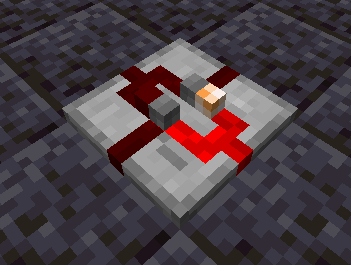
The Latch is a block with an internal state that toggles when one of its input sides receives power; the state of the latch determines which side must be supplied power to toggle it. The latch has two output sides, one of which (depending on the internal state) is emitting maximum-strength redstone power at any given time.
| Contents |
|---|
| Recipe Type | Ingredients | Output | Example |
|---|---|---|---|
| Shaped Crafting |
|
1x Latch |  |
| Soldering |
|
1x Latch |  |
The Latch can be placed in 24 different orientations, on floors, walls, and ceilings.
When placing the block, the flat side will be placed against the face clicked by the player, and the output side will point to the edge of the clicked face nearest to where the player clicked. A transparent preview is rendered to assist with orienting the block; this can be disabled in the Client Config if this is undesired.

The latch has a primary output side, a secondary output side (opposite from the primary output side), and two input sides (oriented 90 and 270 degrees from the primary output side, designated Input A and Input C). When the primary output side is off, supplying redstone power to Input A will turn the primary output on. While the primary output side is off, supplying redstone power to Input C will turn the primary output off. The secondary output side is off while the primary output is on, and on while the primary output is off. The image below shows the changes in state to a latch whose primary output points north as its inputs change (clockwise from top left).

| Block | Block/Item ID | Localization Key |
|---|---|---|
| Latch | morered:latch |
block.morered.latch |
| Block Properties | Value |
|---|---|
| Map Color | Stone |
| Blocks Movement | Yes |
| Flammable | No |
| Liquid | No |
| Opaque | No |
| Replaceable | No |
| Solid | No |
| Blast Resistance | 0 |
| Hardness | 0 |
| Light Output | 0 |
| Tool Required | No |
| Flammable | No |
| Piston Reaction | Pushable |
| Render Type | Cutout |
| Item Properties | Value |
|---|---|
| Stack Limit | 64 |
| Blockstate Properties | Values |
|---|---|
facing |
{"down", "up", "north", "south", "west", "east"} |
rotation |
[0,3] |
input_a |
{false, true} |
input_c |
{false, true} |
powered |
{false, true} |
- The Input A and C properties indicate whether the block is receiving power from the input sides located 90 and 270 degrees from the output side while looking at the top of the block, respectively. The powered property indicates whether the primary output side is emitting power.
| Block Tags |
|---|
| None |
| Item Tags |
|---|
| None |
| Tint Index | Tint Value |
|---|---|
| 1+ | See Logic Plate Tintindexes |
| Version | Changelog |
|---|---|
| 1.16.3-2.0.0.0 | More Red recipes now use tag ingredients instead of specific items in more places |
| 1.0.0.0 | Added to game |