MSDN gRPC example implemented using IndependentReserve.Grpc.Tools package



IndependentReserve.Grpc.Tools adds code-first way to implement gRPC services using Grpc.Tools.
Grpc.Tools requires service and message contracts to be defined in Protobuf to generate C# message classes and service stubs. However since Protobuf is not native to .NET this requirement increases the complexity of the code and often requires ad-hoc solutions for data conversion between generated gRPC/Protobuf code and the rest of the system code.
IndependentReserve.Grpc.Tools on the other hand generates all Protobuf definition required by Grpc.Tools from a plain .NET (POCO) interface and POCO DTO's referenced by the interface methods. It also generates gRPC service and client classes which internally use generated by Grpc.Tools service and client code but operate with the original DTO (gRPC-agnostic) classes.
This example uses IndependentReserve.Grpc.Tools (the tool) to generate gRPC code from a plain .NET interface (the source interface): simple IGreeterService which is equivalent to MSDN example and more involved IGreeterExtendedService.cs which instead of string type parameters uses a set of DTO classes.
Here is how IGreeterExtendedService source interface is defined:
public interface IGreeterExtendedService
{
    Greeting SayGreeting(Person person);
}
Referenced DTO definitions:
public readonly record struct Person
(
    Name Name,
    List<Name> OtherNames,
    string[] Aliases,
    Details Details
);

public readonly record struct Name
(
    Title Title,
    string FirstName,
    string LastName,
    string? MiddleName = null
);

public enum Title
{
    Mr, Mrs, Miss, Ms, Sir, Dr
}

public readonly record struct Details
(
    DateTime DateOfBirth,
    double Height,
    decimal Length,
    Address[] Addresses
);

public readonly record struct Address
(
    string[] Street,
    string City,
    string? State,
    uint? Postcode,
    string? Country
);

public readonly record struct Greeting
(
    string Subject,
    IEnumerable<string> Lines
);
gRPC/Protobuf code (both service and client) is generated by the tool during the build in target project Greeter.Grpc. This project contains only Greeter.Grpc.csproj file which:
-
Contains
PackageReferenceto the tool's NuGet package:<ItemGroup> <PackageReference Include="IndependentReserve.Grpc.Tools" Version="4.1.*" /> </ItemGroup>
-
Marks dependent source project with
GenerateGrpcattribute:<ItemGroup> <ProjectReference Include="..\Greeter.Common\Greeter.Common.csproj" GenerateGrpc="true" /> </ItemGroup>
which forces the tool to generate gRPC code for all source interfaces found
Greeter.Commonproject
Generated gRPC code is automatically included into the build pipeline. Generated code contains a set of *.proto and *.cs files but in practice developer only needs to know about two C# classes:
-
GreeterExtendedServiceGrpcService: gRPC service class which derives from generated byGrpc.Toolsservice stub classGreeterExtendedServiceBaseand can be directly hosted in ASP.NET appGenerated service class content:
public partial class GreeterExtendedServiceGrpcService : Greeter.Common.Grpc.GreeterExtendedService.GreeterExtendedServiceBase
{
    private readonly ILogger<GreeterExtendedServiceGrpcService> _logger;
    private readonly IGreeterExtendedService _greeterExtendedService;

    public GreeterExtendedServiceGrpcService(
        ILogger<GreeterExtendedServiceGrpcService> logger,
        IGreeterExtendedService greeterExtendedService)
    {
        _logger = logger;
        _greeterExtendedService = greeterExtendedService;
    }

    public override async Task<SayGreetingResponse> SayGreeting(SayGreetingRequest request, ServerCallContext context)
    {
        var args = MapperTo<ValueTuple<Greeter.Common.Person>>.MapFrom(new { Item1 = request.Person });
        var result = _greeterExtendedService.SayGreeting(@person: args.Item1);
        return MapperTo<SayGreetingResponse>.MapFrom(new { Result = result });
    }
}
-
GreeterExtendedServiceGrpcClient: gRPC client class which implementsIGreeterExtendedServiceby calling service via gRPC using generated byGrpc.ToolsGreeterExtendedServiceClientclient classGenerated client class content:
public partial class GreeterExtendedServiceGrpcClient : GrpcClient, IGreeterExtendedService
{
    private readonly Lazy<Greeter.Common.Grpc.GreeterExtendedService.GreeterExtendedServiceClient> _client;

    public GreeterExtendedServiceGrpcClient(IGrpcServiceConfiguration config, bool useGrpcWeb = true)
        : base(config, useGrpcWeb)
    {
        var invoker = Channel.CreateCallInvoker();
        SetupCallInvoker(ref invoker);
        _client = new(() => new(invoker));
    }

    partial void SetupCallInvoker(ref CallInvoker invoker);

    private Greeter.Common.Grpc.GreeterExtendedService.GreeterExtendedServiceClient Client => _client.Value;

    public Greeter.Common.Greeting SayGreeting(Greeter.Common.Person @person)
    {
        var response = Client.SayGreeting(MapperTo<SayGreetingRequest>.MapFrom(new { Person = @person }));
        return MapperTo<Wrapper<Greeter.Common.Greeting>>.MapFrom(response).Result;
    }

    public async System.Threading.Tasks.Task<Greeter.Common.Greeting> SayGreetingAsync(Greeter.Common.Person @person)
    {
        var response = await Client.SayGreetingAsync(MapperTo<SayGreetingRequest>.MapFrom(new { Person = @person })).ConfigureAwait(false);
        return MapperTo<Wrapper<Greeter.Common.Greeting>>.MapFrom(response).Result;
    }
}
Both classes are placed in obj/{Configuration}/{TargetFramework}/Grpc/Partials directory.
Service code then uses GreeterExtendedServiceGrpcService class to map gRPC service thus exposing service implementation via gRPC:
app.MapGrpcService<GreeterExtendedServiceGrpcService>();while client code can instantiate and execute GreeterExtendedServiceGrpcClient methods to call the service via gRPC:
var extendedClient = new Greeter.Common.Grpc.GreeterExtendedServiceGrpcClient(config, false);

WriteGreeting(extendedClient.SayGreeting(person));
WriteGreeting(await extendedClient.SayGreetingAsync(person));
WriteGreeting definition:
void WriteGreeting(Greeting greeting)
{
    WriteLine(greeting.Subject);
    foreach(var line in greeting.Lines)
    {
        WriteLine(line);
    }
}The tool can also automatically generate unit tests which test DTO → Protobuf → byte[] → Protobuf → DTO (round-trip) conversion/serialization path.
Greeter.Test project contains the example of configuration for this scenario. Entire configuration is located in Greeter.Test.csproj file:
-
Just like for gRPC code generation the
PackageReferenceis added to the project:<ItemGroup> <PackageReference Include="IndependentReserve.Grpc.Tools" Version="4.1.*" /> </ItemGroup>
-
But instead of
GenerateGrpcattribute the source project is marked byGenerateGrpcTestsattribute which forces the tool to generate tests for all source interface methods:<ItemGroup> <ProjectReference Include="..\Greeter.Common\Greeter.Common.csproj" GenerateGrpcTests="true" /> <ProjectReference Include="..\Greeter.Grpc\Greeter.Grpc.csproj" /> </ItemGroup>
Note that here we also reference
Greeter.Grpcproject which contains generated gRPC/Protobuf code to be tested by generated test code
Server:
cd Greeter.Service
dotnet run
Client:
cd Greeter.Client
dotnet run
Tests:
cd Greeter.Test
dotnet test
Docker:
docker build -t greeter-service -f Greeter.Service/Dockerfile .
docker run -it --rm -p 5001:443 greeter-service
Benchmarks:
cd Greeter.Bench
dotnet run -c ReleaseLatest benchmark results can be found on docs branch:
Benchmark results example:
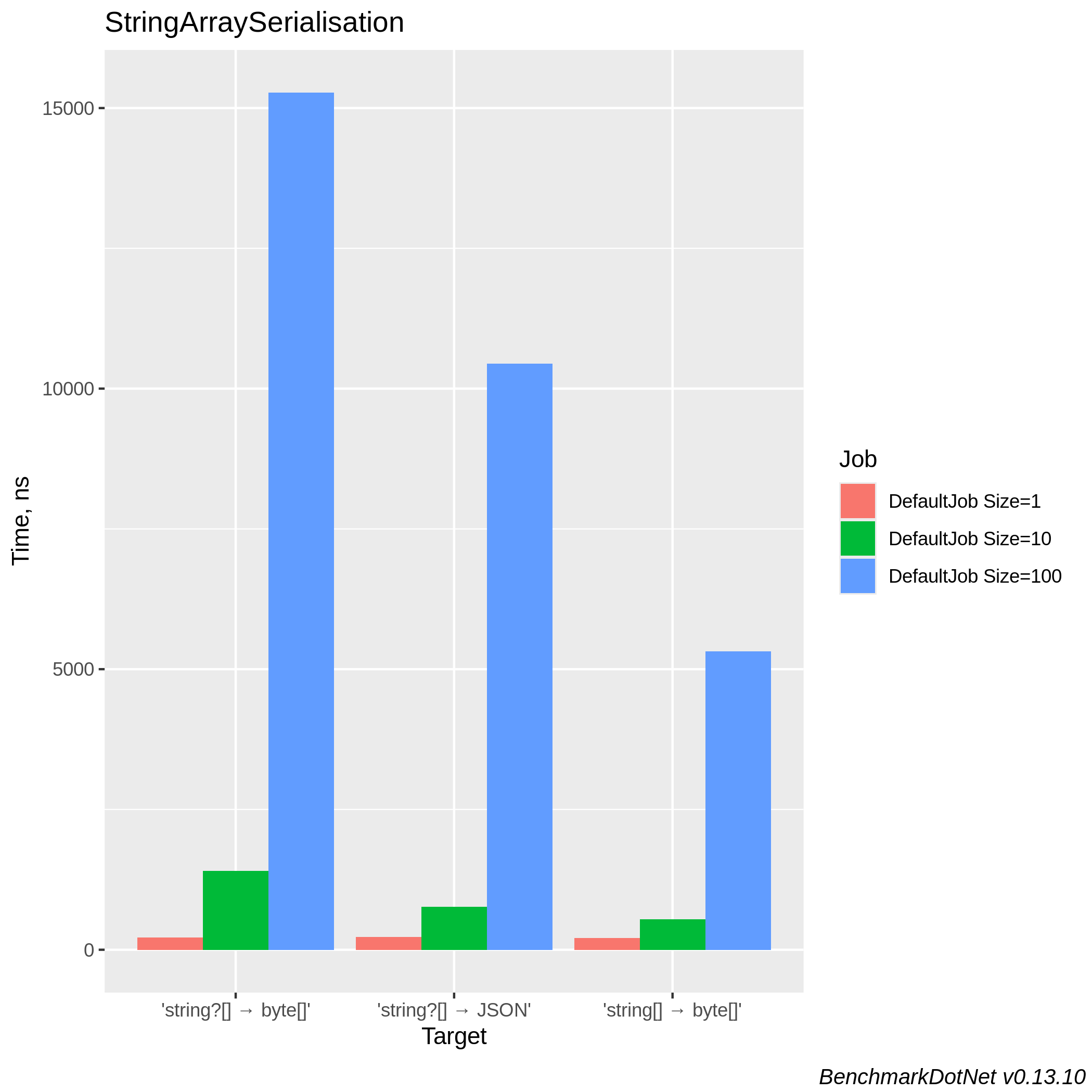
Serialisation of string[] vs string?[] collection (vs JSON serialisation as baseline):
IndependentReserve.Grpc.Tools package can generate all required gRPC code from a plain .NET interface (so called source interface). The only requirement is that source interface must be located in a separate assembly/project which the project where gRPC code is generated (target project) depends on.
To add gRPC code into target project do:
-
Add a package references to IndependentReserve.Grpc and to IndependentReserve.Grpc.Tools, e.g. via:
dotnet add package IndependentReserve.Grpc
dotnet add package IndependentReserve.Grpc.Tools
Why do we need two packages:
Actually if you just manually add
PackageReferencetoIndependentReserve.Grpc.Toolslike that:<ItemGroup> <PackageReference Include="IndependentReserve.Grpc.Tools" Version="4.1.215" /> </ItemGroup>
the reference to
IndependentReserve.Grpcis added implicitly (transitively) so it does not have to be added explicitly.
However due to a bug in the latest IndependentReserve.Grpc.Tools when the package reference to it is added viadotnet addcommand a set of<*Assets/>attributes are also added:<ItemGroup> <PackageReference Include="IndependentReserve.Grpc.Tools" Version="4.1.215"> <IncludeAssets>runtime; build; native; contentfiles; analyzers; buildtransitive</IncludeAssets> <PrivateAssets>all</PrivateAssets> </PackageReference> </ItemGroup>
These unnecessary
<*Assets/>attributes break transitive dependency onIndependentReserve.Grpcwhich later result in compilation errors due to missing dependent types fromIndependentReserve.Grpc. -
In target project
*.csprojfile markProjectReferenceto dependent project which contains source interface(s) withGenerateGrpcattribute, e.g.:<ItemGroup> <ProjectReference Include="..\Greeter.Common\Greeter.Common.csproj" GenerateGrpc="true" /> </ItemGroup>
How source interfaces are located:
By default the tool searches for all public interfaces which names match
Service$regular expression (e.g.ISomeService) and generates all required gRPC-related code for every found interface.
To use a different pattern for interface search specify a custom regular expression (.NET flavor) viaGrpcServicePatternattribute, e.g.:<ItemGroup> <ProjectReference Include="..\Service.Interface.csproj" > <GenerateGrpc>true</GenerateGrpc> <GrpcServicePattern>I[^.]*ServiceInterface$</GrpcServicePattern> </ProjectReference> </ItemGroup>
Once this is done all relevant gRPC code is generated and added to target project build pipeline. Both server and client code is generated, specifically, the following two classes are expected to be used by client or service code:
-
{service-name}GrpcService.cs: generated gRPC service implementationWhat is in gRPC service class:
Grpc.Tools-based gRPC service implementation which depends on source interface (required parameter in constructor) which is expected to implement underlying service logic. Effectively this implementation simply exposes passed source interface implementation via gRPC interface.
-
{service-name}GrpcClient.cs: generated gRPC client implementationWhat is in gRPC client class:
This class implements source interface by calling the service via gRPC (using internal gRPC client class in turn generated by Grpc.Tools). For each method from source interface both synchronous and asynchronous methods are generated.