Checkout EVmanager project website for more details and goal of this project.
The current basic HTTP based version of the project is being hosted at EVmanager
login with Username : jeevan and password : 123456
Functional aspects implemented in the current version are:
- Control Aspects: door lock, alarm etc.
- Battery Percent & Tire Pressure monitor.
Index page of the website implements an authentication system using which user can gain access to their vehicle.
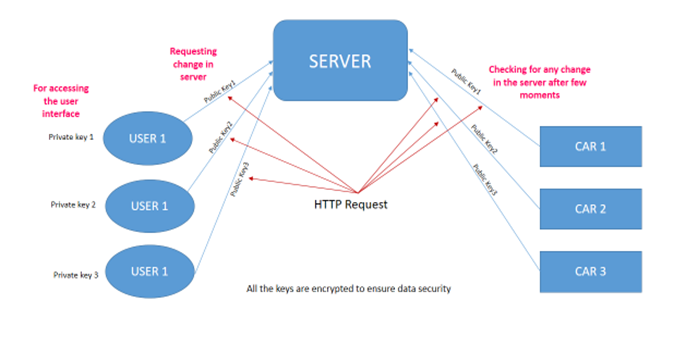
Unfortunately in the current implementation using HTTP, only EV can communicate with the server(unidirectional) and not vice versa -client to server only.
Post method to post vehicles data is implemented in functions.py module as:
def sendvdata():
    data = {'updatealldata': "updatedata", "cid": "123456", "engine": config.engine, "doors": config.doors,
            "hls": config.headlights, "windows": config.windows, "alarm": config.alarm,
            "battery": config.BatteryPercent, "batteryp": config.BatteryPower, "motorp": config.MotorPower}
    r = requests.post(url=config.url, data=data)
Also the method for fetching the data -updated by the user from user page, from the server is implemented in the same module as getdata().
It posts the to the server API using a unique car id cid.
data = {'getalldata': "getalldata", "cid": "123456"}
r = requests.post(url=config.url, data=data)
All the user flagged or updated data from the database is sent back encoded as a response. Same method getdata() then parses the response and update vehicle parametres accordingly.
All the methods for recording analog data viz. current, pressure, motorpower etc are implemented in analog.py module.
Below UpdateVehicleParameters() method records all the signals from the signal bus(refer here).
def UpdateVehicleParameters():
    #Record raw sensor values
    motorcurrent = AnalogIn(mcp, MCP.P0)
    batterycurrent = AnalogIn(mcp, MCP.P1)
    batteryvoltage = AnalogIn(mcp, MCP.P2)

    #Conversion parameters mentioned in datasheet
    motorcurrent = motorcurrent * 30.3
    batterycurrent = batterycurrent * 30.3
    batteryvoltage = 16 * batteryvoltage
    config.BatteryPercent = batteryvoltage * 0.04

    #Then active power is calculated as below
    config.BatteryPower = batteryvoltage * batterycurrent
    config.MotorPower = (motorcurrent/1.414) * batteryvoltage
The mcp ADC module is used in SPI mode(refer analog.py for full implementation).
The config.py contains all different vehicle parameters variables used in project.
And in main.py data is being fetched and posted, from and to server at a desirable frequency.
while True:
    functions.sendvdata()
    functions.getdata()
    time.sleep(3)
For more upcoming implementaions and full project details do visit EVmanager.