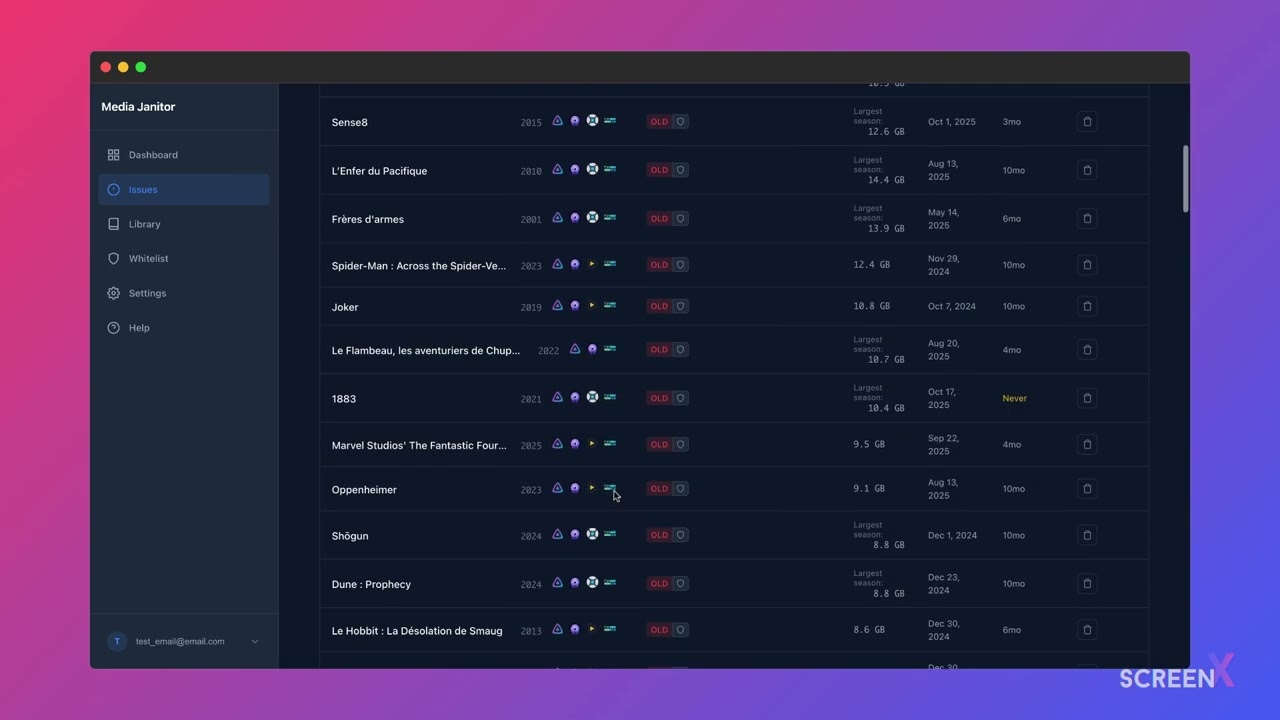
A self-hosted web application for Jellyfin users to analyze their media libraries and get actionable cleanup suggestions.
- Old/Unwatched Content - Find content not watched in 4+ months (configurable)
- Large Movies - Identify movies >13GB for potential re-encoding or re-downloading
- Language Issues - Detect missing audio tracks (EN/FR) or subtitles
- Jellyseerr Requests - Track unavailable and pending media requests
- Recently Available - See new content added to your library
- Whitelist Management - Protect specific content from cleanup suggestions

git clone https://github.com/JimmyDore/mediajanitor.git
cd mediajanitor
cp .env.example .env
# Edit .env with your settings
docker-compose up -d
Open http://localhost:5173 to access the application.
-
Clone the repository:
git clone https://github.com/JimmyDore/mediajanitor.git cd mediajanitor -
Copy and configure environment variables:
cp .env.example .env
-
Edit
.envwith your settings (see Configuration) -
Start the application:
docker-compose up -d
-
Access the app at http://localhost:5173
Requirements: Python 3.11+
cd backend
pip install uv
uv sync --extra dev
uv run uvicorn app.main:app --reload --port 8080Requirements: Node.js 18+
cd frontend
npm install
npm run devCreate a .env file in the project root with the following variables:
| Variable | Description | Default |
|---|---|---|
SECRET_KEY |
JWT secret key for authentication | (required) |
DATABASE_URL |
Database connection string | sqlite:///./plex_dashboard.db |
Jellyfin and Jellyseerr credentials are configured per-user through the application settings page after registration.
- Backend: FastAPI (Python 3.11+)
- Frontend: SvelteKit + TypeScript
- Database: SQLite (dev) / PostgreSQL (prod)
- Deployment: Docker + Docker Compose
# Backend tests
cd backend
uv run pytest

# Frontend tests
cd frontend
npm run test

# E2E tests
cd frontend
npm run test:e2e- Python: PEP 8, type hints
- TypeScript: Strict mode
Contributions are welcome! Please feel free to submit a Pull Request.
This project is licensed under the MIT License - see the LICENSE file for details.