



Built with the tools and technologies:


- Overview
- Background
- AI Features
- System Overview
- System Architecture
- User Interface
- Technology Stack
- Core Components
- Summary
- Installation and Setup
- Going Further
EduView is a smart online proctoring assistant designed to detect potential cheating behaviors during online & offline (hybrid) examinations. The system leverages computer vision, deep learning models, and eye tracking techniques to analyze video feeds from webcams or uploaded media, identifying suspicious activities to assist proctors.
Let’s talk about a problem in education that’s been around forever: cheating during exams. I’m working on another project that combines AI and education, and this time, I’m diving into how we can tackle cheating in both online and offline exams. Education is super important, it’s the foundation of knowledge for us humans. But with the rise of powerful AI tools today, cheating has become a bigger challenge than ever.
In recent years, especially after global emergencies like the pandemic, cheating in exam rooms (both traditional and online) has been a big issue. Back in the day, proctors had to manually watch students to catch cheaters, but now we’re starting to use technology to help. Still, it’s not enough. Students have always been super creative when it comes to cheating, think notes hidden under their shoes or formulas written on a soda bottle label! But now, with technology, cheating has gone to a whole new level. Tools like ChatGPT make it so easy for students to look up answers, and it’s making life harder for teachers to catch them.
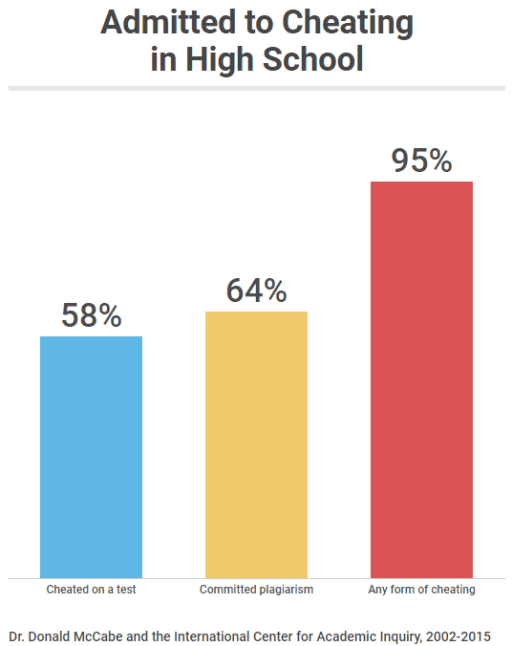
Here’s some data to show how big this problem is. Between 2002 and 2015, Dr. Donald McCabe and the International Center for Academic Inquiry surveyed over 70,000 high school students in the US. They found that 58% admitted to cheating on a test, 64% admitted to plagiarism, and a shocking 95% said they’ve cheated in some way. That’s a lot!
Now, what about online exams? The problem gets even worse. Kennedy et al. (2000) found that 64% of teachers and 57% of students think it’s easier to cheat online than in a face-to-face setting. And honestly, I get why. When you’re taking an online exam, you can just open another tab on your laptop, search Google, or even ask ChatGPT for answers. Some online exam platforms use tab-switching detection like ClassMarker’s tab change detection or ask students to record their screens. But these solutions have limits. What if a student has a second laptop? Or opens a book? Or asks someone nearby for help? Those tricks are hard to catch with just tab detection or screen recording.
So, why do students cheat in the first place? Dr. David Rettinger, a professor at the University of Mary Washington, says, “They cheat just enough to maintain a self-concept as honest people. They make their behavior an exception to a general rule.” Basically, students might think, “I’m not a cheater, but I’ll do it just this once.” But if we let this keep happening, it’s going to hurt the quality of education. Students won’t grow their knowledge, and it’ll affect the future, especially in terms of human resources. Plus, teachers and proctors can’t monitor every single student all the time to see who’s cheating and who’s not. It’s just too much work!
Here’s the big idea: we need a system that can monitor students during exams both online and offline and help teachers spot cheating without having to walk around the classroom or stare at every screen. Imagine if we could use AI to automatically detect cheating behaviors and flag them for the proctor to review. That way, teachers can focus on running the exam instead of playing detective.
For offline exams, we can use a camera to monitor students in the classroom and categorize their behaviors. For example, are they looking around too much? Are they bending over their desk in a suspicious way? For online exams, we need to track things like head movements, eye movements, and even objects around the student (like a phone or a book). If a student is looking away from their screen too often or has something suspicious nearby, the system should notice and alert the teacher.
This is where my project, EduView, comes in. EduView is a smart online proctoring assistant designed to detect potential cheating behaviors during exams. It uses AI, computer vision, and deep learning to analyze video feeds from webcams or uploaded media, helping proctors catch suspicious activities easily.
Now that you know the problem and the big idea behind EduView, let’s dive into the AI features we built to make this system work. EduView has three main models, each designed to tackle cheating in a different way. Here’s what they do:
This model is for offline exams in a classroom setting. We use the YOLO object detection model to detect and classify student behaviors. It can spot things like:
- Normal behavior: A student sitting and focusing on their exam.
- Suspicious behaviors: Things like bending over the desk, putting their hand under the table, looking around, standing up, or waving to someone. The system analyzes the video feed from a camera in the classroom and flags any suspicious behaviors for the proctor to review. This way, the proctor doesn’t have to walk around the room, they can just check the alerts from EduView and take action if needed. It also makes students think twice about cheating because they know the AI is watching!
This model is another YOLO-based system, but it’s focused on head movement and detect objects around student during online exam. With this system, we can detect if student looking away from their screen too much or if there any suspicious objects like books, phones, or other people nearby. This system use YOLO for object detection for head movement that can tell if student behavior is normal or cheating. This helps catch the more obvious cheating attempts that might be missed by a human proctor, especially in an online setting where the proctor can’t see everything.
This is my favorite feature because it’s super detailed! For online exams, we built an AI system that focuses on the student’s face specifically their eyes to catch silent cheating. Here’s how it works:
- It uses a Convolutional Neural Network (CNN) in deep learning model (trained with TensorFlow) and MediaPipe to track eye movements.
- It can tell if a student is looking to the side too often or for too long, which might mean they’re looking at a cheat sheet or asking someone nearby for help.
- It also checks if the student’s eyes are closed for too long (maybe they’re pretending to think but actually sneaking a peek somewhere).
The system flags these suspicious eye movements for the proctor to review. For example, if a student keeps looking to the left for more than 5 seconds (we can adjust this duration threshold), the system might show a “WARNING: Suspicious movement” alert. If it goes on longer, it might say “CHEATING DETECTED.” This makes online exams much fairer because even the sneakiest cheating attempts can be caught!
EduView provides a comprehensive solution for online exam proctoring with the following capabilities:
- Real-time processing of webcam feeds
- Analysis of uploaded images and videos
- Three specialized detection models:
- Classroom behavior detection
- Cheating behavior detection
- Eye gaze tracking and analysis
- User-configurable detection thresholds
- Detailed visualization of detection results The system is implemented as a web application built with Reflex, providing an intuitive user interface for proctors to monitor student behavior during online examinations.
The CameraState class serves as the central component of the system, coordinating between input sources, detection models, and the user interface. The three detection models provide specialized analysis capabilities, while the UI components offer a comprehensive interface for controlling the system and viewing detection results.
Sources:


Sources:
The EduView user interface is divided into two main sections that provide comprehensive monitoring and control capabilities:

The left section contains the camera feed, controls for operating the system, and a table displaying detection results. The right section houses panels for adjusting thresholds, viewing statistics, analyzing behaviors, tracking coordinates, and managing inputs.
EduView is built using the following technologies:
| 🔧 Component | 💻 Technology |
|---|---|
| 🎨 Frontend Framework | Reflex 0.7.1 |
| 👁️ Computer Vision | OpenCV 4.11.0.86 |
| 🧠 Deep Learning | TensorFlow 2.18.0, Ultralytics 8.3.91 (YOLO) |
| 😊 Face Detection | MediaPipe |
| 📊 Data Processing | NumPy |
Sources:

The CameraState class is the central component of the EduView system. It manages:
- Camera feed processing
- Video and image analysis
- Model selection and application
- Detection result storage
For more information, see:

The ThresholdState class manages detection thresholds, allowing users to adjust:
- Confidence thresholds for detection models
- IoU (Intersection over Union) thresholds for Models 1 and 2
- Duration thresholds for Model 3 (eye tracking)
For more information, see:

The EyeTracker component is responsible for:
- Face detection using MediaPipe
- Eye region extraction
- Eye closed detection
- Gaze direction determination
- Coordinate tracking
- Alert generation for suspicious eye movements
For more information, see:

EduView provides a comprehensive solution for online exam proctoring through its integration of computer vision, deep learning, and eye tracking techniques. The system's modular architecture allows for easy switching between different detection models while maintaining a consistent user experience.
Before installing EduView, ensure your system meets the following requirements:
- Modern CPU (multi-core recommended for real-time analysis)
- At least 8GB RAM (16GB recommended for smooth operation)
- GPU with CUDA support (recommended for faster model inference)
- Webcam for live proctoring (optional if only analyzing uploaded videos)
- Python 3.10 or newer
- Git (for cloning the repository)
- pip (Python package manager)
- Compatible operating system: Windows 10/11, macOS, or Linux
Clone the EduView repository from GitHub:
git clone https://github.com/Laoode/EduView.git
cd EduViewIt's recommended to use a virtual environment for Python projects to avoid dependency conflicts:
python -m venv venv

# Activate the virtual environment
# For Windows:
venv\Scripts\activate
# For macOS/Linux:
source venv/bin/activateInstall all required packages using pip:
pip install -r requirements.txtThis will install the following key dependencies:
- reflex (v0.7.1): Web framework for the UI
- opencv-python (v4.11.0.86): Computer vision library
- tensorflow (v2.18.0): Machine learning framework
- mediapipe: Face and pose detection
- numpy: Numerical computing
- ultralytics (v8.3.91): For YOLO models
Sources:
To start the EduView application, run the following command from the project root directory:
reflex runThis will start the development server, and you can access the application by opening a web browser and navigating to http://localhost:3000 (or the address shown in the terminal).

After starting the application, you may want to configure detection thresholds to adjust the sensitivity of the detection models. These can be adjusted from the Threshold Panel in the UI:
- Confidence Threshold: Minimum confidence score for detection (higher values are more strict)
- IoU Threshold: Intersection over Union threshold for Models 1 and 2
- Duration Threshold: Time threshold for Model 3 (eye tracking)
EduView supports three detection models:
- Model 1: Classroom Behavior Detection - General classroom monitoring
- Model 2: Cheating Detection - Specific focus on identifying cheating behaviors
- Model 3: Eye Tracking - Monitors eye movements for suspicious patterns
Select the appropriate model from the Controls Panel based on your proctoring needs.
EduView.mp4
Tip
The video above demonstrates a trial run the EduView app. Please note that the playback speed has been increased by 6.6× and the quality has been reduced to comply with GitHub’s upload size limitations. For a clearer and full-resolution version, you can watch it on my LinkedIn profile. Alternatively, you may reduce the playback speed on GitHub to 0.25× or 0.5× for a more natural viewing experience.
| Issue | Solution |
|---|---|
| Missing models | Run the application once to download models automatically |
| Camera not detected | Check camera permissions and connections |
| Dependencies installation errors | Ensure you're using Python 3.10+ and try installing dependencies one by one |
"ModuleNotFoundError" |
Verify virtual environment is activated and all requirements are installed |
| Detection directory missing | The application will create it on first use, or create it manually |
Error logs are stored in the application's default logging location. Check these logs for detailed error information if you encounter issues.
After successful installation and setup, you can proceed to:
- Configure detection thresholds for optimal performance
- Test with different input sources (webcam, images, videos)
- Begin monitoring for suspicious behaviors
Note
If you’d like to check out more projects I’ve built, feel free to drop by my portfolio:
🟢 Still cooking up more projects: yudhyprayitno.vercel.app
This project was a great step into learning how to process video feeds from scratch, analyze them, and feed the data into detection models using EduView. It showed a cool real-world use of computer vision and deep learning, especially for proctoring exams. If you followed along easily or even with some effort, awesome job! Next up, I’m planning to take this further with some exciting ideas:
- Temporal Behavior Analysis with LSTM: I want to add a system that tracks student behavior over time using LSTM (Long Short-Term Memory) networks. This will help detect patterns, like repeated suspicious movements, to make cheating detection even smarter.
- Object Detection Around Students: I’ll improve the object detection to spot things like books, phones, or even people nearby more accurately. This will catch more cheating attempts, especially in online exams.
- Enhancing Model 3 for Open Mouth/Sound Analysis: I’m thinking of upgrading Model 3 to analyze if a student’s mouth is open or if they’re making sounds (like asking for help from someone nearby). This could flag verbal cheating, making the system more complete.
If you find this project helpful, please star the repo and follow me to stay updated on these next steps and future projects!
Suggestions, improvements, and contributions are welcome.
Please open an Issue or submit a Pull Request via GitHub.
This project is licensed under the MIT License.
Feel free to reach out if you have any questions or feedback:


