
Forum (Main announcement channel)
IRC: OFTC - #adc-archiver (Only used for meetings and events)











Compatible with: 

ADC (ArchivedDataCodec) is an open-source  file extension and archiving/compression tool that uses Zlib for efficient compression and decompression of various file types. With a simple command-line interface, ADC supports both Windows and Linux, making it easy for users to archive and extract files.
ADC Archiver uses a byte-key of 8, meaning that it can create archives without limitations
For the unstable/rolling release see: ADC Aurora
Please note: ADC can currently only pack files, folders aren't supported yet. ADC Aurora supports this now!
Test files here
For container/format info go to FORMAT.md
- Great Compression Algorithm: Utilizes zlib for efficient compression.
- Cross-Platform: Compatible with both Windows and Linux.
- Command-Line Interface: Simple and intuitive interface.
- Support: Supports a wide range of file types.
Users Windows
- Windows 8 or higher Linux
- A Modern Linux distro that has at least glibc 2.31
Developers:
- Python3
- zlib
- tkinter
- progress
- colorama
- cryptography
- bas64
- zipfile
- webbrowser
- urlib
- json
- ssl
- Download the official installer here:
Download the tarball and run install.sh, this will copy the files to /opt and make a symlink to /usr/local/bin.
To remove run remove.sh in the same tarball.
Dependencies:
- Wget
- xz-utils
Run:
mkdir -p ~/adc-temp && cd ~/adc-temp && wget -O adc.tar.xz "https://github.com/Mealman1551/ArchivedDataCodec/releases/download/v1.4.3/adc.tar.xz" && tar -xJf adc.tar.xz && sudo ./install.sh && cd ~ && rm -rf ~/adc-tempto install ADC without leaving any garbage
To remove ADC you can run:
wget -O- "https://gitlab.com/adc-project/bash/-/raw/main/remove.sh" | bashADC has multiple mirrors
- Install Python3
- Install
requirements.txt - Install python3-tk
- Download the source code from /src
- Run the source code in python3
Download the program for Windows or Linux. Tarballs and setups available in the Releases tab.
This project is licensed under the GNU GPL-3.0 License. You are free to use, modify, and distribute it under the terms of the license.
- ADC is a purpose-built archiving format No historical baggage, no legacy compromises. ADC is designed with a single, clear structure and a strict data layout.
- Linear and predictable archive layout Archives are written and read sequentially from start to end. No central directories, no backward seeks, no hidden tables.
- Straightforward to implement in any language The format is compact and explicit. A complete reader or writer can be implemented without complex or specialized libraries.
- Full control over the archive contents Each file is processed, compressed, and stored individually. There is no implicit metadata or opaque behavior.
- Built-in modern encryption Optional password protection is integrated into the format using proven cryptography, not external tooling.
- Deterministic behavior ADC behaves consistently and predictably. The same input produces the same structural output every time.
- Tooling-first design ADC is designed as a technical foundation. The CLI is an interface on top of the format, not the core of it.
- Extensible without legacy constraints The format can evolve without being locked into decades of backward-compatibility decisions.
- Cross-platform by design ADC archives behave identically across supported operating systems.
- Fully transparent and open The format is inspectable, understandable, and auditable. No black boxes, no closed specifications.
- Built for engineers ADC is focused, explicit, and controlled. It is designed for people who want to understand and own their tooling.
Create an issue easily without the need for a GitHub account via this form.
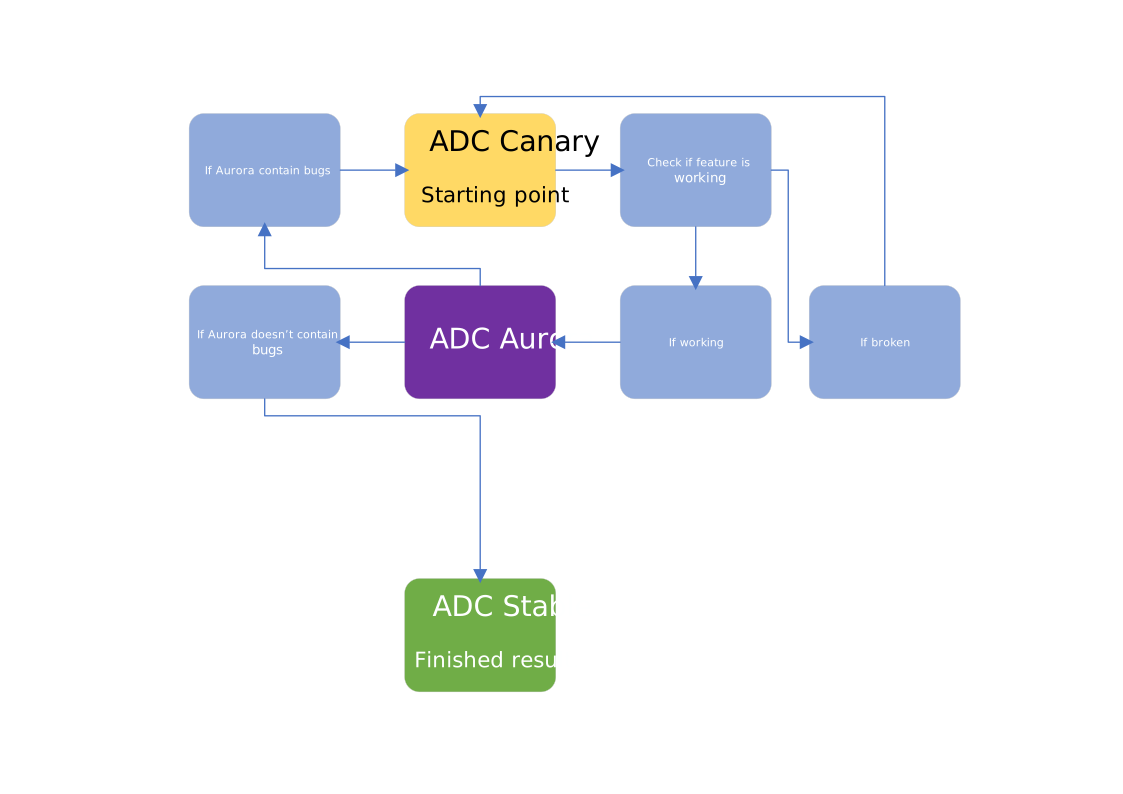
I select a date myself what is the best time, cuz i have work. Meanwhile, the rolling release Python source script ADC Aurora will be updated monthly, if not weekly.
- ADC Canary, live updated repo, not meant to use.
- after ADC Canary the working code will be ported to ADC Aurora asap.
- Stable version will be based on Aurora's source code after testing the code, if there are bugs i will use a stable Aurora script.
Contributions are welcome! See the CONTRIBUTING.md file.
Have questions or want to learn more? Feel free to reach out via this mail address.
I have 2 ADC Repos on Gitlab, one is a continuously updated mirror of the Main branch (Stable only), and the other is the Canary repo, meant to be before Aurora.
Mirror/Main(Stable) GitLab repo of ADC: ADC on GitLab
Unstable (Aurora) is only on GitHub!
For Canary/continuous live development see: ADC Canary on GitLab
ADC Core Utils are for OEM manufacturers or people who only want to open a .adc file:
Syncing to GitLab is done via the gitlab-sync.yml file in /.github/workflows/gitlab-sync.yml
If you want to support the project please consider a small donation: <a href="https://www.paypal.com/donate/?hosted_button_id=LEE83CJJ2BEJC">
<img src="https://centerproject.org/wp-content/uploads/2021/11/paypal-donate-button-high-quality-png-1_orig.png" alt="Donate button" width="100"/>
</a>
ADC Archiver does NOT support macOS, and it never will. This is a deliberate decision to take a stand against the growing dominance of proprietary ecosystems and Apple’s developer restrictions. This project supports open platforms only: Windows and Linux/Unix.
You can ofc run the source code but official binaries and/or setups are not compiled for macOS!
| Version | Release Type | Supported | EOL (End Of Life) |
|---|---|---|---|
| 1.4.x | LTS | ✅ | 18-10-2029 |
| 1.3.x | Regular | ✅ | 15-05-2027 |
| 1.2.0 | Regular | ✅ | 15-11-2026 |
| 1.1.0 | Regular | ✅ | 15-05-2026 |
| 1.0.0 | Regular | ❌ | 15-11-2025 |
Note
For compiling on Python 3.13 and up, a C compiler is required. On Linux, GCC is sufficient. On Windows, MSVC (cl.exe) is required > >via Visual Studio Build Tools 2022. Python 3.12 can compile without a C compiler using MinGW64.
Supported versions: 1.0.0, 1.1.0, 1.2.0, 1.3.1, 1.4.3. Use make windows or make linux for the latest version (1.4.3), or x.x.x-windows / x.x.x-linux for a specific version.
Please disable Windows Defender as it may block compilation.
Options to install GNU Make:
Option 1 — WinGet (Recommended)
winget install GnuWin32.Make
Add Make to PATH. More info
Option 2 — Chocolatey
choco install make
- Download and extract: source_code.zip
- Install Python 3.13.x (64-bit). Ensure pip is installed and Python is added to PATH.
python --version
- Install Visual Studio Build Tools 2022:
winget install Microsoft.VisualStudio.2022.BuildTools --override "--add Microsoft.VisualStudio.Workload.VCTools --includeRecommended"- Open VS Developer PowerShell:
Import-Module "C:\Program Files (x86)\Microsoft Visual Studio\2022\BuildTools\Common7\Tools\Microsoft.VisualStudio.DevShell.dll"
Enter-VsDevShell -VsInstallPath "C:\Program Files (x86)\Microsoft Visual Studio\2022\BuildTools" -DevCmdArguments "-arch=x64 -host_arch=x64"
Then:
cd ArchivedDataCodec-1.4.3Then:
make deps-windows
Warning
Do NOT run the binary while compiling!
Warning
Do NOT install MinGW64 if Nuitka asks for it. You CAN install depends.exe if Nuitka asks for it.
Compile the latest version:
make windowsOr specific version:
make 1.3.1-windowsRun the binary:
cd dist
./ADC_Archiver_1.4.3.exe
or
./ADC_Archiver_1.3.1.exeClean build:
make clean-windowsDebug build (Optional) Only use if you really need to, normally make windows is the best option:
make debug-windowsInstall dependencies:
sudo apt install build-essential pip python3-tk make patchelf ccache sconsEnsure Python 3.10+:
python3 --versionDownload and extract source: source_code.tar.gz
Install additional dependencies:
make deps-linuxRestart or logoff to apply packages.
Warning
Do NOT run the binary while compiling!
Compile latest version:
make linuxOr specific version:
make 1.3.1-linuxRun the binary:
cd dist
./ADC_Archiver_1.4.3.bin
or
./ADC_Archiver_1.3.1.binClean build:
make clean-linuxDebug build (optional):
make debug-linuxSpecific old versions can be compiled with commands like make 1.1.0-windows or make 1.2.0-linux. Version 1.0.0 is deprecated; compilation is possible but not recommended.