The PyPSA-SAPP model is an extension of PyPSA-Earth developed for the Southern African Power Pool (SAPP) by Meridian Economics. If you would like to collaborate, please contact Janet.cronje@meridianeconomics.co.za
If your resources and data for PyPSA-Earth sit in another directory and you would like to use this folder for PyPSA-SAPP, a PYPSAEARTH_DIR can be set in you .bashrc. The default for this folder is set to this repository. If you would like to add a PYPSAEARTH_DIR in your .bashrc, an example entry can be seen below
export PYPSAEARTH_DIR="/insert/path/to/data/"
To run the default config files, there are two options:
- Copy the config file to the main directory and rename it config.yaml. In your terminal then run "snakemake -j10 solve_all_networks"
- In your teminal run "snakemake -j10 solve_all_networks --configfile 'SAPP/Configs/chosen config file name.yaml'"
This model is still being improved but the following features have been implemented
- DC AC Ratio implemented for Solar PV
- GWA correction added for Onwind to improve reflection of high resource wind speeds
- Custom REDZ raster added to restrict Onwind and Solar PV development to specific, high resource, regions
The additions needed in the config to implement the above are shown below. These changes are already implemented in the provided config files in SAPP/Configs/updated myopic model
renewable:
  onwind:
    custom_redz_raster:
      folder: resources/redz/sapp
      file: sapp.gpkg
      layer: wind
      invert: True # If True, only include regions passed, if False, exclude the regions passed
    gwa_correction:
      folder: resources/redz/era5_correction
      file: SAPP_wind-speed_100m.tif      # Can be downloaded for individual countries from https://globalwindatlas.info/en/download/gis-files
  solar:
    dc_ac_ratio: 1.25
    custom_redz_raster:
      folder: resources/redz/sapp
      file: sapp.gpkg
      layer: solar
invert: True # If True, only include regions passed, if False, exclude the regions passedIn PyPSA-Earth, line transfer capacities are calculated using thermal limits. In the SAPP region, very long 400 kV and 765 kV lines result in a significant overestimation of the capacities when thermal limits are used. Another method to calculate inter-region transfer capacities is using stability limits by utilising Surge Impedance Loading (SIL) in combination St Clair Curves to create a more accurate estimation of the line capacities
The additions needed in the config to implement the above are shown below. These changes are already implemented in the provided config files in SAPP/Configs/updated myopic model
lines:
  limits: "St Clair" # ["thermal", "SIL", "St Clair"]
default_frequency: 50.In PyPSA-Earth, the modelling of coal plants is very simplistic and not representative of South Africa's coal fleet. Therefore, hourly outage profiles can be specified in a csv for any generator and p_max_pu and/or p_min_pu be adjusted. A scaling factor for each parameter is also specified to adjust each individual parameter's values.
The additions needed in the config to implement the above are shown below. These changes are already implemented in the provided config files in SAPP/Configs/updated myopic model
electricity:
  outages:
    hourly_profiles_folder: resources/outages
    hourly_profiles_file: 2030.csv # index = snapshots, columns = station names that match Name in powerplantmatching
    parameter: [p_max_pu, p_min_pu] # options [p_max_pu, p_min_pu]
scaling: [1, 0.6]An electricity only workflow can be run using the rule 'solve_elec_networks_myopic' from the Snakefile. Therefore, the following command can be run in your terminal to run this workflow
snakemake --cores 16 solve_elec_networks_myopicNote that the following modifications and additions to your config.yaml are required to run this workflow
# change foresight to myopic
foresight: myopic

# add this line (preferably near the sector coupling section of the config)
enable_sector_coupling: false
PyPSA-Earth. A Flexible Python-based Open Optimisation Model to Study Energy System Futures around the World.
by









PyPSA-Earth: A Global Sector-Coupled Open-Source Multi-Energy System Model
PyPSA-Earth is the first open-source global cross-sectoral energy system model with high spatial and temporal resolution. The workflow provide capabilities for modelling the energy systems of any country in the world, enabling large-scale collaboration and transparent analysis for an inclusive and sustainable energy future. PyPSA-Earth is suitable for both operational studies and capacity expansion studies. Its sector-coupled modeling capabilities enable features for the detailed optimization of multi-energy systems, covering electricity, heating, transport, industry, hydrogen and more.
All the data needed for a simulation are automatically and flexibly retrieved from open sources. This includes, in particular, energy demand across sectors, generation capacities, medium- to high-voltage networks, and renewable energy potentials. Custom datasets can also be integrated as needed, and kept private if required. At the same time, PyPSA-Earth-Status provides functionality to share regional insights. If you are willing to contribute your regional expertise, feel free to open an issue there.
PyPSA-Earth is capable of providing the modelling evidence needed to translate the implications of energy scenarios into actionable regional strategies. By making this tool openly available, we aim to foster collaboration, innovation, and informed decision-making to support sustainable and efficient energy solutions worldwide.
Details on the model are available in the following academic publications:
- power model M. Parzen et all. "PyPSA-Earth: A new global open energy system optimization model demonstrated in Africa", Applied Energy, 341, 2023. https://doi.org/10.1016/j.apenergy.2023.121096
- sector-coupled model H. Abdel-Khalek et al. "PyPSA-Earth sector-coupled: A global open-source multi-energy system model showcased for hydrogen applications in countries of the Global South", Applied Energy, 383, 2025. https://doi.org/10.1016/j.apenergy.2025.125316
PyPSA meets Earth is an independent research initiative developing a powerful energy system model for Earth. We work on open data, open source modelling, open source solver support and open communities. Stay tuned and join our mission - We look for users, co-developers and leaders!
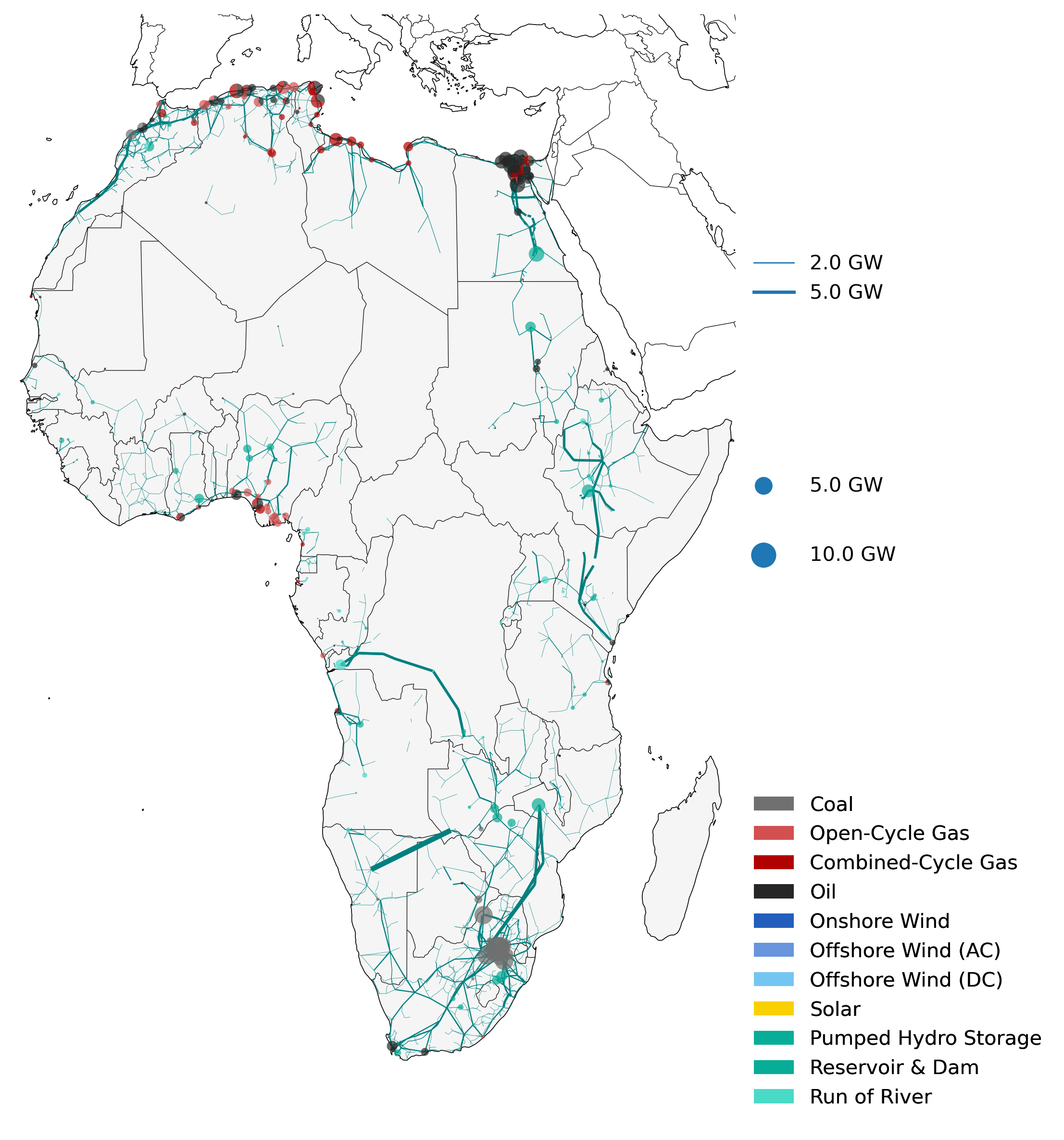
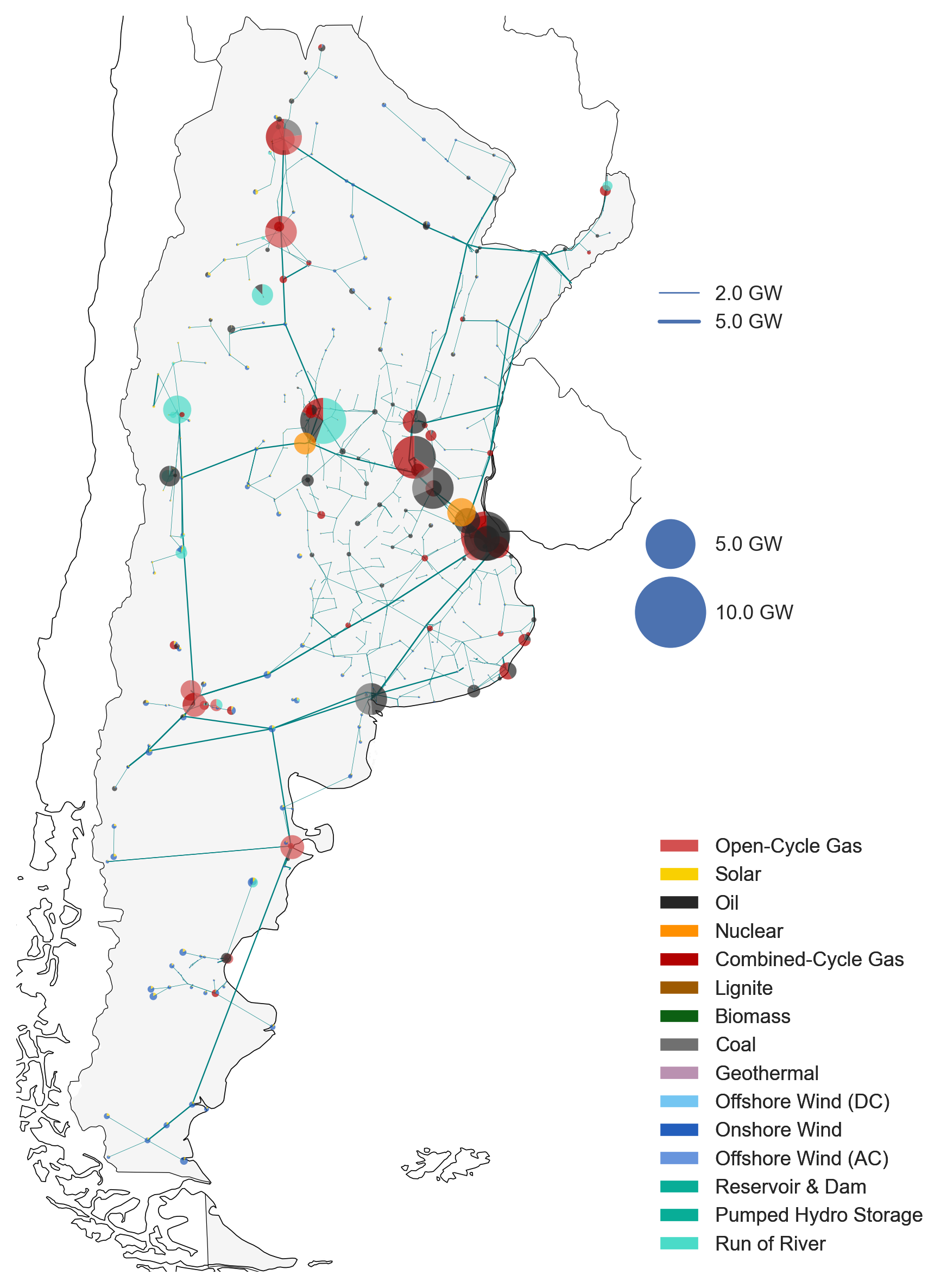
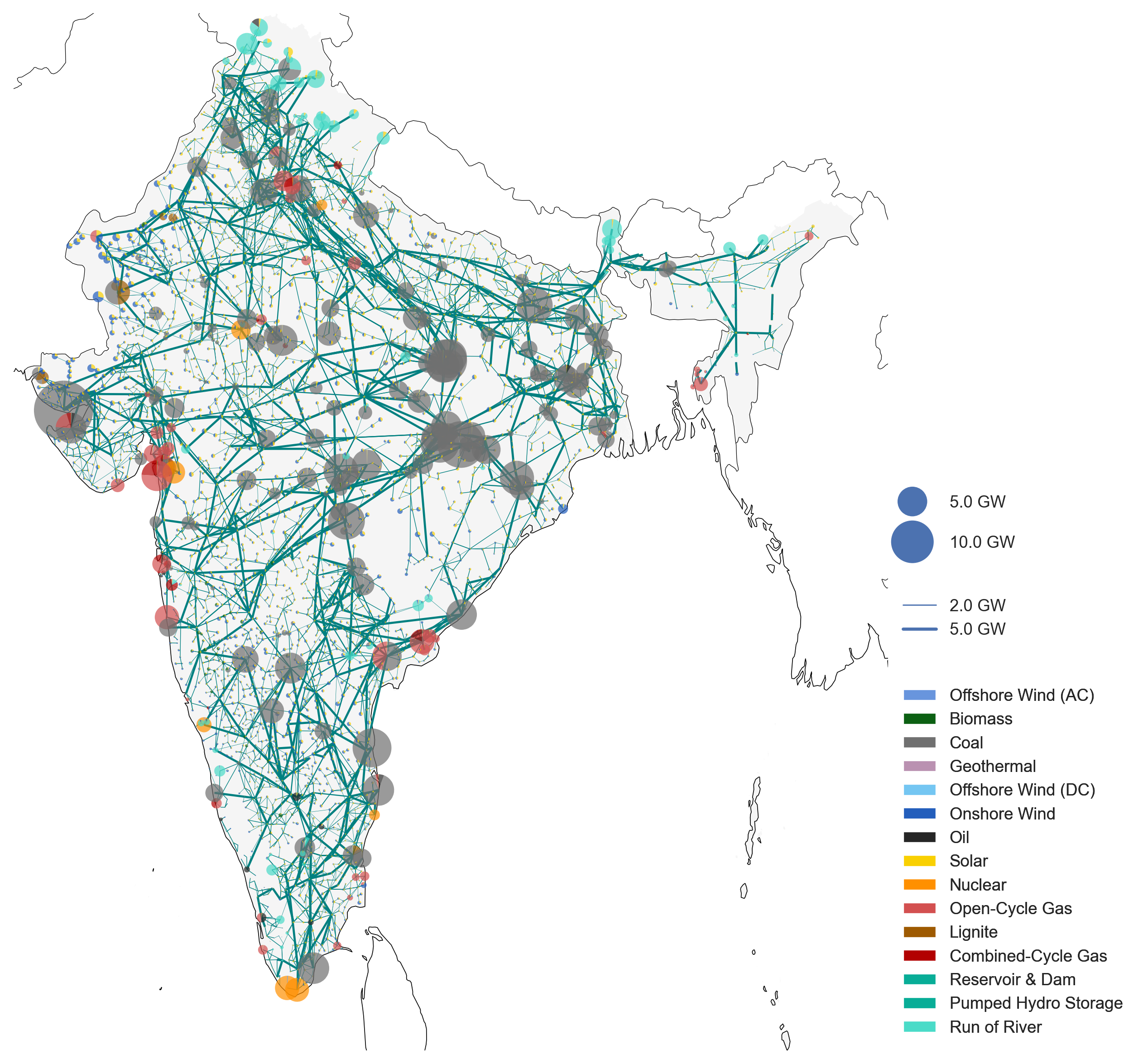
Figure: Example power systems build with PyPSA-Earth.
See images of ~193 more countries at Zenodo
The diagram below depicts one representative clustered node for the sector-coupled model with its generation, storage and conversion technologies.

There are multiple ways to get involved and learn more about our work:
- Join our Discord Server to connect in discussion channels, get help in the support forum, and join our meetings
- Chat on Discord with us in the following open meetings:
- General initiative meeting for project news and high-level code updates. Held every fourth Thursday 16-17:00 (UK time) and is a perfect place to meet the community and get a high-level update on PyPSA ecosystem relevant for PyPSA-Earth developments.
- Weekly developers meetings
- Eastern-Hemisphere friendly Morning meeting every Thursday at 09:00 (UK time).
- Western-Hemisphere friendly Evening meeting every Thursday 16:00 (UK time). Every forth Thursday is replaced by the General initiative meeting which has a more high-level perspective, but you can also join to discuss more particular questions.
- Look at public materials at google Drive to share to minutes, presentations, lists and documents. Feel gree to get a look!
- Notify your interest to on-demand meetings:
- On-demand meetings
- Demand creation and prediction meeting
- AI asset detection meeting
- Outreach meeting for planning, discussing events, workshops, communication, community activities
- On-demand meetings
- Join us and propose your stream.
-
Open your terminal at a location where you want to install pypsa-earth. Type the following in your terminal to download the package from GitHub:
.../some/path/without/spaces % git clone https://github.com/pypsa-meets-earth/pypsa-earth.git
-
The python package requirements are curated in the
envs/environment.yamlfile. The environment can be installed using:
.../pypsa-earth % conda env create -f envs/environment.yamlIf the above takes longer than 30min, you might want to try mamba for faster installation:
    (base) conda install -c conda-forge mamba

.../pypsa-earth % mamba env create -f envs/environment.yaml-
For running the optimization one has to install the solver. We can recommend the open source HiGHs solver which installation manual is given here.
-
To use jupyter lab (new jupyter notebooks) continue with the ipython kernel installation and test if your jupyter lab works:
   .../pypsa-earth % ipython kernel install --user --name=pypsa-earth
   .../pypsa-earth % jupyter lab
-
Verify or install a java redistribution from the official website or equivalent. To verify the successful installation the following code can be tested from bash:
.../pypsa-earth % java -version
The expected output should resemble the following:
   java version "1.8.0_341"
   Java(TM) SE Runtime Environment (build 1.8.0_341-b10)
   Java HotSpot(TM) 64-Bit Server VM (build 25.341-b10, mixed mode)
The model can be run in previous versions by checking out the respective tag. For instance, to run the model in version 0.6.0, which is the last version before the recent PyPSA update, the following command can be used:
git checkout v0.6.0After checking out the tag, the model can be run as usual. Please make sure to use the environment built for the respective version.
-
In the folder open a terminal/command window to be located at this path
~/pypsa-earth/ -
Activate the environment
conda activate pypsa-earth -
Rename config.tutorial.yaml to config.yaml. For instance in Linux:
mv config.tutorial.yaml config.yaml
-
Run a dryrun of the Snakemake workflow by typing simply in the terminal:
snakemake -j 1 solve_all_networks -n
Remove the -n to do a real run. Follow the tutorial of PyPSA-Eur 1 and 2 on YouTube to continue with an analysis.
- We recently updated some hackathon material for PyPSA-Earth. The hackathon contains jupyter notebooks with exercises. After going through the 1 day theoretical and practical material you should have a suitable coding setup and feel confident about contributing.
- The get a general feeling about the PyPSA functionality, we further recommend going through the PyPSA and Atlite examples.
- We are happy to answer questions and help with issues if they are public. Through being public the wider community can benefit from the raised points. Some tips. Bugs and feature requests should be raised in the GitHub Issues. General workflow or user questions as well as discussion points should be posted at the GitHub Discussions tab. Happy coding.
The documentation is available here: documentation.


