A modern Android inventory management application built with Jetpack Compose for managing stock transactions, customers, and products. Features a retro-styled UI with hot pink and teal colors, utilizing Room database with a fully normalized relational schema.
- Create supply and sell transactions
- Link transactions to customers and products
- Track transaction date and total amount
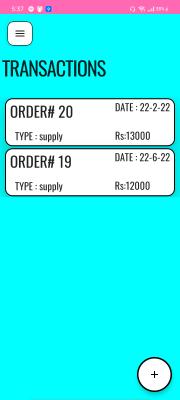
- View transactions list sorted by most recent
- Swipe-to-delete gesture support
- Add customers with name, phone, and address
- View all customers in grid layout
- Delete customers with swipe gesture
- Link customers to their transaction history
- Track products across multiple transactions
- Store price and quantity per transaction
- Product selection via dropdown in transaction forms
- Dynamic product-transaction relationships
- Retro-style design with vibrant colors
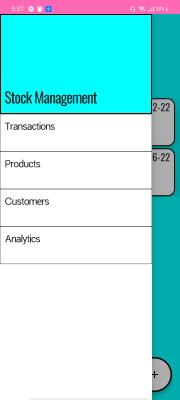
- Navigation drawer for easy screen access
- Material Design 3 components
- Smooth animations and transitions
- Custom Oswald font typography
- Language: Kotlin 1.5.31
- Minimum SDK: Android 21 (Lollipop 5.0)
- Target SDK: Android 32 (12.0)
- Build System: Gradle 7.2.0
- UI Framework: Jetpack Compose 1.1.0-beta01 (declarative UI)
- Database: Room 2.4.2 (SQLite ORM)
- Dependency Injection: Dagger Hilt 2.40.5
- Navigation: Jetpack Navigation Compose 2.4.2
- Architecture Components: ViewModel, LiveData
- Async: Kotlin Coroutines 1.6.1
- Gestures: RevealSwipe 1.0.0 (swipe-to-delete)
The app follows Model-View-ViewModel architecture with clear separation of concerns:
UI Layer (Compose Screens)
    ↓
ViewModel Layer (OrderViewModel)
    ↓
Repository Layer (Repository)
    ↓
Data Access Layer (OrderDao)
    ↓
Database Layer (Room + SQLite)
- Reactive: Flow streams from database converted to LiveData for UI
- Coroutines: Async operations on IO dispatcher
- Dependency Injection: Hilt provides database, DAO, and repository instances
TransactionsEntity
transId(Primary Key, Auto-increment)orderType(String: "Supply" or "Sell")date(String)amount(Int)customerID(Foreign Key → CustomerTable)
CustomerTable
customerID(Primary Key, Auto-increment)name(String)phone(String)address(String)
ProductsTable
productID(Primary Key, Auto-increment)name(String)
ProductsChange (Bridge Table)
productChangeID(Primary Key, Auto-increment)productID(Foreign Key → ProductsTable)transID(Foreign Key → TransactionsEntity)price(Int)quantity(Int)
- One Customer → Many Transactions
- One Transaction → Many ProductsChange
- One Product → Many ProductsChange
app/src/main/java/com/example/stockmanagerupdate/
├── MainActivity.kt                  # Entry point
├── components/                      # Reusable UI components
│   ├── buttons.kt
│   ├── CustomEditText.kt
│   ├── TransactionCard.kt
│   ├── CustomerCard.kt
│   ├── NavDrawer.kt
│   └── insertProductChangeBox.kt
├── database/                        # Data layer
│   ├── OrderDatabase.kt            # Room database config
│   ├── OrderDao.kt                 # Database queries
│   ├── Repository.kt               # Repository pattern
│   ├── OrderViewModel.kt           # UI state management
│   ├── StockApplication.kt         # Hilt application
│   └── entities/                   # Data models
│       ├── TransactionsEntity.kt
│       ├── CustomerTable.kt
│       ├── ProductsTable.kt
│       ├── ProductsChange.kt
│       └── relations/              # One-to-many relationships
├── di/                             # Dependency injection
│   └── DatabaseModule.kt
├── navigation/                     # App navigation
│   ├── Screen.kt                   # Route definitions
│   └── Navigation.kt               # NavHost setup
├── screens/                        # UI screens
│   ├── HomePage.kt                 # Transactions list
│   ├── AddOrder.kt                 # Create transaction
│   ├── AddCustomer.kt              # Create customer
│   ├── Customers.kt                # Customers list
│   ├── OrderDetails.kt             # Transaction details
│   └── CustomerDetails.kt          # Customer details
└── ui/theme/                       # Design system
    ├── Theme.kt
    ├── Color.kt
    └── Type.kt
- Android Studio (Arctic Fox or later)
- JDK 8 or higher
- Android SDK 32
- Gradle 7.2.0+
-
Clone the repository
git clone https://github.com/yourusername/StockManager.git cd StockManager -
Open in Android Studio
- Open Android Studio
- Select "Open an Existing Project"
- Navigate to the cloned directory
-
Sync Gradle
- Android Studio will automatically sync Gradle
- Wait for dependencies to download
-
Run the app
- Connect an Android device or start an emulator
- Click "Run" or press Shift + F10
- Select your device/emulator
- Debug: Development build with debugging enabled
- Release: Production build (requires signing configuration)
- Tap the "+" FAB button on the home screen
- Select transaction type (Supply or Sell)
- Choose a customer from the dropdown
- Add products with quantity and price
- Enter transaction date and total amount
- Tap "Add Order" to save
- Open navigation drawer and select "Customers"
- Tap "+" FAB to add new customer
- Enter customer name, phone, and address
- Swipe left on any customer card to delete
- Home screen displays all transactions
- Swipe left on any transaction to delete
- Tap a transaction card to view details (in development)
- Complete OrderDetails and CustomerDetails screens
- Dedicated product management screen
- Search and filter functionality
- Analytics dashboard with charts
- Database migration strategy for production
- Export data to CSV/PDF
- Backup and restore functionality
- Dark mode support
- Input validation and error handling
- Pagination for large datasets
- Cloud sync with Firebase
- Multi-user support
- Barcode scanning for products
- Receipt generation
- Push notifications for low stock
- Financial reports and insights
Contributions are welcome! Please follow these steps:
- Fork the repository
- Create a feature branch (
git checkout -b feature/AmazingFeature) - Commit your changes (
git commit -m 'Add some AmazingFeature') - Push to the branch (
git push origin feature/AmazingFeature) - Open a Pull Request
This project is open source and available under the MIT License.
For questions or feedback, please open an issue on GitHub.
Built with Jetpack Compose and Room Database