这个项目通过Pythonista输入法和QBin服务,实现多设备剪贴板自动同步功能。
不同于微信输入法的剪贴板同步,这个项目完全开源,并且支持在纯内网环境运行,保障你的数据隐私。
C/S架构
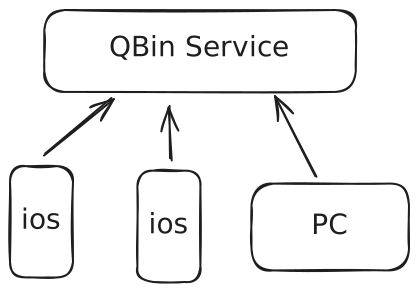
- 安装 Pythonista
- 导入 clipboard.py 代码
- 设置Shortcuts 为 Pythonista Keyboard
- New Shortcut 输入Arguments
send,标题:剪贴板-发送 - 重复步骤3,New Shortcut 输入Arguments
receive,标题:剪贴板-接收 - 切换为 Pythonista 输入法开始使用
暂未完成,欢迎大佬PR
Windows PowerShell 安装 Deno:
irm https://deno.land/install.ps1 | iex
Mac/Linux 安装 Deno:
curl -fsSL https://deno.land/install.sh | sh
启动项目:
git clone https://github.com/Quick-Bin/qbin
cd qbin
deno run --allow-net --allow-env --allow-read --unstable-kv --unstable-broadcast-channel index.ts
deno compile --target x86_64-pc-windows-msvc --allow-net --allow-env --allow-read --unstable-kv --unstable-broadcast-channel --no-check --output QBin --icon static\img\apple-icon-152.png index.ts
deno compile --allow-net --allow-env --allow-read --unstable-kv --unstable-broadcast-channel --no-check --output QBin index.ts
deno compile --target x86_64-apple-darwin --allow-net --allow-env --allow-read --unstable-kv --unstable-broadcast-channel --no-check --output app_macos index.ts
deno compile --target aarch64-apple-darwin --allow-net --allow-env --allow-read --unstable-kv --unstable-broadcast-channel --no-check --output app_macos_arm64 index.ts
支持Deno Deploy、Docker、Docker Compose部署方式。 部署方法请查看 Self-host.md
访问 http://localhost:8000/home#settings 生成Token,后面需要用到
点击运行代码跟着提示操作,也可以在api_config.json文件进行修改
修改.env配置文件
# 管理员信息(登录时需要)
ADMIN_EMAIL=admin@qbin.github    # 管理员邮箱(必选)
ADMIN_PASSWORD=qbin              # 管理员密码(必选)
# 数据库配置
DATABASE_URL=					  # PostgreSQL连接URL(必选)
PORT=8000       # 开放访问端口
JWT_SECRET=    # JWT密钥,用于加密验证(建议修改)
ISDEMO=			# 演示模式,留空不开启, 内网环境推荐开启
更多配置详情请阅览 环境变量配置说明