Home
About
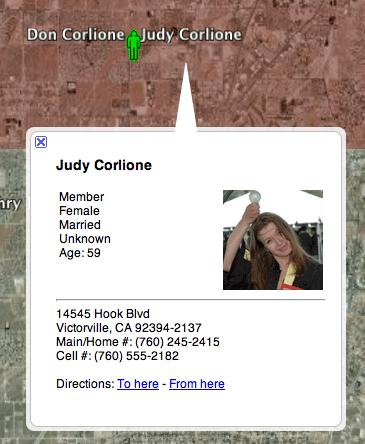
The Google Maps package provides a set of modules, javascript and images for providing an export to Google Earth. Many types of data can be exported including Lists, small group membership, tag membership, areas. Once loaded into Google Earth each person is represented by a visual pin on the map. If you click on the pin you will receive more information about that specific person. Below is a sample screenshot of what a person looks like.
Requirements
Google Maps package requires Arena version 2010.1.100 or later.
Modules
There are currently four modules to this package:
MapViewer
This module provides the ability to look at people on a live Google Map inside of Arena. It also provides the ability to download the results for use with Google Earth and to add the results into a personal Tag.
People In Range
This is a kind of hacked together module. It provides an extremely simple purpose. You enter an address, a distance and select how you want the map populated. Once you submit that information the map will be populated with the people, families or small groups within the distance of the address you entered. This is most useful for generating a list of people for mailing if you want them within a certain area (for example when launching a new campus). The results can be added to a new or existing tag if you wish to work with them further.
Area Picker
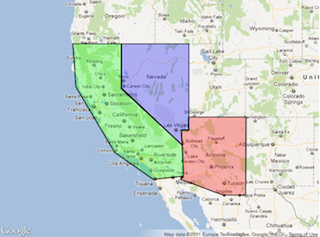
The Area Picker provides a graphical map view for the user to see and view the defined small group areas. This module is meant to be used in conjunction with the Google Group Locator module. The user would be redirected to the group locator with the filter automatically set to show just those small groups in the selected area.
Module Settings
- Map Width - Allows you to override the default width of the map displayed to the user. Default width is 640 pixels.
- Map Height - Allows you to override the default height of the map displayed to the user. Default height is 480 pixels.
- Small Group Locator Pager - The page to link to when the user clicks on an area.
Google Group Locator
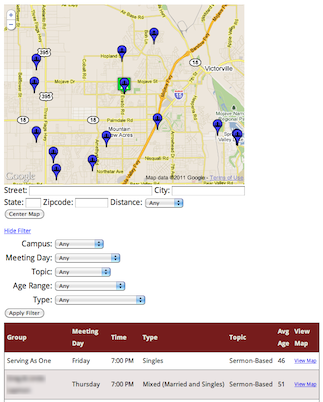
This is a small group locator module built around the live Google Map view. It provides both a graphical view (the map) and an optional list view of all the groups. You can enter an address and distance to filter the groups to those in your area and you can also filter the groups by various attributes. This module does not provide a direct sign up, but you can link the module to another page that will provide signup, either through "direct" sign up or an e-mail form to the group leader.
Module Settings
- Address On Top - If you wish the "center on address" panel to appear above the map set this to true, by default this appears below the map.
- Category ID - Select the category to use for searching for small groups.
- Filter Expanded - If the Filter panel should be visible on page load, if set to false the user will see a "show filter" button that will reveal the filter.
- Filter On Top - Shows the filter above the map instead of below.
- Filter Options - Select the options that will be available in the filter, if nothing is selected all filter options are available.
- Info Xslt File - When the user clicks on the small group icon on the map this file defines what information is displayed in the info popup.
- Limit To Cluster Type - You can select a root-level cluster to limit the results to.
- Map Height - The height of the map in pixels.
- Map Width - The width of the map in pixels.
- Map Visible - Defines wether or not a single map is shown on the page.
- Registration Page - The page to redirect somebody to when they select a group, the URL receives a &group=xxx value to identify the group ID number. For example, the page that contains the Join Small Group module.
- Show Campuses - Shows pins representing your campus locations.
- Show List Results - Wether or not to show the results in list form as well as map form. The list results are sorted by distance. When the user enters an address a new column will also become available that shows the distance from the address entered.
- Style Css - The CSS file to include for styling the default list view and filter options. If set this file will be included instead of the standard CSS file so all settings must be included.
- Xslt File - When the Show List Results option is turned on this Xslt file is used to generate the information displayed to the user in list form.
Styling
The List Results of the Small Group Locator can be styled via your site's CSS file, the styling we use is:
tr.sglRow:hover, tr.over td { background-color: #C8C8C8; cursor: pointer; }
tr.sglHeader { background-color: #761C1C; color: #E7E7DB; font-size: small; }
tr.sglRow { font-size: small; }
td.sglMapLink { font-size: x-small; }
tr.sglAlternateRow { font-size: small; background-color: #EAE4E4; }
tr.sglAlternateRow:hover, tr.over td { background-color: #C8C8C8; cursor: pointer; }
Join Small Group
This module provides the ability have a person be joined into a small group directly, create a pending registration for them to be placed into a small group, or have a person notified via e-mail that this person is interested in joining the small group. If a person is already logged in when they reach the page containing this module then the fields will be pre-filled in with their information.
Module Settings
- Member Status - If a person is not logged in and this module setting is set then a new membership record will be created for this person(s) and their member status will be set to this value.
- New Member Role - If you wish the person(s) to be added to the small group as a new member then set this value to the role you want them to have in the small group. Using this setting requires that either the Member Status setting be set or that you require all users to login before reaching this page. This setting cannot be used at the same time as the Pending Registration option.
- Pending Registration - Creates a Pending Registration record and associates it with the small group. If you want the small group leader to be notified you should also set the Notify Group Leader option.
- Redirect URL - The URL to redirect the user to after they finish submitting their information. If not set a simple "thank you" screen will be displayed to the user.
- Available Fields - The user information fields to be displayed to the user. If nothing is selected then all fields will be made available to the user.
- Style Css - You can override the default style template used for displaying information and fields to the user by setting a custom CSS file here.
- Notify Address - One or more e-mail addresses separated by commas who will receive a notification e-mail saying that somebody is interested in joining the small group.
- Notify Group Leader - Wether or not to send an e-mail to the small group leader letting them know somebody is interested in joining their small group.
Google Maps Insert
This module generates the Javascript and (via jQuery) HTML needed to generate the code for providing a link on various pages to view the data on a Google Map. When you click the "dark earth" link you will be taken to the MapViewer page.
Module Settings
- Module Type - This should be set to coincide with the primary module on this page. KMLInsert uses this setting to know what Javascript to generate.
- Map Viewer Page - The page ID of the KMLDownloader.
Module Types
-
Area Detail
 Provides a link that shows all individuals, families, or small groups that live in the currently selected area.
 -
List Report View
 Provides a way to view the individuals found in the results of a list report.
 -
Small Group Cluster Tab Control
 View all of the members of all small groups underneath the currently viewed cluster. Can also view small groups below the current cluster level.
 -
Small Group Tab Control
 View all of the active members of the currently viewed small group.
 -
Profile Tab Control
 View all of the active members of the currently viewed tag.
Security Considerations
Generally speaking, these security considerations only apply to when you download for Google Earth. The live-view mode enforces security, meaning if you try to put one of these modules (with the exception of the Small Group Locator) onto the public site they will not function very well.
There are a few security considerations in the current version of this package to be aware of. For every person listed the following information is included:
- First and Last Name
- Member Status
- Gender
- Marital Status
- Age
- Address
- Phone Numbers
- Person's Picture
The individuals information is included wether or not the person performing the export is allowed to view the individual attribute. Because of this you should be aware of who you give access to this module set. Future versions may provide more configurable security.
Installation
For detailed installation instructions see the Installation page.