HouseGenie is a Python Flask application designed for managing household services. Developed as a project for IIT M MAD-I, this app enables users to manage profiles, services, and appointments within a clean, RESTful API.
-
Clone the Repository:
git clone https://github.com/rishi-the-programmer/HouseGenie.git cd HouseGenie -
Set Up a Virtual Environment: Create a virtual environment to manage dependencies:
python3 -m venv .
source bin/activate  # On Windows use: Scripts\activate
-
Install Dependencies: Install all the required packages using pip:
pip install -r requirements.txt
-
Environment Variables: Configure the environment by creating a
.envfile in theCodedirectory to specify environment-specific variables, such as database URI and JWT secret. Useexample.envin theCodefolder as a template for setting up environment variables.Copy
example.envto.env:cp Code/example.env Code/.env
Update the
.envfile with your actual configurations:DATABASE_URI="your-database-uri" # if its in cloud or present in any other location or place a database.sqlite3 file in `Code` directory JWT_SECRET_KEY="your-jwt-secret-key" -
Configure Database URI: Ensure that the
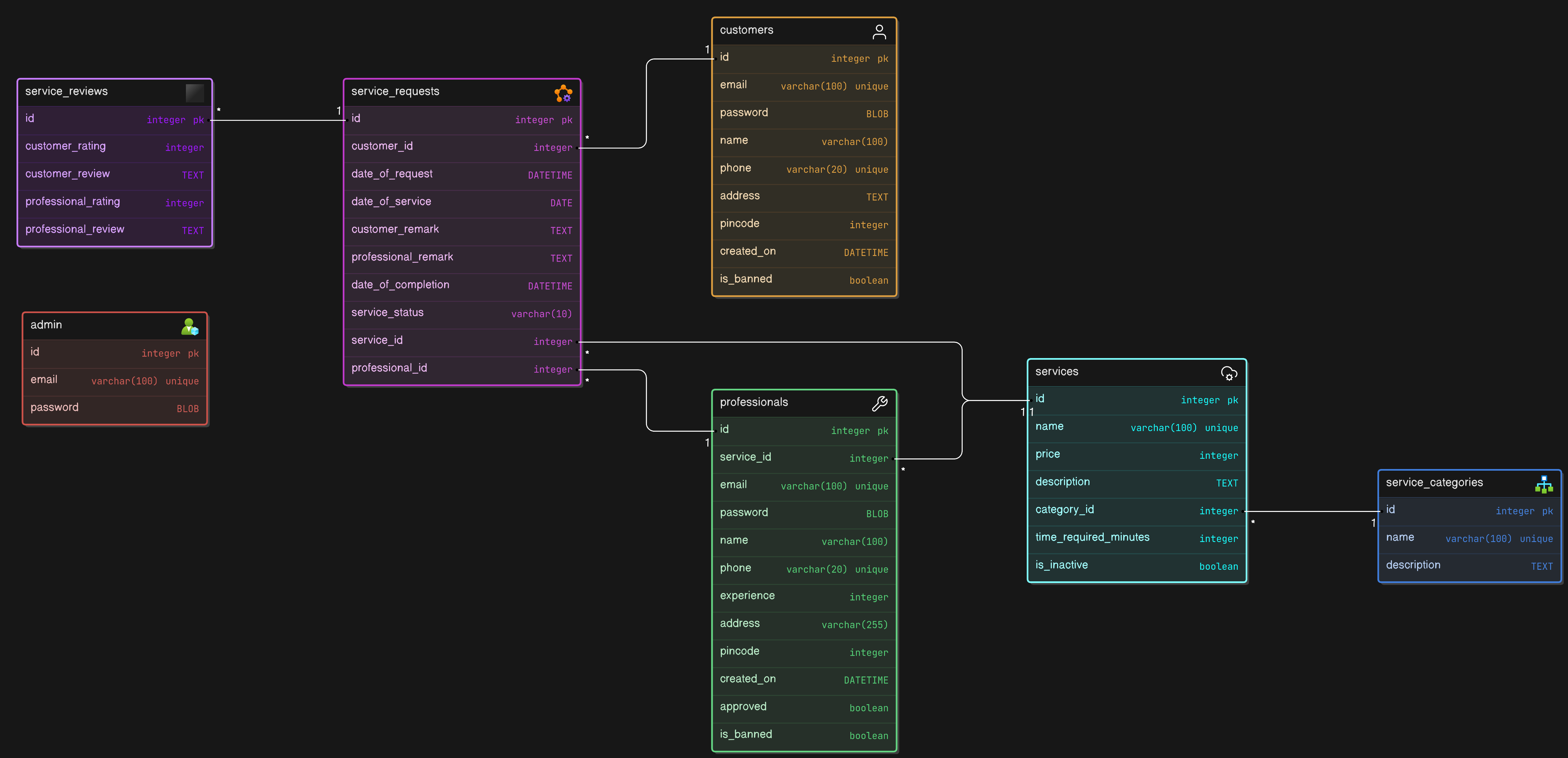
DATABASE_URLin.envpoints to your chosen database. For development, SQLite (sqlite:///housegenie.sqlite3) is easy to set up, but for deployment, consider a production-grade database (e.g., PostgreSQL, MySQL).For DB structure you can refer to the database_structure.sql file.
-
Run the Application: Start the Flask development server:
python main.py
Your app should now be running locally at
http://127.0.0.1:5000or as specified in the terminal output.
-
Register as a Professional or Customer: HouseGenie allows both customers and professionals to register and create profiles, each with specific endpoints.
-
Login: Obtain an access token by logging in, which will be used to authenticate further API requests.
-
Manage Services: Professionals can create and update services they provide, and customers can browse and book these services.
-
Profile Visibility:
- Professional profiles are visible to admin and themselves but not by customer.
- Customer profiles are are visible to admin and themselves but not by any professional.
| Endpoint | Method | Description |
|---|---|---|
/api/signin |
POST | User login |
/api/register |
POST | User registration |
/api/signout |
GET | User logout |
/api/services |
GET | List all services |
/api/services/<category> |
GET | List services by category |
/api/service/<int:id> |
GET | Get service details |
/api/service_category |
GET | List service categories |
/api/service_category/<int:id> |
GET | Get category details |
/api/category/<int:id> |
GET | Get specific category details |
/api/service_request |
GET | View service requests |
/api/service_request/<int:id> |
GET | View specific service request |
/api/service/<int:id>/book |
POST | Book a service |
/api/service_request/<int:id>/edit |
PUT | Edit a service request |
/api/service_request/<int:service_request_id>/assign/<int:professional_id> |
PUT | Assign service request to a professional |
/api/service_request/<int:id>/accept |
PUT | Accept a service request |
/api/service_request/<int:id>/reject |
PUT | Reject a service request |
/api/service_request/<int:id>/close |
PUT | Close a service request |
/api/service_request/<int:id>/rate |
POST | Rate a service request |
/api/professional/<int:id>/approve |
PUT | Approve professional profile |
/api/service/<int:service_id>/professionals/<professionalType> |
GET | List professionals for a service type |
/api/edit_profile |
PUT | Edit user profile |
/api/<user_type>/<int:id>/service_requests |
GET | View user's service requests |
/api/search |
GET | Search for services or users |
/api/summary |
GET | Get platform summary |
/api/<request_type>/<user_type>/<int:id> |
PUT | Ban or unban a user |
/api/service/<int:id>/reactivate |
PUT | Reactivate a service |
- Flask: Micro web framework for building the application.
- Flask-RESTful: Adds support for quickly building REST APIs.
- Flask-SQLAlchemy: SQL toolkit and ORM for managing the database.
- bcrypt: For securely hashing and verifying passwords.
- python-dotenv: For managing environment variables in a
.envfile. - pyjwt: JSON Web Token library for handling JWT-based authentication.