Smart GitHub Profile Analyzer & Scoring Engine





- 🧠 Overview
- ✨ Features
- 🎥 Live API Preview
- 📊 Scoring System
- 🚀 Quick Start
- 📡 API Documentation
- 💻 Code Examples
- 🛠️ Tech Stack
- 🏗️ Architecture
- ⚙️ Configuration
- ☁️ Deployment
- 🤝 Contributing
- 💳 Support
- 📄 License
GitHubAPI transforms raw GitHub data into actionable developer insights. It combines REST + GraphQL endpoints, calculates a weighted developer score (0–100), assigns a game‑style rank (GODLIKE down to BEGINNER), tracks contribution streaks, analyzes languages, and optionally provides AI‑powered summaries.
Perfect for:
- 📈 Portfolio reviews & resume boosting
- 🧑💻 Candidate screening & technical recruiting
- 🏆 Developer leaderboards & gamification
- 🖼️ Dynamic GitHub README badges & profile cards
| Feature | Description | Emoji |
|---|---|---|
| Advanced Scoring | 8 metrics → 0–100 score + game rank (GODLIKE → BEGINNER) | 🧮 |
| Contribution Streak | Real current & longest streak from GraphQL calendar | 🔥 |
| AI Summaries | GPT‑4o mini strengths/weaknesses analysis (optional) | 🤖 |
| Compare Users | Side‑by‑side comparison of two developers | ⚖️ |
| SVG Badge | Embeddable badge with avatar, rank & level – no animation | 🖼️ |
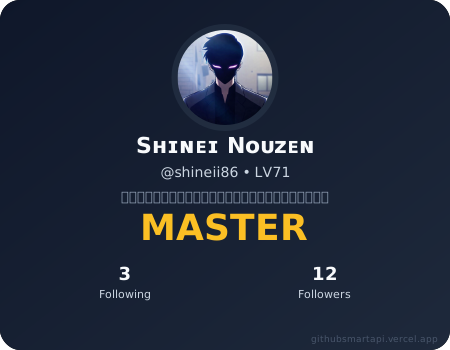
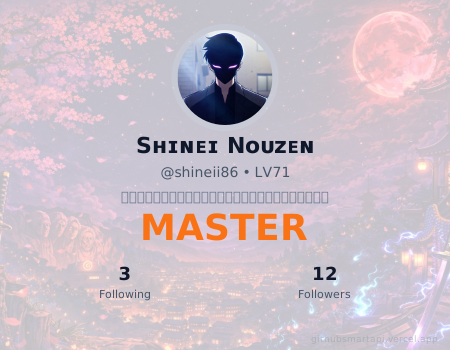
| Profile Card | Beautiful animated SVG card (500×350) with custom backgrounds, theme overlays & Google Sans font | 🃏 |
| Redis Caching | 5‑minute cache to reduce API calls (optional) | 🗄️ |
| Serverless Ready | Deploy to Vercel in one click | 🌐 |
| Interactive Web UI | Built‑in frontend to test the API live | 🌍 |
- JSON analysis – score, rank, level, rank name, stats, languages, AI summary
- Compare two users – side‑by‑side JSON comparison
- SVG badge – avatar + name + rank with level (e.g.,
octocat MYTHIC • LV90) - Profile card – full card with avatar, name, username+level, rank name, following/followers, custom backgrounds
- Shields.io badges –
Rank MASTER(gold) andLevel 90(blue), light/dark theme support - Optional AI summaries (OpenAI GPT‑4o mini)
- Redis caching (5 min TTL)
- Custom card backgrounds – use
?bgImage=1to6(add your own images inCUSTOM_BGarray)
| Endpoint | Description | Example |
|---|---|---|
GET /api/user/:username |
Full JSON analysis | /api/user/shineii86 |
GET /api/vs/:user1/:user2 |
Compare two users | /api/vs/shineii86/octocat |
GET /api/badge/:username |
SVG badge (avatar + name + rank•LV) | /api/badge/shineii86?theme=dark |
GET /api/card/:username |
Profile card (with custom backgrounds) | /api/card/shineii86?theme=light&bgImage=1 |
GET /api/rank-badge/:username |
Shields‑style “Rank MASTER” badge | /api/rank-badge/shineii86?theme=dark |
GET /api/level-badge/:username |
Shields‑style “Level 90” badge | /api/level-badge/shineii86?theme=light |
Query parameters:
?theme=lightor?theme=dark(default dark)?bgImage=1..6for custom card backgrounds?animated=true(only for the full badge, optional)
Try the API instantly without writing any code!
👉 Launch Interactive API Preview
The built‑in web UI (included in this repo at /public/index.html) lets you:
- Enter any GitHub username and see the full JSON response
- Compare two users side‑by‑side
- Toggle light/dark theme for the profile card
- Select custom backgrounds (1–6) for the card
- Copy cURL commands
The developer score is calculated using 8 weighted metrics. Below is the scoring flow and the rank mapping:
flowchart TD
    A[Fetch GitHub User Data] --> B{REST + GraphQL}
    B --> C[Total Stars<br/>Weight: 25%]
    B --> D[Total Forks<br/>Weight: 15%]
    B --> E[Followers<br/>Weight: 15%]
    B --> F[Account Age<br/>Weight: 10%]
    B --> G[Public Repos<br/>Weight: 10%]
    B --> H[Language Diversity<br/>Weight: 10%]
    B --> I[Contribution Streak<br/>Weight: 10%]
    B --> J[Commit Frequency<br/>Weight: 5%]

    C & D & E & F & G & H & I & J --> K[Normalize each metric 0-100]
    K --> L[Apply weights & sum]
    L --> M[Final Score 0-100]
    M --> N{Rank Mapping}
    N --> O[100: GODLIKE]
    N --> P[90-99: MYTHIC]
    N --> Q[80-89: LEGEND]
    N --> R[70-79: GRANDMASTER]
    N --> S[60-69: MASTER]
    N --> T[50-59: ELITE]
    N --> U[40-49: EXPERT]
    N --> V[30-39: DEVELOPER]
    N --> W[20-29: APPRENTICE]
    N --> X[10-19: NOVICE]
    N --> Y[0-9: BEGINNER]
| Score Range | Rank Name | Level Display |
|---|---|---|
| 100 | GODLIKE | LV100 |
| 90–99 | MYTHIC | LV90–99 |
| 80–89 | LEGEND | LV80–89 |
| 70–79 | GRANDMASTER | LV70–79 |
| 60–69 | MASTER | LV60–69 |
| 50–59 | ELITE | LV50–59 |
| 40–49 | EXPERT | LV40–49 |
| 30–39 | DEVELOPER | LV30–39 |
| 20–29 | APPRENTICE | LV20–29 |
| 10–19 | NOVICE | LV10–19 |
| 0–9 | BEGINNER | LV0–9 |
- Node.js 18+
- GitHub Personal Access Token (classic) with
repoanduserscopes - (Optional) Redis server / Upstash account
- (Optional) OpenAI API key
# Clone the repository
git clone https://github.com/Shineii86/GitHubAPI.git
cd GitHubAPI

# Install dependencies
npm install

# Copy environment variables
cp .env.example .env

# Edit .env with your tokens
nano .env

# Start development server
npm run dev
The API will run at http://localhost:3000 and the frontend will be served at the same address.
All endpoints return JSON unless specified otherwise.
Returns complete profile analysis with score, rank, stats, and optional AI summary.
Path parameter:
username– GitHub username (e.g.,shineii86)
Example request:
curl https://githubsmartapi.vercel.app/api/user/shineii86Example response:
{
  "username": "shineii86",
  "score": 68,
  "rank": "MASTER",
  "profile": {
    "followers": 5,
    "publicRepos": 8,
    "accountAgeYears": 12
  },
  "stats": {
    "totalStars": 12,
    "totalRepos": 8,
    "activeRepos": 3,
    "totalContributions": 243,
    "currentStreak": 2,
    "longestStreak": 7
  },
  "topLanguages": {
    "JavaScript": 4,
    "Ruby": 1
  },
  "aiSummary": "Moderate activity with room for growth. Good language diversity.",
  "fetchedAt": "2026-04-05T12:00:00.000Z",
  "cached": false
}Returns side‑by‑side comparison of two users.
Example:
curl https://githubsmartapi.vercel.app/api/vs/shineii86/gaearonExample response:
{
  "user1": {
    "username": "Shineii86",
    "profile": {
      "followers": 12,
      "publicRepos": 30,
      "accountAgeYears": 2
    },
    "stats": {
      "totalStars": 65,
      "totalRepos": 30,
      "activeRepos": 17,
      "totalContributions": 1244,
      "currentStreak": 2,
      "longestStreak": 13
    },
    "languages": {
      "HTML": 17,
      "TypeScript": 1,
      "JavaScript": 4,
      "CSS": 1,
      "Jupyter Notebook": 1
    },
    "score": 69,
    "rank": "B",
    "level": 69,
    "rankName": "MASTER",
    "rankWithBullet": "MASTER • LV69"
  },
  "user2": {
    "username": "github",
    "profile": {
      "followers": 72271,
      "publicRepos": 540,
      "accountAgeYears": 17
    },
    "stats": {
      "totalStars": 557973,
      "totalRepos": 100,
      "activeRepos": 100,
      "totalContributions": 0,
      "currentStreak": 0,
      "longestStreak": 0
    },
    "languages": {
      "Python": 2,
      "TypeScript": 17,
      "Go": 7,
      "C": 3,
      "Vim Script": 1,
      "EJS": 1,
      "HTML": 3,
      "JavaScript": 15,
      "CodeQL": 2,
      "Shell": 5,
      "Ruby": 9,
      "Swift": 1,
      "DIGITAL Command Language": 1,
      "Rust": 1,
      "C#": 2,
      "Java": 1,
      "Jupyter Notebook": 2,
      "C++": 1,
      "CSS": 1,
      "CoffeeScript": 1
    },
    "score": 100,
    "rank": "SSS",
    "level": 100,
    "rankName": "GODLIKE",
    "rankWithBullet": "GODLIKE • LV100"
  }
}Returns an SVG badge with profile photo, username, rank and level (e.g., MYTHIC • LV90).
Animation has been removed – the badge renders instantly.
| Query param | Values | Default | Description |
|---|---|---|---|
theme |
dark, light |
dark |
Colour scheme (light = grey background, dark = dark background) |
⚠️ Theanimatedparameter is no longer supported – the badge appears immediately.
| Light Badge Preview | Dark Badge Preview |
|---|---|
Example usage in Markdown:
Returns a large animated SVG profile card (500×350) with avatar, stats, rank, score, and custom background support.
| Query param | Values | Default | Description |
|---|---|---|---|
theme |
dark, light |
dark |
Colour scheme for text & overlay |
bgImage |
1, 2, 3, … |
(none) | Use one of the pre‑configured custom backgrounds (up to 6 images) |
animated |
true, false |
false |
Fade‑in + scale animation for the whole card |
💡 Custom backgrounds are automatically overlaid with a semi‑transparent color (white for light theme, black for dark theme) to keep text readable. No extra parameters needed – the overlay adapts to your
theme.
| Light Card | Dark Card | Custom Card |
|---|---|---|
Example usage in Markdown:
<!-- Default gradient card (dark theme, animated) -->
<!-- Custom background #3 with light theme -->
Returns a shields.io‑style badge showing Rank MASTER (gold text).
Supports ?theme=light (white background) or ?theme=dark (grey background).
| Light Rank Preview | Dark Rank Preview |
|---|---|
Example:
Returns a shields.io‑style badge showing Level 90 (blue text).
Supports ?theme=light or ?theme=dark.
| Light Level Preview | Dark Level Preview |
|---|---|
Example:
async function getUserAnalysis(username) {
  const response = await fetch(`https://githubsmartapi.vercel.app/api/user/${username}`);
  const data = await response.json();
  console.log(`${data.username} has score ${data.score} (rank ${data.rank})`);
}
getUserAnalysis('shineii86');import requests
def get_github_score(username):
url = f"https://githubsmartapi.vercel.app/api/user/{username}"
response = requests.get(url)
data = response.json()
print(f"{data['username']}: {data['score']} points - Rank {data['rank']}")
get_github_score('shineii86')curl -s https://githubsmartapi.vercel.app/api/user/shineii86 | jq '.score, .rank'| Category | Technology | Badge |
|---|---|---|
| Runtime | Node.js 18+ |  |
| Framework | Express.js |  |
| API Clients | Axios + GraphQL |  |
| AI Integration | OpenAI (GPT‑4o mini) |  |
| Caching | Redis (ioredis) |  |
| Fonts | Google Sans |  |
| Deployment | Vercel / Docker |  |
graph LR
    Client[Client<br/>Browser/App] -->|HTTP Request| Gateway[API Gateway<br/>Express.js]
    Gateway -->|Route| Controller[User Controller]
    Controller -->|Check| Cache[Redis Cache]
    Cache -->|Miss| GH[GitHub Service]
    GH -->|REST + GraphQL| GitHubAPI[GitHub API]
    GH -->|Raw Data| Scoring[Scoring Engine]
    Scoring -->|Score & Rank| AI[AI Service<br/>Optional]
    AI -->|Summary| Controller
    Controller -->|JSON Response| Client
    Controller -->|SVG| Badge[Badge Generator<br/>No Animation]
    Controller -->|SVG| Card[Profile Card<br/>Custom Backgrounds]
# Server
PORT=3000

# GitHub (required)
GITHUB_TOKEN=your_github_personal_access_token

# OpenAI (optional – removes AI summary if missing)
OPENAI_API_KEY=your_openai_api_key

# Redis (optional – caching disabled if missing)
REDIS_URL=redis://localhost:6379FROM node:18-alpine
WORKDIR /app
COPY package*.json ./
RUN npm ci --only=production
COPY . .
EXPOSE 3000
CMD ["node", "src/app.js"]docker build -t githubapi .
docker run -p 3000:3000 --env-file .env githubapiWe welcome contributions! Please see CONTRIBUTING.md and our Code of Conduct.
- Fork the repo
- Create a feature branch:
git checkout -b feat/amazing-feature - Commit changes:
git commit -m 'Add amazing feature' - Push to branch:
git push origin feat/amazing-feature - Open a Pull Request
If you find this project useful, consider supporting it. Your contribution helps maintain servers, add new features, and keep the API free.
GitHub Sponsors | Sponsor on GitHub
Your support is greatly appreciated!
Distributed under the MIT License. See LICENSE for more information.


