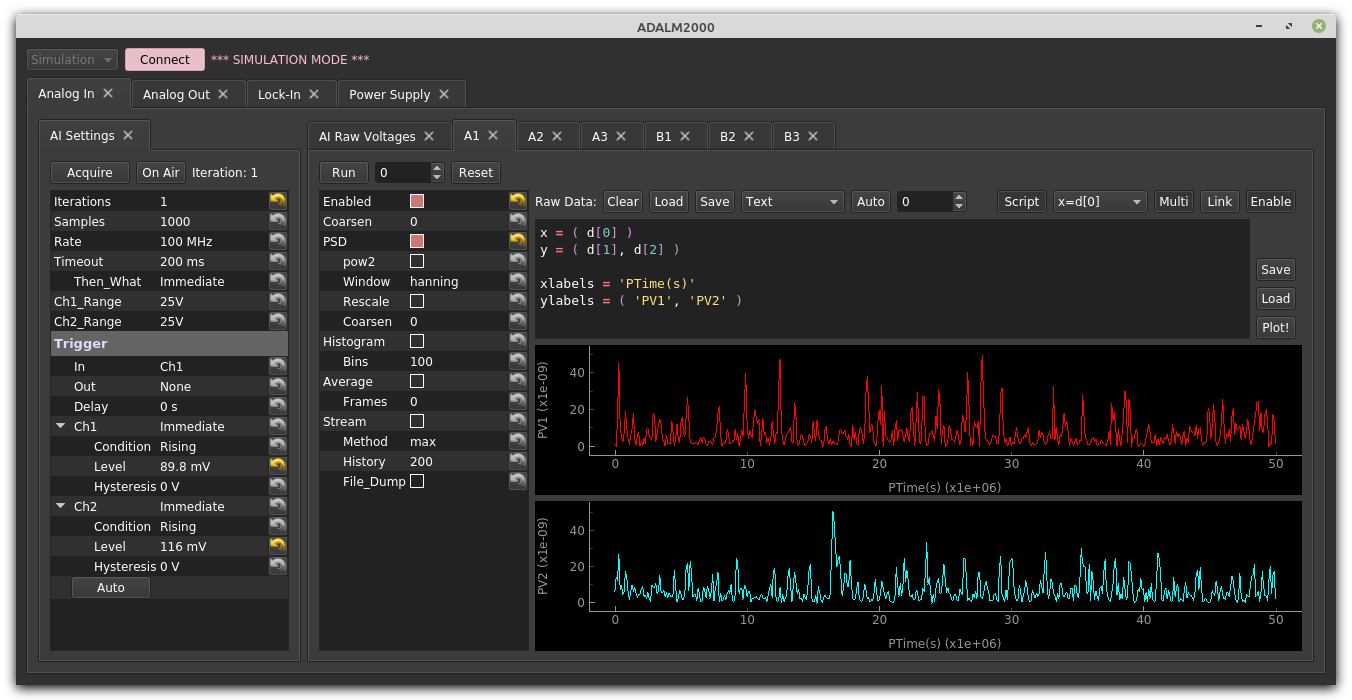
This is a library of tools spefically aimed at the McGill undergraduate physics labs, namely PHYS 359/469 at the moment. It can be thought of as an augmentation of the Spinmob library, which provides general-purpose, broadly applicable data handling, plotting, fitting, graphical interface, and other analysis tools.
-
Install Spinmob
-
From a console with your Python environment activated, install the "core" packages:
pip install mcphysics -
Start playing. For example:
import mcphysics
playground.fitting_statistics_demo()
To upgrade to the latest stable versions,
pip install mcphysics spinmob --upgrade --no-cache-dir
If you need to talk to the supported equipment, you may also need to install some drivers. You can see which are installed and missing with the function
mcphysics.check_installation()
To access VISA-based instruments (see below) you will also need a "standard" VISA driver, such as Rhode & Schwartz VISA or National Instruments VISA. I recommend Rhode & Schwarz because it's lightweight and works with everything we've tested. You will then need to run pip install pyvisa pyserial to get python access.
To access an ADALM2000, you will need to install libiio and libm2k (with python bindings!). On Windows, you will also need the m2k driver, and you may have to download the appropriate *.whl file for your system, then manually run a pip install [filename].whl from the anaconda prompt to get it into python. On Linux (and probably osx), we are required to manually compile the libm2k library, so McPhysics may require a specific version to be installed. If this is the case, import mcphysics should complain and tell you which version is required when you try to access the device.
Fancy sound cards may require their own drivers to be installed, but do not need anything more than the sounddevice library, which is installed by default above.
The McPhysics library is organized heirarchically, and you should use Spyder's code completion suggestions to navigate it. You can also type <ctrl>-i while your cursor is beside an object to access its documentation. Below is a list of the existing functionality. All of these objects are documented within the code itself, and detailed help is available via python's help() command or your favorite IDE's or ipython's built in help / autocomplete functionality. An introduction to some of the complex items is available on our (growing) wiki.
- load_chn(): Loads a Maestro .Chn file, returning a spinmob databox.
- load_chns(): Load multiple .Chn files, returning a list of spinmob databoxes.
- load_chns_directory(): Performs
load_chns()on all the .Chn files in a selected directory. - plot_chns(): Shortcut function for analyzing / plotting multiple .Chn files on the same axes.
- plot_chns_directory(): Performs
plot_chns()on all the .Chn files in a selected directory. - convert_chn_to_csv(): Loads multiple .Chn files, converts them to csv, and dumps them in a directory of your choice.
- load_image(): Loads an image file (jpg, png, etc...), returning 3d numpy array (1 dimension for x, 1 dimension for y, and 1 for the color channel).
- load_images(): Loads multiple images, returning a list of such arrays.
- em_gaussian(): Exponentially modified Gaussian probability density function.
- gaussian(): Gaussian probability density function.
- gaussian_cdf(): Cumulative density function (running integral) of the above Gaussian probability density function.
- reduced_chi2(): Reduced chi^2 probability density function.
- piecewise_parabola(): Sinusoid-like oscillatory function composed of connected parabolic segments.
- voigt(): Voigt probability density function.
- adalm2000() (requires m2k drivers and libraries): Scriptable graphical interface for the ADALM2000 multifunction DAQ.
- adalm2000_api() (requires m2k drivers and libraries): Lower level, non-graphical interface for the ADALM2000.
- auber_syl53x2p: Scriptable graphical interface for an Auber SYL-53X2P temperature controller.
- auber_syl53x2p_apo(): Lower level, non-graphical interface for the Auber SYL-53X2P.
- keithley_dmm() (requires VISA): Graphical interface for our the Keithley digital multimeters (currently 199).
- keithley_dmm_api() (requires VISA): Lower level, non-graphical interface for the DMM.
- sillyscope() (requires VISA): Semi-unified graphical interface for interacting with an assortment of Rigol and Tektronix sillyscopes.
- sillyscope_api() (requires VISA): Lower level, non-graphical interface for the same sillyscopes.
- soundcard(): Scriptable graphical interface for interacting with sound cards.
- fitting_statistics_demo(): Graphical fake data generator and fitter. Useful for visualizing fit statistics.
- plot_and_integrate_reduced_chi2(): Plots the reduced chi^2 distribution for the specified degrees of freedom, then numerically integrates it. This is useful if you want to know how reasonable a given value of chi^2 is.
Some of the experiments have a collection of the above tools, along with some additional tools specific to the experiment:
- alpha.arduino(): Graphical front-end for the specific Arduino controllers connected to the Alpha Decay experiments.
- drum.motors_api(): Scripted interface for controlling the stepper motors via the attached Arduino.