Tooltips
Tooltips on rotting items communicate information on their freshness.
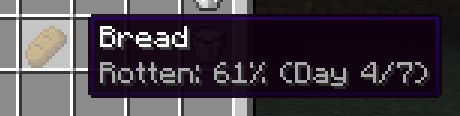
- "Rotten: p%" - The item is p% through its lifetime. At 100%, the item rots.
- "Day x/y" - The item is x days old out of a y days lifetime (assuming item is not in a preserving container).
A preserving container will slow or stop the item rot, making the above information accurate assuming the item is removed from the preserving container immediately.
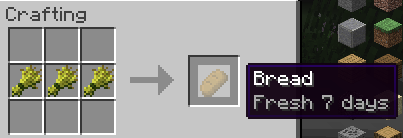
This tooltip appears on items in the crafting grid result section (and may appear if other mods have incompatibilities with this mod).
- "Fresh x days" - The item stays from for x days once it is crafted or comes into existence.
You may see the following tooltips in other circumstances (and may appear more often if other mods have incompatibilities with this mod):
- Decaying tooltip - the item has hit 100% lifetime and decay is imminent.
- (Technically this means the item has reached end of lifetime but a periodic tick has not transformed it into the rotten item yet.)
- Preserved tooltip - the item no longer rots.
- Debug tooltip
- "Date x Time y" - the item has a lifetime of y ticks, and x is the fresh timestamp (the creation time plus any preserved time) used to calculate age.
- "When a / b" - a is the current timestamp in ticks, and the item will rot at timestamp b.