What’s the new service (i.e new Amazon Prime Benefit ) that you can provide to Prime Student Members to make their/your lives better?
Prime Student benefits comes with many benefits that’s provided exclusively by Amazon as well as by partnering with other companies such as GrubHub, Course Hero, Student Universe etc- Please review this link to learn more about all the benefits.
You are welcome to think along these lines to figure out a problem that you face as a student on or off campus and how to best solve it either as a new service by Amazon or with the new partnership with any entity. We highly recommend you to start thinking from Customer/user (i.e Student) stand point to understand the real pain points and validate your assumptions before moving on to build the solution. We highly encourage you to think Big and Bold (the Amazon way!!!) and don’t be restricted by any new constraints. Problems can also range anywhere from solving environmental crisis, food wastage, homelessness, or using technologies like Alexa, AI/VR to solve any problems that may interest you.
We will be scoring your problem solutions along two axes: 1) problem statement evaluation and business idea and 2) implementation details.
We want to encourage you to really Think Big and be creative with your solutions. We’re looking for business ideas that are outside the box and that would excite us both as consumers of Prime (Amazon employees are Prime members!) and as employees within Prime looking to delight our customers. Additionally, we have basic milestones for the actual implementation, but will reward solutions that are technically challenging and inventive.
Below you will find the specific implementation milestones we will be looking for. We will be asking you to build a landing page and an email notification system that emails new Prime members that elect to sign up for Prime via your landing page. Further details about how to build your landing page and how to implement the email notification system can be found in the Problem Statement Instructions Section
Milestone 1: Functional Landing page
- You should build a static web page, hosted in S3, that we can navigate to and sign up from. Extra points will be awarded for creative HTML/CSS content and styling! We want an experience that delights the customer!
Milestone 2: Email Form Submission
- Your landing page should include a signup form where a visitor can enter their email. This create an HTTP POST request that will invoke the backend processing for sending the email.
Milestone 3: Lambda
- Your email form should trigger a Lambda workflow (starter code for this has been provided), that will parse the user’s email from the event input and send the email via SES. Extra points will be rewarded here for extra functionality! Ideas include using DynamoDB to store the emails of users that are already signed up, or personalizing emails with user’s first names. Think Big!
Milestone 4: SES
- Lambda should invoke SES (Simple Email Service) to actually send the email. You will need to register your team emails and your mentor’s email.
Presentation:
- Your presentation will consist of a demo of your website and email workflow. Be sure to showcase how your idea works to Invent and Simplify on behalf of customers!
Once you join the zoom meeting provide to you by the hackathon committee, we will guide you to the right break out rooms where you will work with Amazonians throughout the session.
Mentors are your valuable resource and don’t hesitate to ask any question or help- we are here to work and build with you!
To assist you in implementing your solution to the problem statement, we have provided files that you will edit to build your landing page. Please review the Evaluation Criteria section for further information around what kind of content we expect to see on your landing pages. We are also asking that students implement an “email notification” feature on their landing page that will send a welcome email to new users that decide to sign up for Amazon Prime as a result of the new service offering you have come up with. This is to give you exposure to cloud technologies that Amazon Software Development Engineers use in their everyday work, and to help you think with Customer Obsession, an Amazon Leadership Principle that’s at the core of our business and influences the way we approach all problems we work on. This is also the way we welcome new customers who visit our Amazon Prime landing page and decide to enroll in Prime today!
Within this repository you will see the following files. Below we explain what each file is for and how they should be used/populated:
- index.html - this is the main HTML file that you will populate with the content to display on your web page. You can can think of HTML as the content of websites (the text, pictures, forms, etc. that you all are familiar with). For more information, you can look at this “Intro to HTML” overview here: https://www.w3schools.com/html/html_intro.asp
- Note that the “navigation bar” we provide you is non-functional (e.g. if you click on any of the links in the navigation bar, nothing happens). This is intentional! Your landing page is “static” meaning it’s not connected to Amazon’s retail website, and is meant for demonstration purposes only. That said, if you want to read more about navigation bars and how they work, feel free!
- https://www.w3schools.com/bootstrap/bootstrap_navbar.asp
- /static/index.css - CSS files are used to define the styling of a website. You can use CSS to define color themes, font sizes, font styling, page layout and formatting, etc. If you’d like more information about CSS, you can visit this link here: https://www.w3schools.com/css/css_intro.asp
- /static/email_trigger.js - this file will contain the function that will invoke an API call to a service hosted in AWS to send a welcome email when a new user signs up for Amazon Prime on your landing page. We’ve filled most of the code in for you, as the focus of this project is page content and the program benefits, not getting a small feature like this to work. That said, at Amazon we challenge our engineers to Think Big and Learn and Be Curious, so your mentor will encourage to think how this functionality might be improved in order to enhance the customer experience!
- /fonts/amazon_ember_condensed/ - this folder contains a series of
.tfffiles which provide various “Amazon” fonts in use across our digital UI/UX experiences. Feel free to incorporate any of them in your page styling. This will give your landing page a distinctly “Amazon” feel, and give you experience building web content that aligns with existing thematic elements - lambda_email_trigger.py - this is the function that will be called to actually send the welcome email for users that sign up for Prime on your landing page. We’ve implemented the actual functionality of “sending the email” for you, but encourage you to Learn and Be Curious if you’re wondering how the functionality works. You will have to provide the actual content of the welcome email yourselves. Like in the
index.htmlfile, we leave the actual content of the welcome email completely up to you!
At Amazon we love architecture diagrams. Our engineers use them to illustrate how our services are deployed and how they interact with existing services within the Amazon ecosystem. Below you will find an architecture diagram illustrating how we want you to deploy your landing page and email notification system. In this section we’ll explain what each component is, what it does, and provide resources for further reading. We want to note that this is not the only way to implement your solution, but is just one way that you can get things working. If you have other ideas on how you might implement your solution, we encourage them! Talk to your mentor for guidance or to talk through your ideas. At Amazon we encourage diversity of thought and Bias for Action. Solutions to problems are varied and come with pros and cons. As Software Development Engineers we must consider the various alternatives for implementing solutions, and choose the one that is cost effective, efficient, scalable, and most importantly, one that will Earn Trust and Delight our Customers. The intention of this diagram is to introduce you to Cloud Computing concepts and AWS. If you have any additional questions, your mentors are your first resource!
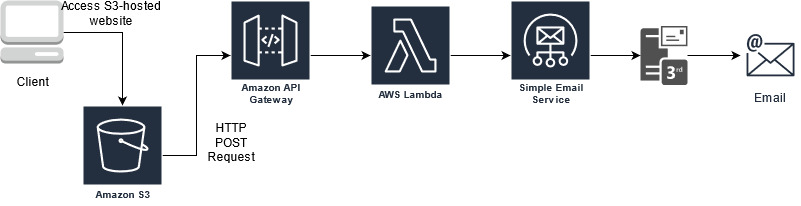
- Client - the “client” is simply someone on the internet visiting your landing page! They can access your landing page from a mobile phone with internet access, a desktop computer, an iPad, etc.
- Amazon S3 - S3 (Simple Cloud Storage) is an AWS service that allows customers to store “objects” securely and effectively. Like many cloud services offered by AWS, S3 is designed with scalability, availability, security and performance in mind. For the purposes of your solution you don’t really need to worry about the full suite of features of S3, and why they are advantageous to our customers. Your biggest takeaway is that the “assets” of your landing page will be hosted here, and AWS will provide the infrastructure needed so that these assets can be used to display your landing page, accessible by anyone on the web!
- Amazon API Gateway - is used to define the entrypoint for services to communicate. In this context, APIs act as the “front door” for applications (your landing page!) to access data, business logic and functionality from backend services. In the context of your solution, API Gateway is used to provide your landing page “access” to the “send email” functionality that it will use to send welcome emails to new customers signing up for Amazon Prime.
- Amazon Lambda - is a “compute” service that let’s you run code without provisioning or managing servers. In the context of your solution, Lambda will be the compute environment where you define your “send email” function, which is “fronted” by API Gateway. Much like a road is the “environment” required to drive a car, Lambda provides the “environment” needed to run a piece of code, and abstracts a way a lot of the nuance that typically comes along with having to configure “your own” environment to get a piece of code to execute
- Amazon Simple Email Service - “SES” (Simple Email Service) is an AWS service that allows developers to send email from within any application. In the context of your solution, SES is used by Lambda to actually send your welcome email to new Prime customers signing up for Prime on your landing page. You can think of SES in the same way you think of “gmail” (although SES is functionally different) in that SES provides the infrastructure to physically send an email from a sender to a recipient
- 3rd party email service - this is the resource that SES interacts with to actually send your email. If your email account is with “gmail”, for example, SES will interact with gmail’s email servers to send your email for you
- How do I actually host my landing page in S3?
- Resource: https://docs.aws.amazon.com/AmazonS3/latest/userguide/WebsiteHosting.html
- Your mentor will guide you on the steps required to actually host your landing page in S3. You can follow the provided guide, or reach out to them for clarification and help
- How do I create a RESTful API in API Gateway?
- Resource: https://www.youtube.com/watch?v=XeYPSDeBj1g
- Your mentor will provide you the configuration settings you need to make in order to make your API publicly accessible (e.g. accessible from your landing page). The provided resource provides a quick overview of the steps involved, but your mentor will be providing additional context on how this is done
- How do I host my “email trigger” function in AWS Lambda?
- Resource: https://riptutorial.com/aws-lambda/example/22790/hello-world---lambda-function
- As with 1 and 2, your mentor will be providing more context about AWS Lambda and how to ensure your Lambda function is accessible by API Gateway
- How do I set up SES (Simple Email Service)?
- Resource: https://docs.aws.amazon.com/ses/latest/dg/setting-up.html
- This will actually be the easiest step in your solution, but your mentor will give you more context. You will need to register the email addresses for all the mentors from Amazon, as well as your personal email address(es). Mentors will attempt to sign up for Prime from your landing page, and will use their Amazon email addresses as their signup ID to see if they successfully receive a welcome email
- I have no idea how to create web content using HTML. Where can I get help?
- Use the “Intro to HTML” page in the Team Handout section, and ask your mentor for help!
- Use the web! There is no shame in asking others for help, or researching on your own how certain technologies work. Learn and Be Curious!
- I have no idea how to customize the styling of my landing page using CSS. Help!
- See 5! Review the resource in the Team Handout section and ask your mentor for help!
- My mentor isn’t responding/isn’t in my breakout room. Who do I ask for help?
- We will provide you a list of all the mentors participating in the Hackathon. We encourage you to try and implement your solution before immediately asking for help, but if your mentor is for some reason not available feel free to reach out to one of the other participating mentors for help
More Resources!
Sending email through AWS SES using AWS SDK
Create dynamic contact forms for S3 static websites using AWS Lambda, AWS API Gateway and AWS SES
Trigger an email when adding an item to a DynamoDB table