A script created to check the "Getting to Philosophy" phenomenon:
Clicking on the first link in the main text of an English Wikipedia article, and then repeating the process for
subsequent articles, leads to the Philosophy article.
You are welcome to read more about this interesting phenomenon here: https://en.wikipedia.org/wiki/Wikipedia:Getting_to_Philosophy
I created a python script which "plays" this "game" and generates a nice Graph showing the paths created by clicking the
first link in a Wikipedia article.
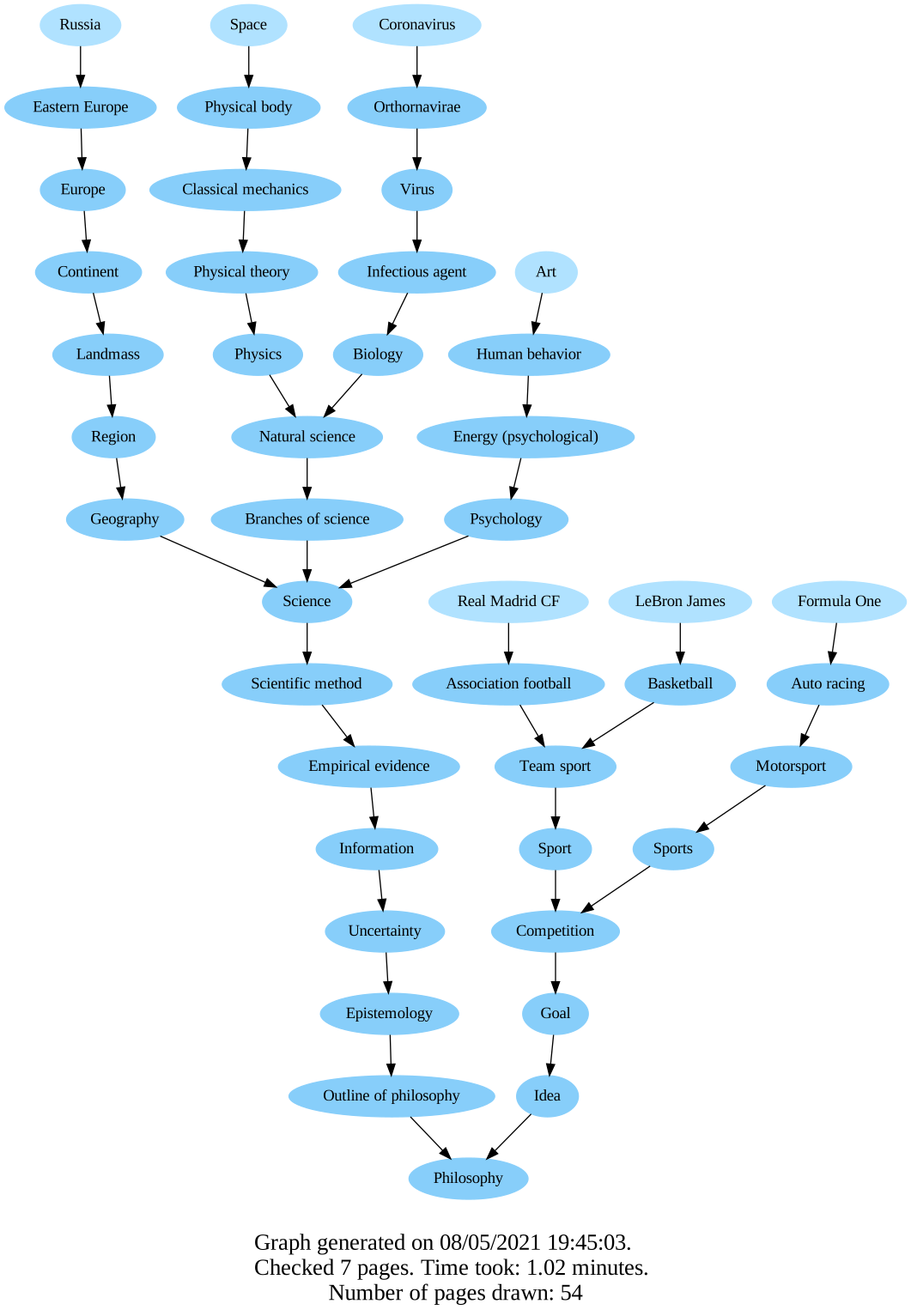
For example the following graph, which ran on these first pages:
"Russia", "Space", "Coronavirus", "Art", "LeBron James","Real Madrid" and "Formula One".
(to view raw: 7_0.svg
, 7_0.pdf)

pip install -r requirements.txt- Install Graphviz from here: https://www.graphviz.org/download/ and make sure that the directory containing the dot executable is on your systems’ path !
- bs4 to scrape information from web pages easily.
- wikipedia to access and parse data from Wikipedia.
- Graphviz to create and render graphs.
There are three options to run:
Gets a list of Wikipedia article names to draw. The script finds the closest article to each name entered and draws the graph for the pages chosen.
e.g:
python draw_pages.py formula 1, Nervous system, Road Bicycle Racing, minerals, baseball, cafe
Results in the following graph: (to view raw: 6_1.svg , 6_1.pdf)
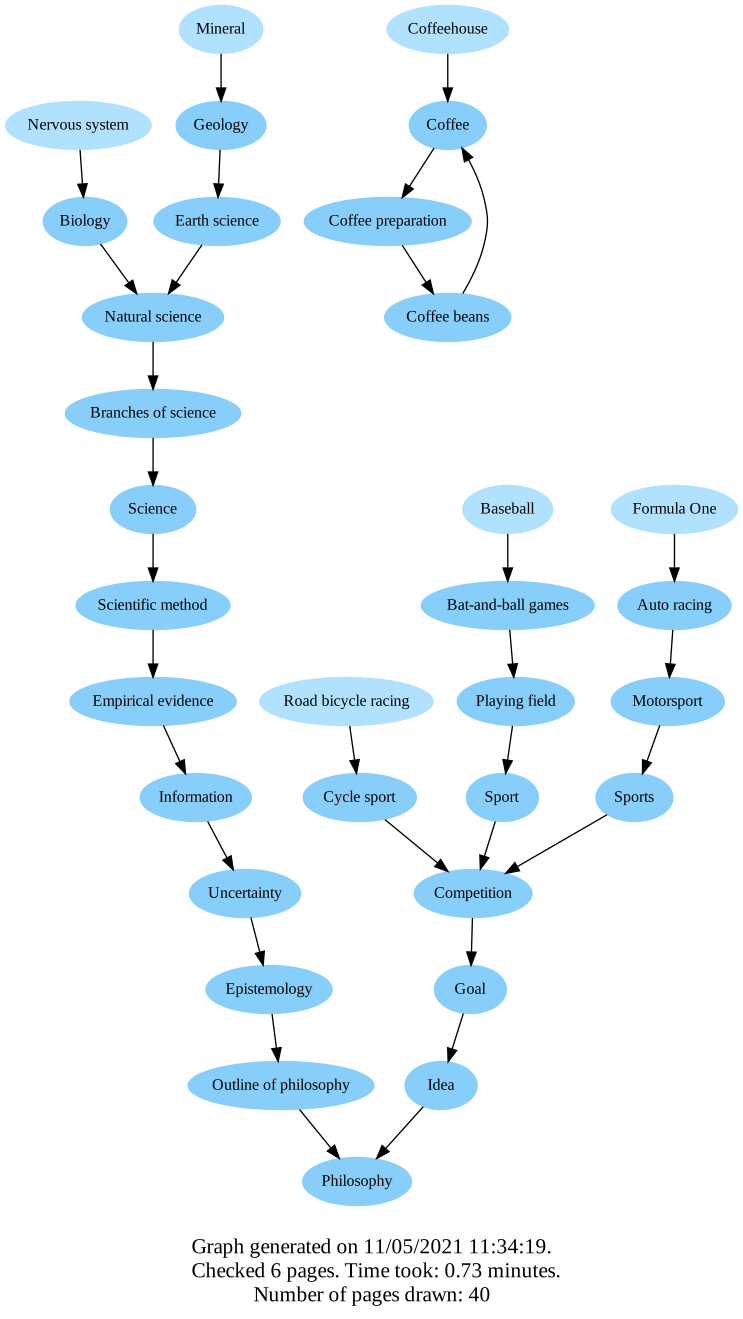
6 Formula One+Nervous system+Road bicycle racing.svg

Gets a list of integers. For each number in the arguments, the script generates and draws a graph, with randomly chosen articles. Each integer corresponds for the number of random articles in a drawing.
e.g:
python draw_random.py 10 18
Results in two graphs. One with 10 randomly chosen Wikipedia articles to start with, and one with 18 randomly chosen Wikipedia articles to start with.
Gets a number of pages to draw. Then the script lets the user choose each Wikipedia article manually, (using console I/O). After all the pages are chosen, the script generates the graph from the Wikipedia articles chosen.
e.g:
python draw_handpicked_pages.py 8
Gives the user 8 articles to choose, and then draws the graph for the 8 Wikipedia articles chosen.
Following the chain consists of:
- Clicking on the first non-parenthesized, non-italicized link.
- Ignoring external links, links to the current page, or red links (links to non-existent pages).
- Stopping when reaching "Philosophy", a page with no links or a page that does not exist, or when a loop occurs.
The function that decides what we should click-on is: is_href_valid(), located in the WikiPage.py, in
class WikiPage. It gets a href html tag, parsed with bs4(BeautifulSoup) and decides if it is valid to click on or
not. If the page is valid - it returns True, otherwise - False.
You can go take a look on the checks it does, but in general we check the following stuff:
-
It is indeed a link to a Wikipedia article. Meaning it is not an external link to somewhere outside Wikipedia.
-
It is not a link enclosed in brackets.
For example in Epistemology the first link that is clicked shouldn't be(🔊listen),Greekorἐπιστήμη. The right link to click on isbranch of philosophyinstead. -
It is not a side-comment, meaning the link is not in the following tags:
- italicized (
<i>) - smaller text (
<small>) - supper text (
<sup>)
- italicized (
-
It is not a link to a disambiguation page ( disambiguation ).
To generate the graph, I used a very convenient open-source library I found called Graphviz.
The Graphviz library supports tons of output formats ( their documentation). In this project I preferred to use .SVG and .PDF files. Both preserve "quality" when zooming in.
One advantage of .SVG over .PDF files is that it allows adding URL links onto nodes, a feature which I found very useful. Consequently, the nodes of the graphs in the .SVG files are clickable and lead to the Wikipedia page they represent.
Of course the "Getting to Philosophy" phenomenon doesn't happen in 100% percent of the cases, and there are some loopholes in it. Some interesting loops of Wikipedia articles I found:
- Logic ➜ rules of inference ➜ Logical form ➜ Logic again :)
- United States ➜ Contiguous United States ➜ U.S. states ➜ United States again :)
- Carbon fibers ➜ fibers
➜ Carbon fibers again :)
notice that the first two links in fibers are local links, leading to a section in the article, so we ignore and skip them: ... "is a natural or man-made substance" ...
 |
 |
 |
|---|
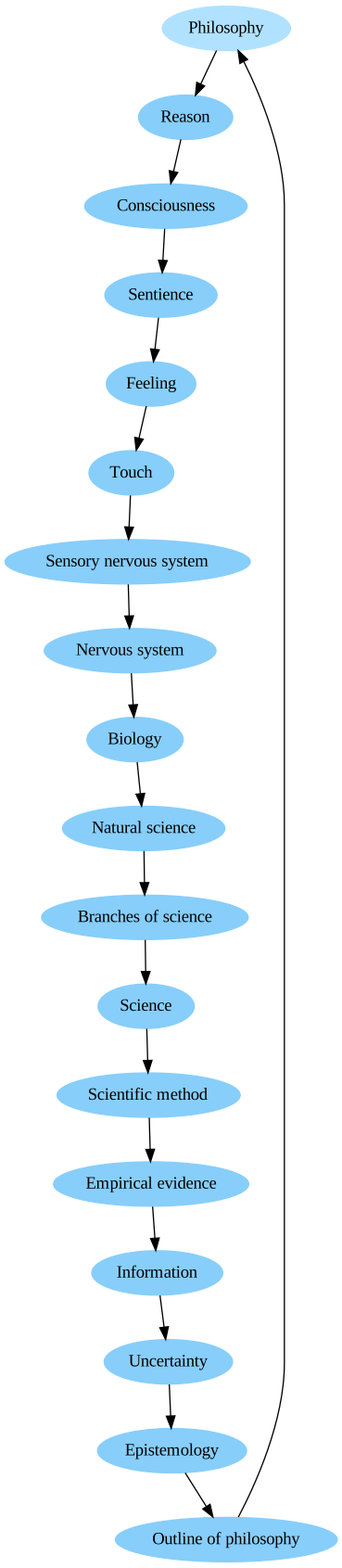
As surprising as it sounds, Philosophy also leads to Philosophy 🥳🥳
You can see its path here: philosophy path
(to view
raw: philosophy.svg
, philosophy.pdf)

Check out the folder output_examples for some examples of generated graphs.
Created by Tommy Zaft