Skip to content

Conversation

@EMaksymenko
Copy link
Member

@EMaksymenko EMaksymenko commented Apr 19, 2019

Description of the Change

Added the capability to rotate SurfaceText objects.

  • Added the heading property to the SurfaceText class
  • Added methods to compute rotated text dimensions
  • Added functional test

Why Should This Be In Core?

Enhances the SDK's labeling features.

Benefits

This improvement adds SurfaceText rotation capability.

Potential Drawbacks

Note: The following truncation issue was resolved through collaboration with @wcmatthysen on this pull request.

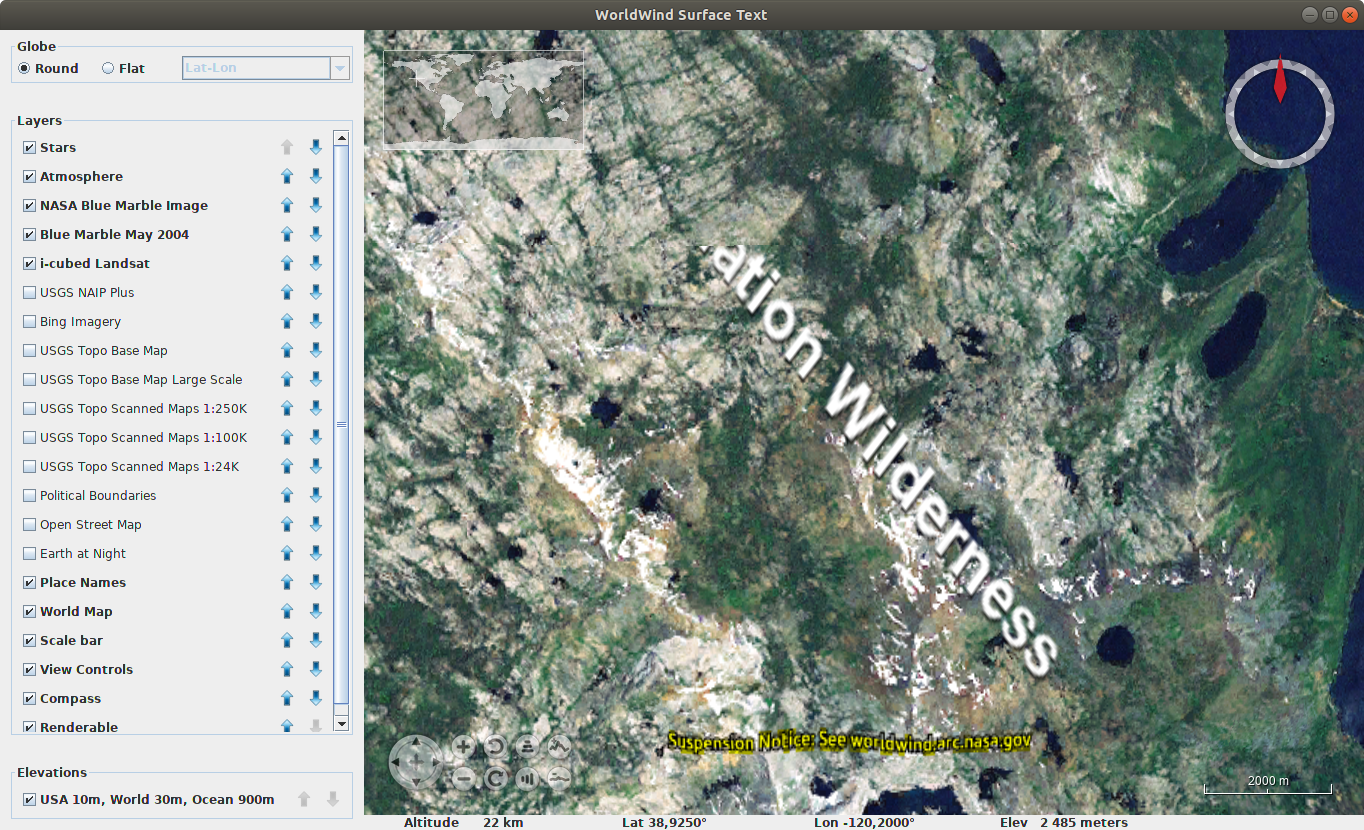
Initially, the only issue found - big texts are truncated by tile borders.
Знімок екрану з 2019-04-19 21-41-09

Note: See the conversation on this pull requests for more information on the fix.

Applicable Issues

Closes #37

@EMaksymenko
Copy link
Member Author

There is no truncation issue in some bigger zoom.

Probably it is not related with rotation itself, but with displaying text on different scaled tiles.

Знімок екрану з 2019-04-19 22-00-11

@wcmatthysen wcmatthysen added the enhancement New feature or request label Apr 19, 2019
@PJHogan
Copy link
Member

PJHogan commented Apr 19, 2019

Eugene (Sufaev), this one is for you!
https://www.youtube.com/watch?v=0Ph89xbv0Kw

@wcmatthysen wcmatthysen self-requested a review April 19, 2019 22:05
Copy link
Member

@wcmatthysen wcmatthysen left a comment

Choose a reason for hiding this comment

The reason will be displayed to describe this comment to others. Learn more.

Hi Eugene,

I made a couple of suggestions regarding this commit. If you look at SurfaceQuad as an example you'll see that the angle is called "heading" and the type is Angle. Could you make these changes to fit in with the convention already established in WorldWind?

Btw. I'm looking into that chopped-off text issue. I'm also seeing it on my side.

@wcmatthysen
Copy link
Member

I think I found the issue with the text being cut off like that. The bounding-sector calculation should be updated to take the rotation into account. If you rotate the text then the bounding-sector should enlarge if rotated at 45-degrees. If the bounding-sector is too small then the cut-off will occur. To see the bounding-sector for the SurfaceText object you can enable the debug drawing logic as:

surfaceText.setDrawBoundingSectors(true);

This will cause a white rectangle to be drawn around it that looks like:

without-fix

You can see from image that the rectangle is not rotated. This causes the clipping issue.

To rotate the rectangle, you need to modify the computeSector() method in SurfaceText to look like:

protected Sector[] computeSector(DrawContext dc)
{
    // Compute text extent depending on distance from eye
    Globe globe = dc.getGlobe();

    double widthInPixels = this.textBounds.getWidth();
    double heightInPixels = this.textBounds.getHeight();

    double heightInMeters = this.textSizeInMeters;
    double widthInMeters = heightInMeters * (widthInPixels / heightInPixels);
    
    double radius = globe.getRadius();
    double heightInRadians = heightInMeters / radius;
    double widthInRadians = widthInMeters / radius;

    // Compute the offset from the reference position. Convert pixels to meters based on the geographic size
    // of the text.
    Point2D point = this.getOffset().computeOffset(widthInPixels, heightInPixels, null, null);

    double metersPerPixel = heightInMeters / heightInPixels;

    double dxRadians = (point.getX() * metersPerPixel) / radius;
    double dyRadians = (point.getY() * metersPerPixel) / radius;
    
    double centerLat = this.location.latitude.addRadians(dyRadians + 0.5 * heightInRadians).degrees;
    double centerLon = this.location.longitude.addRadians(dxRadians + 0.5 * widthInRadians).degrees;
    LatLon center = LatLon.fromDegrees(centerLat, centerLon);
    
    double hw = widthInMeters / 2.0;
    double hh = heightInMeters / 2.0;
    double distance = Math.sqrt(hw * hw + hh * hh);
    double pathLength = distance / radius;
    double halfPI = Math.PI / 2.0;
    
    double azimuth1 = halfPI - (Math.atan2(-hh, -hw) - this.heading.radians);
    LatLon corner1 = LatLon.greatCircleEndPosition(center, azimuth1, pathLength);
    double azimuth2 = halfPI - (Math.atan2(-hh, hw) - this.heading.radians);
    LatLon corner2 = LatLon.greatCircleEndPosition(center, azimuth2, pathLength);
    double azimuth3 = halfPI - (Math.atan2(hh, hw) - this.heading.radians);
    LatLon corner3 = LatLon.greatCircleEndPosition(center, azimuth3, pathLength);
    double azimuth4 = halfPI - (Math.atan2(hh, -hw) - this.heading.radians);
    LatLon corner4 = LatLon.greatCircleEndPosition(center, azimuth4, pathLength);
    
    Sector boundingSector = Sector.boundingSector(Arrays.asList(corner1, corner2, corner3, corner4));
    
    double minLat = boundingSector.getMinLatitude().degrees;
    double maxLat = boundingSector.getMaxLatitude().degrees;
    double minLon = boundingSector.getMinLongitude().degrees;
    double maxLon = boundingSector.getMaxLongitude().degrees;
    
    this.drawLocation = LatLon.fromDegrees(minLat, minLon);

    if (maxLon > 180) {
        // Split the bounding box into two sectors, one to each side of the anti-meridian.
        Sector[] sectors = new Sector[2];
        sectors[0] = Sector.fromDegrees(minLat, maxLat, minLon, 180);
        sectors[1] = Sector.fromDegrees(minLat, maxLat, -180, maxLon - 360);
        this.spansAntimeridian = true;
        return sectors;
    } else {
        this.spansAntimeridian = false;
        return new Sector[] {Sector.fromDegrees(minLat, maxLat, minLon, maxLon)};
    }
}

The fix was done by borrowing some logic from SurfaceQuad. In particular, if you look at the getLocations() method you'll see how to calculated rotated positions. This results in the bounding-sector being calculated as shown here:

with-fix

However, the bounding-sector is not 100% accurate. If you set the heading to 0-degrees so that the text is not rotated, you get a bounding-sector that looks like:

with-fix-no-rotation

If you remove the rotation fix for the bounding-sector you'll see that the bounding-sector for a 0-degrees heading rotation is perfectly calculated (it fits perfectly around the text). I'm not too sure what the implications of this is. If @emxsys can confirm, I think this is good enough and you can use the fix.

@EMaksymenko
Copy link
Member Author

EMaksymenko commented Apr 20, 2019

I have changed attribute name and type to protected Angle heading = Angle.ZERO;.
Do not merge this PR until bounding sector issue will be solved.
It has not only wrong width calculation, but also do not process offset correctly.
I am working to solve both issues.

Bellow is example with Offset.LEFT_CENTER:
Знімок екрану з 2019-04-20 12-25-31

@EMaksymenko
Copy link
Member Author

EMaksymenko commented Apr 20, 2019

Could anybody help me with offset calculation in bounding sector? I am stuck.
I have tested all types of offset and I do not understand why text is located in unexpected positions (especially Offset.RIGHT_CENTER) or I do not correctly understand the offset meaning.

I also do not understand why Math.atan2 returns absolutely correct bounding box and text corners with 90 degree heading, but for some reasons it returns wider bounding box when heading become closer to 0 degrees, but with correct height.
Знімок екрану з 2019-04-20 13-20-53

I have little bit optimized proposed sector calculation:

        double hw = 0.5 * widthInRadians;
        double hh = 0.5 * heightInRadians;

        double centerLon = this.location.longitude.addRadians(dxRadians + hw).degrees;
        double centerLat = this.location.latitude.addRadians(dyRadians + hh).degrees;
        LatLon center = LatLon.fromDegrees(centerLat, centerLon);

        double pathLength = Math.sqrt(hw * hw + hh * hh);

        double azimuth1 = Math.atan2(-hw, -hh) - this.heading.radians;
        LatLon corner1 = LatLon.greatCircleEndPosition(center, azimuth1, pathLength);
        double azimuth2 = Math.atan2(-hw, hh) - this.heading.radians;
        LatLon corner2 = LatLon.greatCircleEndPosition(center, azimuth2, pathLength);
        double azimuth3 = Math.atan2(hw, hh) - this.heading.radians;
        LatLon corner3 = LatLon.greatCircleEndPosition(center, azimuth3, pathLength);
        double azimuth4 = Math.atan2(hw, -hh) - this.heading.radians;
        LatLon corner4 = LatLon.greatCircleEndPosition(center, azimuth4, pathLength);

        Sector boundingSector = Sector.boundingSector(Arrays.asList(corner1, corner2, corner3, corner4));

        double minLat = boundingSector.getMinLatitude().degrees;
        double maxLat = boundingSector.getMaxLatitude().degrees;
        double minLon = boundingSector.getMinLongitude().degrees;
        double maxLon = boundingSector.getMaxLongitude().degrees;

@wcmatthysen
Copy link
Member

Hi @Sufaev, I'll have a look for you as well. I think the offset needs to be taken into account when calculating the bounding-sector.

@wcmatthysen
Copy link
Member

@Sufaev, I looked a bit at the offset calculation. The offset-constants specified in the Offset class like RIGHT_CENTER won't work with SurfaceText as these offset values are taken from the bottom left corner. For example the center location is:

public static final Offset CENTER = Offset.fromFraction(0.5, 0.5);

whereas if you look at the default offset of SurfaceText you have:

public static final Offset DEFAULT_OFFSET = new Offset(-0.5d, -0.5d, AVKey.FRACTION, AVKey.FRACTION);

This means that the offset for SurfaceText is taken relative to the center-point and calculates the bottom-left corner where the text starts.

That is why you were getting strange results when you used Offset.RIGHT_CENTER.

@wcmatthysen
Copy link
Member

@Sufaev, I found an issue with the rotation logic. You need to modify applyDrawTransform() method as follows:

/**
 * Apply a transform to the GL state to draw the text at the proper location and scale.
 *
 * @param dc  Current draw context.
 * @param sdc Current surface tile draw context.
 */
protected void applyDrawTransform(DrawContext dc, SurfaceTileDrawContext sdc)
{
    Vec4 point = new Vec4(this.location.getLongitude().degrees, this.location.getLatitude().degrees, 1);
    // If the text box spans the anti-meridian and we're drawing tiles to the right of the anti-meridian, then we
    // need to map the translation into coordinates relative to that side of the anti-meridian.
    if (this.spansAntimeridian &&
        Math.signum(sdc.getSector().getMinLongitude().degrees) != Math.signum(this.drawLocation.longitude.degrees)) {
        point = new Vec4(this.location.getLongitude().degrees - 360, this.location.getLatitude().degrees, 1);
    }
    point = point.transformBy4(sdc.getModelviewMatrix());

    GL2 gl = dc.getGL().getGL2(); // GL initialization checks for GL2 compatibility.

    // Translate to location point
    gl.glTranslated(point.x(), point.y(), point.z());

    // Apply the scaling factor to draw the text at the correct geographic size
    gl.glScaled(this.scale, this.scale, 1d);
    
    double widthInPixels = this.textBounds.getWidth();
    double heightInPixels = this.textBounds.getHeight();
    gl.glTranslated(widthInPixels / 2, heightInPixels / 2, 0);

    // Apply rotation angle
    gl.glRotated(-this.heading.degrees, 0, 0, 1);
    
    gl.glTranslated(-widthInPixels / 2, -heightInPixels / 2, 0);
}

This ensures that the text is rotated about its center-point before being offset.

Then, if I rotate 45-degrees and I offset so that the text is left-aligned and centered vertically:

surfaceText.setHeading(Angle.fromDegrees(45));
surfaceText.setOffset(Offset.fromFraction(0.0, -0.5));

you will get the following bounding-sector:

rotated-left-aligned

This is very close to what we want. I'm still having issues with the slightly larger bounding-sector. Thus, if I rotate 0-degrees (and left-align as before) I still get the following:

not-rotated-left-aligned

I'm currently taking a look at that.

@wcmatthysen
Copy link
Member

wcmatthysen commented Apr 20, 2019

I think the bounding-sector overshoot happens because of the way the path-length is calculated in the computeSector() method:

double distance = Math.sqrt(hw * hw + hh * hh);
double pathLength = distance / radius;

If we change this to:

double pathLength = LatLon.greatCircleDistance(this.location, center).radians;

You get a bounding-sector that fits more snugly around the text again:

snug-fit

But, if you rotate the text, the fit is too snug again and you get this:

too-snug-fit

Correct me if I'm wrong @emxsys, but I think the slightly larger bounding-sector won't cause any noticeable problems? On the other hand, I think a bounding-sector that is too small will cause text to be clipped like we saw initially.

- Modified the SurfaceText class by first, removing the offset
  calculation in the drawText() method. We want the text to be drawn
  normally without any offsets added at this point. Then, we modified
  the applyDrawTransform() method by moving the text to the center,
  applying the rotation, moving the text back to the offset position.
  A new private method called getRotatedTextDimensions() was added. This
  method calculates the pixel-dimensions of the rotated text. Changed
  the cumputeSector() method to take the rotated-text dimensions into
  account when calculating the bounding-sector.
- Changed the SurfaceTextUsage class by changing the code to add a lot
  of SurfaceText objects. We iterate over all of the different
  position-offsets as well as incrementing the angle by 30-degrees so
  that we can see the text rotation together with the bounding-box. The
  position of the surface-text is drawn with a red-dot for debugging
  purposes (we use a placemark for this).
@wcmatthysen
Copy link
Member

wcmatthysen commented Apr 22, 2019

@Sufaev, I managed to fix the SurfaceText rotation. I now perform a calculation to get new pixel width and height values and work with those. The previous changes took the latitude and longitude values of the corners and rotated them which wasn't 100% accurate (hence the slightly larger bounding sector).

If you pull the latest changes I made in your repository you'll see this when you run SurfaceTextUsage:

fixed-rotations

I iterate over 30-degree angle intervals and over all offsets. The location of each SurfaceText object is highlighted with a red-dot PointPlacemark. This demonstrates where it is actually placed, and how the text is offset relative to this position.

@EMaksymenko
Copy link
Member Author

Thanks. Looks perfect! Can we merge this solution to develop?

@wcmatthysen
Copy link
Member

@Sufaev, I'm just moving the changes in SurfaceTextUsage out to a new class in the functional tests folder.

Reverted the SurfaceTextUsage changes back to its original state. The
tests are going to be moved out to a new functional test class.
Added a new class called SurfaceTextTest that contains the functional
tests for the SurfaceText class. This class can be run to visually
inspect whether the SurfaceText rotations and offsets are correctly
calculated as well as whether the text is contained within the
bounding-sector.
@wcmatthysen
Copy link
Member

wcmatthysen commented Apr 22, 2019

OK, I've moved the test class out to the testFunctional folder. It is now called SurfaceTextTest. The original SurfaceTextUsage was reverted to its previous state. I think it is better to keep this in the testFunctional folder along the other functional-tests. However, I see that the ant-scripts to not compile the functional-tests. We should probably change that as well, so that we can actually run the functional-tests.

@emxsys, I think we can merge this into the development branch. If you can just cross-check and confirm that everything is in order.

@wcmatthysen wcmatthysen requested a review from emxsys April 22, 2019 15:14
@emxsys
Copy link
Member

emxsys commented Apr 22, 2019

@wcmatthysen @Sufaev I'll perform a sanity check and merge the changes today.

@emxsys emxsys changed the title Add SurfaceText rotation Added SurfaceText rotation Apr 22, 2019
Copy link
Member

@emxsys emxsys left a comment

Choose a reason for hiding this comment

The reason will be displayed to describe this comment to others. Learn more.

@Sufaev and @wcmatthysen Great collaboration! I set the pull request title/description set to SDK standards.

@emxsys emxsys merged commit 1855da5 into WorldWindEarth:develop Apr 22, 2019
@PJHogan
Copy link
Member

PJHogan commented Apr 22, 2019

@wcmatthysen wcmatthysen added this to the WWJ-CE 2.2.0 milestone Aug 7, 2019
Sign up for free to join this conversation on GitHub. Already have an account? Sign in to comment

Labels

enhancement New feature or request

Projects

None yet

Development

Successfully merging this pull request may close these issues.

SurfaceText has no rotation support

4 participants