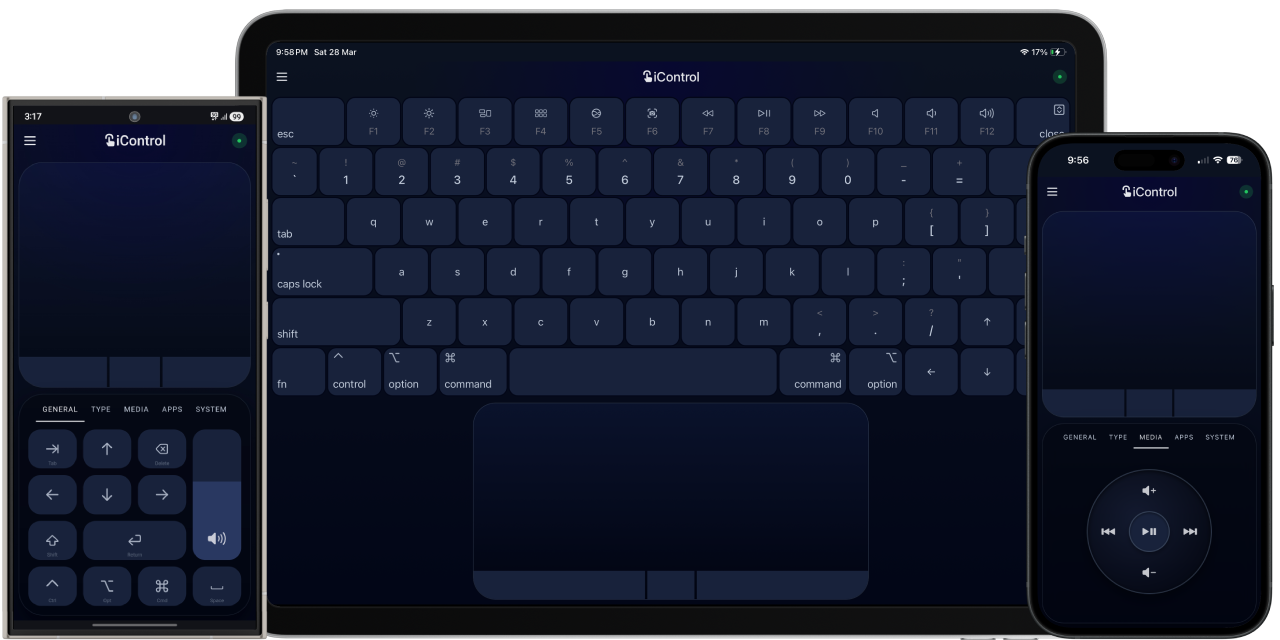
Control your Mac from any device. Instantly. No install. No account. No cloud.
Open a URL on your phone — you're in.
Your device becomes a trackpad, keyboard, and control surface for macOS.
- Zero install — works on any device with a browser
- LAN only — physically cannot leave your network
- Under 1MB — server + client combined
- No accounts, no telemetry — nothing to track, nothing to leak
- PWA-ready — install to home screen, feels native
Built out of spite for bloated remote apps that track you, lock features behind subscriptions, and solve a simple problem the hard way.
iControl turns any device into a direct input peripheral for your Mac.
Not screen sharing.
Not remote desktop.
Not "control via cloud".
Input goes in. Actions happen. Nothing comes back.
No file access.
No system inspection.
No hidden sync.
Most remote control apps:
- require installing apps on both devices
- rely on cloud relays
- track usage or gate features behind subscriptions
- feel laggy or unnatural
iControl does none of that.
It runs entirely on your local network, uses a single WebSocket connection, and executes a small, explicit set of input commands.
No middle layers. No abstraction leaks. Just input.
Browser (any device) ──WebSocket──▶ Swift HTTP/WS server ──▶ macOS APIs port 4040
- Native Swift menu bar app
- Serves a single self-contained
index.html - Persistent WebSocket for real-time input
- No REST, no polling, no dependencies
| Purpose | API |
|---|---|
| Mouse & keyboard input | CGEvent (HID pipeline) |
| App management | NSWorkspace |
| Volume control | CoreAudio |
| Launch at login | SMAppService |
- Native cursor acceleration (HID-level)
- Click, right-click, middle-click
- Drag and scroll
- Adjustable sensitivity
- Full key support with modifiers
- Sticky modifiers (Cmd, Option, Shift, Ctrl)
- Shortcut-friendly (Cmd+Tab, Cmd+Space, Spotlight, etc.)
- F1–F12 with system actions (brightness, media, volume, Siri, screenshot)
-
Compose
Use your phone's native keyboard — autocorrect, emoji, voice input, multilingual. Type and send. -
Passthrough
Full keyboard replica. Raw keystrokes sent in real-time — behaves like a physical keyboard attached to your Mac.
- Mission Control, App Exposé, Launchpad
- App switching, Spotlight
- Volume control (with system overlay)
- Media playback (iPod-style wheel UI)
- Siri, Screenshot toolbar
- Launch or focus apps instantly
- Open URLs directly on your Mac
Not integration. Just input sequences executed cleanly.
- Download and open
iControl.app - Bypass Gatekeeper (see below — required on first launch)
- Scan the QR code from the menu bar
- Grant Accessibility permission
- Done
Your Mac is now always ready.
iControl is not notarized by Apple. macOS Gatekeeper will block the app on first launch with a message like "iControl cannot be opened because it is from an unidentified developer" or "Apple could not verify iControl is free of malware."
This is expected. The app makes no network calls outside your LAN, has no external dependencies, and the full source code is in this repository. You can audit every line before running it.
To open it anyway:
Option A — Right-click method (recommended)
- Right-click (or Control-click)
iControl.appin Finder - Choose Open from the context menu
- Click Open in the dialog that appears
You only need to do this once. After the first launch, macOS remembers the exception and opens normally.
Option B — System Settings
- Try to open the app normally — it will be blocked
- Go to System Settings → Privacy & Security
- Scroll down to the Security section — you'll see a message about iControl
- Click Open Anyway, then confirm
Option C — Remove the quarantine flag (command line)
xattr -d com.apple.quarantine /path/to/iControl.appWhy isn't it notarized? Notarization requires an Apple Developer account ($99/year). iControl is a free, open-source tool with no revenue. The source code is fully open — if you prefer, build it yourself from source in Xcode instead of using the downloaded binary.
Phone → WebSocket → iControl → macOS input system
- Commands are JSON frames
- Validated and dispatched
- Executed via native APIs
Example:
{ "type": "move", "dx": 10, "dy": -5 }
{ "type": "kb", "key": "space", "flags": { "cmd": true } }
{ "type": "app", "app": "Finder" }
{ "type": "url", "url": "https://example.com" }- LAN-only server (no external access)
- No cloud, no telemetry, no accounts
- Whitelisted command set
- One-way communication
The client sends commands. The Mac executes them. That's it.
No files, no screen data, no system state exposed.
iControl ships with two security modes, configurable from the menu bar under Connection Security.
Secure (default) Every device must authenticate before any input is accepted. There are two paths in:
- Token — the QR code and URLs shown in the menu bar already contain the token (e.g.
?token=QE7T). Scan the QR code and you're in automatically. The token is saved in the browser and reused silently on reconnect. - Request Access — devices without the token can tap Request Access on the auth screen. A dialog appears on your Mac asking you to Allow or Deny. Approved devices receive a one-time session token valid for the life of that browser tab. Denied devices are locked out for the remainder of that tab session.
Open No authentication. Any device on the network connects immediately. Switching to Open requires Touch ID or your Mac password. Switching back to Secure automatically generates a new token and invalidates all prior sessions.
Regenerate Token (menu bar, Secure mode only) Issues a new token and clears all approved sessions. Use this to revoke access from all previously connected devices at once.
iControl simulates input via macOS user-space APIs (CGEvent). Some system behaviours require hardware-level HID input and cannot be replicated this way:
- Space switching (Ctrl+Arrow) — intercepted by the Dock before user-space events reach it
- Hot corners — triggered by hardware cursor arrival at screen edges, not cursor position alone
- Dock auto-hide — same as hot corners
- Password fields — macOS blocks input simulation when secure input mode is active
These are platform constraints, not bugs. They affect all software-based input simulation tools, not just iControl.
iControl/
├── App/
│   └── iControlApp.swift
├── Input/
│   └── InputController.swift
├── Server/
│   ├── HTTPServer.swift
│   └── WebSocketServer.swift
└── Resources/
    ├── index.html
    ├── manifest.json
    ├── sw.js
- No package managers
- No build steps
- No external dependencies
The entire project is readable in an afternoon.
- Handle in
WebSocketServer.swift - Implement in
InputController.swift - Trigger from
index.html
Edit index.html directly — no frameworks, no bundlers.
Requires Accessibility access:
System Settings → Privacy & Security → Accessibility
This is required for any app simulating input via CGEvent.
iControl does one thing:
Send input from your device to your Mac.
It does not:
- read your files
- inspect your system
- sync your data
- phone home
- connect to internet
Once downloaded, it exists entirely on your machine.
You control your Mac.
You control your data.
You control the system.
iControl is free, open source, offilne and has no ads, accounts, or subscriptions. If it saves you time or you just want to say thanks:
- International: paypal.me/aianisulislam
- India (UPI / cards): razorpay.me/@aianisulislam
MIT — do whatever you want.
Your phone becomes a Mac input device. Instantly. No middleman.