This repository goes along with a 1 hour workshop on the topic of how to spend your time most effectively at a hackathon. Checkout the slides in the workshop folder in this repository.
This is a simple Android sample app written in Kotlin and using Android Jetpack, ViewModels, Hilt, Retrofit, OkHttp, and RxRelays.
If your team is looking to make an Android app, this sample app could be a great starting point. Making a copy of this repo will allow you and your team to make changes that will have no impact on the original repository. Go ahead, test things out, break things, that's what a hackathon is all about.
Steps:
- Create a Github account if you don't have one already.
- Select the
Forkbutton at the top left of the Github window.
Expected Result: A copy of this repository should exist on your github account.
Only 1 of your team members will need to fork this repository. Everyone else can be added as collaborators.
- Click the
Settingsbutton on the repository you just forked. - Select
Manage Accessfrom the menu. - Click the
Invite a collaboratorbutton and search for a github username.
Expected Result: A team member can now make changes to your repository.
Latest Android Studio Download Link (v4.1 as of Nov 2020): https://developer.android.com/studio

The app follows the following architecture:
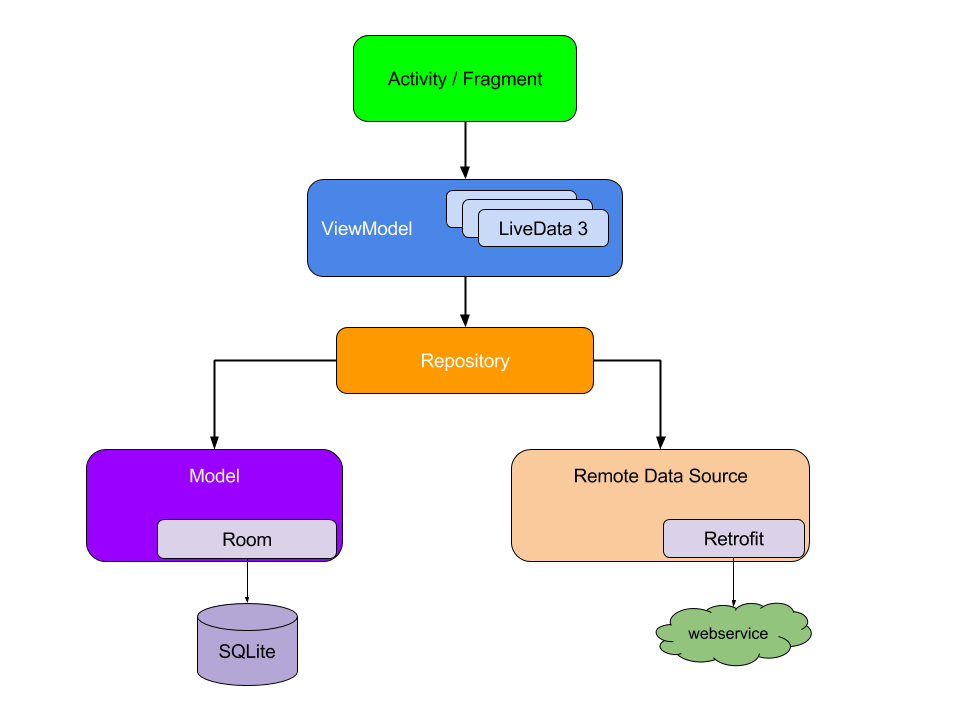
The repository is responsible for orchestrating and retrieving data. The repository can be a mediator between multiple data sources (i.e. different APIs, databases, etc...). The purpose of this is to abstract away data sources from the rest of the app. The sample app has a "NewsRepository".
The ViewModels provide data for a specific UI component and contains data-handling business logic if necessary. The ViewModel doesn't know about UI components. The sample app has two ViewModels: "NewsArticleViewModel" and "SearchViewModel".
An activity is a single, focused thing that the user can do. Almost all activities interact with the user and handle the lifecycle events of an app. The sample app has a single activity called "MainActivity".
Fragments live inside activities and each activity can host many fragments. Fragments can be thought of as a modular section of an activity. The sample app has three fragments: "NewsFragment", "SearchFragment", and "SocialFragment". The MainActivity has a bottom nav bar that is responsible for activating and deactivating the associated fragments.
Linked are the final designs we came up with for the start project. We also show 3 iterations of progress that was done before arriving at the final designs. Create a Figma account if you want to the full experience which allows you to checkout design specs.