



Quick Start · Documentation · Examples · Updates · Community
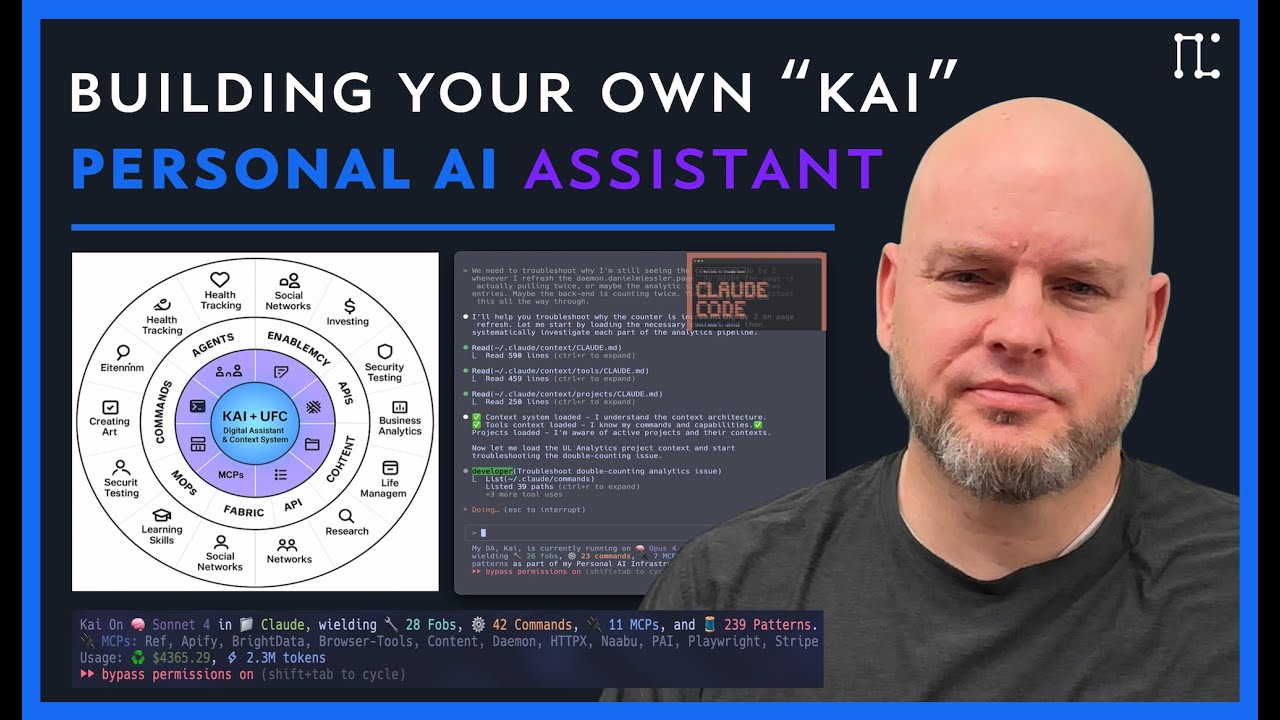
Watch the full PAI walkthrough | Read: The Real Internet of Things

Right now the most powerful AI setups are being built inside companies for efficiency and profits.
That's all good, but I think the purpose of technology is to serve humans—not the other way around. These new AI frameworks should be available to everyone, including people not in technology, so that regular people can use it to help them flourish.
That's what PAI is. It's the foundation for building a Personal AI System that understands your larger goals and context, gets better over time, and that works for you because it's yours. Not some generic chatbot. Not some common assistant. A full platform for magnifying yourself and your impact on the world.
Related reading:
- The Real Internet of Things — The vision behind PAI (full book)
- AI's Predictable Path: 7 Components — Visual walkthrough of where AI is heading
PAI (Personal AI Infrastructure) is an open-source template for building your own AI-powered operating system. It's currently built on Claude Code, but designed to be platform-independent — the architecture, skills, and workflows are structured so future migrations to other AI platforms are straightforward.

| Component | Description |
|---|---|
| Skills | Self-contained AI capabilities with routing, workflows, and documentation |
| Agents | Specialized AI personalities for different tasks (engineer, researcher, designer) |
| Hooks | Event-driven automation that captures work and manages state |
| History | Automatic documentation system (UOCS) that captures everything |
Tip
Start clean, small, and simple. Build the scaffolding that makes AI reliable.
Big updates! PAI is now fully platform-agnostic — your AI identity, your system.
| Feature | Description |
|---|---|
| 📊 Observability Dashboard | Real-time agent monitoring with live charts |
| 🎭 Genericized Identity | Configure your DA name, it flows everywhere |
| ⚙️ Better Configuration | Clear docs for all environment variables |
Choose your platform:
🍎 macOS
1. Clone PAI
git clone https://github.com/danielmiessler/PAI.git ~/.claude2. Run the Setup Wizard
~/.claude/.claude/tools/setup/bootstrap.sh3. Add Your API Keys
cp ~/.claude/.env.example ~/.claude/.env
nano ~/.claude/.env
4. Start Claude Code
source ~/.zshrc  # Load PAI environment
claude
🐧 Linux
1. Clone PAI
git clone https://github.com/danielmiessler/PAI.git ~/.claude2. Run the Setup Wizard
~/.claude/.claude/tools/setup/bootstrap.sh3. Add Your API Keys
cp ~/.claude/.env.example ~/.claude/.env
nano ~/.claude/.env
4. Start Claude Code
source ~/.bashrc  # Load PAI environment
claude
🪟 Windows
1. Clone PAI (PowerShell)
git clone https://github.com/danielmiessler/PAI.git $env:USERPROFILE\.claude2. Run the Setup Wizard
& "$env:USERPROFILE\.claude\.claude\tools\setup\bootstrap.ps1"3. Add Your API Keys
Copy-Item "$env:USERPROFILE\.claude\.env.example" "$env:USERPROFILE\.claude\.env"
notepad "$env:USERPROFILE\.claude\.env"
4. Start Claude Code
# Restart PowerShell to load environment, then:
claude
Tip
The setup wizard will configure your name, email, AI assistant name, and environment variables to customize to your environment.
📚 For detailed setup, see docs/QUICKSTART.md
All documentation lives in the CORE skill (.claude/skills/CORE/):
| Document | Description |
|---|---|
| CONSTITUTION.md | System philosophy, architecture, operating principles |
| SkillSystem.md | How to create your own skills — the canonical skill structure guide |
| SKILL.md | Main PAI skill with identity, preferences, quick reference |
| HookSystem.md | Event-driven automation |
| HistorySystem.md | Automatic work documentation (UOCS) |
Additional Reference
| Document | Description |
|---|---|
| Prompting.md | Prompt engineering patterns |
| Aesthetic.md | Visual design system |
| voice-server/README.md | Text-to-speech feedback |
Explore example skills in .claude/skills/:
| Skill | Description |
|---|---|
| Observability/ | Real-time agent monitoring dashboard with WebSocket streaming |
| BrightData/ | Four-tier progressive web scraping with automatic fallback |
| Fabric/ | Native Fabric patterns — 248 patterns run directly in Claude's context (no CLI needed) |
| Research/ | Multi-source research workflows |
| Createskill/ | Templates for creating new skills |
Each skill demonstrates the skills-as-containers pattern with routing, workflows, and self-contained documentation.
The Fabric skill now executes patterns natively within Claude Code — no CLI spawning required:
- Your subscription's power — Patterns run with your Opus/Sonnet model, not Fabric's configured model
- Full context — Patterns have access to your entire conversation history
- Faster execution — No process spawning overhead
- 248 patterns included — extract_wisdom, summarize, threat modeling, and more
# Update patterns from upstream
.claude/skills/Fabric/tools/update-patterns.sh
Only use fabric CLI for YouTube transcripts (-y) or pattern updates (-U).
PAI is built on 13 foundational principles that define how to build reliable AI infrastructure.
Complete architecture documentation: .claude/skills/CORE/Architecture.md
The quality of outcomes depends on the quality of thinking and prompts. Before any code, before any architecture—there must be clear thinking.

The system architecture matters more than the underlying AI model. A well-structured system with good scaffolding will outperform a more powerful model with poor structure.

Favor predictable, repeatable outcomes over flexibility. Same input → Same output. Always.

Write code to solve problems, use prompts to orchestrate code. Prompts should never replicate functionality that code can provide.

Define expected behavior before writing implementation. If you can't specify it, you can't test it. If you can't test it, you can't trust it.

Do one thing well. Compose tools through standard interfaces. Build small, focused tools—compose them for complex operations.

Apply software engineering and site reliability practices to AI systems. AI infrastructure is infrastructure—treat it with the same rigor.

Every operation should be accessible via command line. If there's no CLI command for it, you can't script it or test it reliably.

The proper development pipeline for any new feature. Each layer builds on the previous—skip a layer, get a shaky system.

The system should be able to improve itself. A system that can't update itself will stagnate.

Skills are the organizational unit for all domain expertise. Skills are how PAI scales—each new domain gets its own skill, maintaining organization as the system grows.

Automatic capture and preservation of valuable work. Memory makes intelligence compound. Without history, every session starts from zero.

Specialized agents with distinct personalities for different tasks. Personality isn't decoration—it's functional.

| Category | Choice | Note |
|---|---|---|
| Runtime | Bun | NOT Node.js |
| Language | TypeScript | NOT Python |
| Package Manager | Bun | NOT npm/yarn/pnpm |
| Format | Markdown | NOT HTML for basic content |
| Testing | Vitest | When needed |
| Voice | ElevenLabs | TTS integration |
Kai and I work hard to address issues and PRs throughout the week — we try not to get too far behind!
| Channel | Link |
|---|---|
| 🐛 Issues | Report bugs or request features |
| 💬 Discussions | Ask questions and share ideas |
| 🎥 Video | Watch the full PAI walkthrough |
| 📝 Blog | The Real Internet of Things |
v0.9.0 (2025-12-01) — Platform Agnostic Release
This release focuses on making PAI fully portable and fork-friendly. Your AI, your identity, your system.
Observability Dashboard
- Complete real-time agent monitoring at
.claude/Observability/ - WebSocket streaming of all agent activity
- Live pulse charts, event timelines, and swim lanes
- Multiple themes (Tokyo Night, Nord, Catppuccin, etc.)
- Security obfuscation for sensitive data
Genericized Agent Identity
- All agent references now use
process.env.DA || 'main' - No more hardcoded names — your DA name flows through the entire system
- Observability dashboard shows your configured identity
Platform-Agnostic Configuration
- Clear separation:
settings.jsonfor identity/paths,.envfor API keys DA(Digital Assistant name) — your AI's identityPAI_DIR— root directory for all configurationTIME_ZONE— configurable timezone for timestamps
Skill System Improvements
- Canonical TitleCase file naming throughout
- Standardized skill-workflow-notification script for dashboard detection
- All paths use
${PAI_DIR}/for location-agnostic installation
v0.8.0 (2025-11-25) — Research & Documentation
Research Skill
- Comprehensive research skill with 10 specialized workflows
- Multi-source research with parallel agent execution
- Fabric pattern integration (242+ AI patterns)
Infrastructure
- Path standardization using
${PAI_DIR}/throughout PAI_CONTRACT.mddefining core guarantees- Self-test validation system for health checks
- Protection system for PAI-specific files
v0.7.0 (2025-11-20) — Protection & Clarity
PAI Path Resolution System (#112)
- Centralized
pai-paths.tslibrary — single source of truth - Smart detection with fallback to
~/.claude - Updated 7 hooks to use centralized paths
PAI vs Kai Clarity (#113)
PAI_CONTRACT.md— official contract defining boundaries- Self-test system (
bun ${PAI_DIR}/hooks/self-test.ts) - Clear README section distinguishing PAI from Kai
Protection System
.pai-protected.jsonmanifest of protected filesvalidate-protected.tsscript for pre-commit validation- Pre-commit hook template for automated checks
v0.6.5 (2025-11-18) — BrightData Integration
Four-Tier Progressive Web Scraping
- Tier 1: WebFetch (free, built-in)
- Tier 2: cURL with headers (free, more reliable)
- Tier 3: Playwright (free, JavaScript rendering)
- Tier 4: Bright Data MCP (paid, anti-bot bypass)
v0.6.0 (2025-11-15) — Major Architecture Update
Repository Restructure
- Moved all configuration to
.claude/directory - Skills-as-containers architecture
- Three-tier progressive disclosure
Skills System
- Art skill with visual content generation
- Story-explanation skill for narrative summaries
- Create-skill and create-cli meta-skills
Hook System
- Comprehensive event capture system
- Session summary and tool output capture
- Tab title updates
Voice Integration
- Voice server with ElevenLabs TTS
- Session start notifications
v0.5.0 and Earlier
v0.5.0 — Foundation
- CORE skill as central context loader
- Constitution defining system principles
- CLI-First Architecture pattern
- Initial skills: Fabric, FFUF, Alex Hormozi pitch
Pre-v0.5.0 — Early Development
- Initial repository setup
- Basic settings.json structure
- Agent personality definitions
- Foundational hook experiments
MIT License — see LICENSE for details.
Built on Claude Code by Anthropic.
PAI is the technical foundation for Human 3.0 — a program I created to help people transform into a version of themselves that can thrive in the post-corporate world that's coming. Human 3.0 means AI-augmented humans who build and control their own AI systems.
Right now, the most sophisticated AI infrastructure exists inside corporations with massive engineering teams. PAI exists to change that. To give individuals the same scaffolding that companies spend millions building.
Your AI, knowing how you work, learning from your patterns, serving your goals — not some corporation's engagement metrics. That's what this enables.


