Because of lack of time, in this project I did not had the opportunity to reflect what is my normal day as a developer.
I did not create branches (did committed everything directly in master and my commits were not detailed).
SpaceX is a project created with Swift 5 and UIKit.
The app consists of presenting a list with all the launches of advanced rockets, apply a filter date and give the possibility to user access more information about them.
In the exercise, it was mentioned that we should show a success or failure icon depending on if the launch was succeded or not. However, in this new API (V4) I noticed that some launches were being retrieved with null. For this cases I've decided to show a warning icon
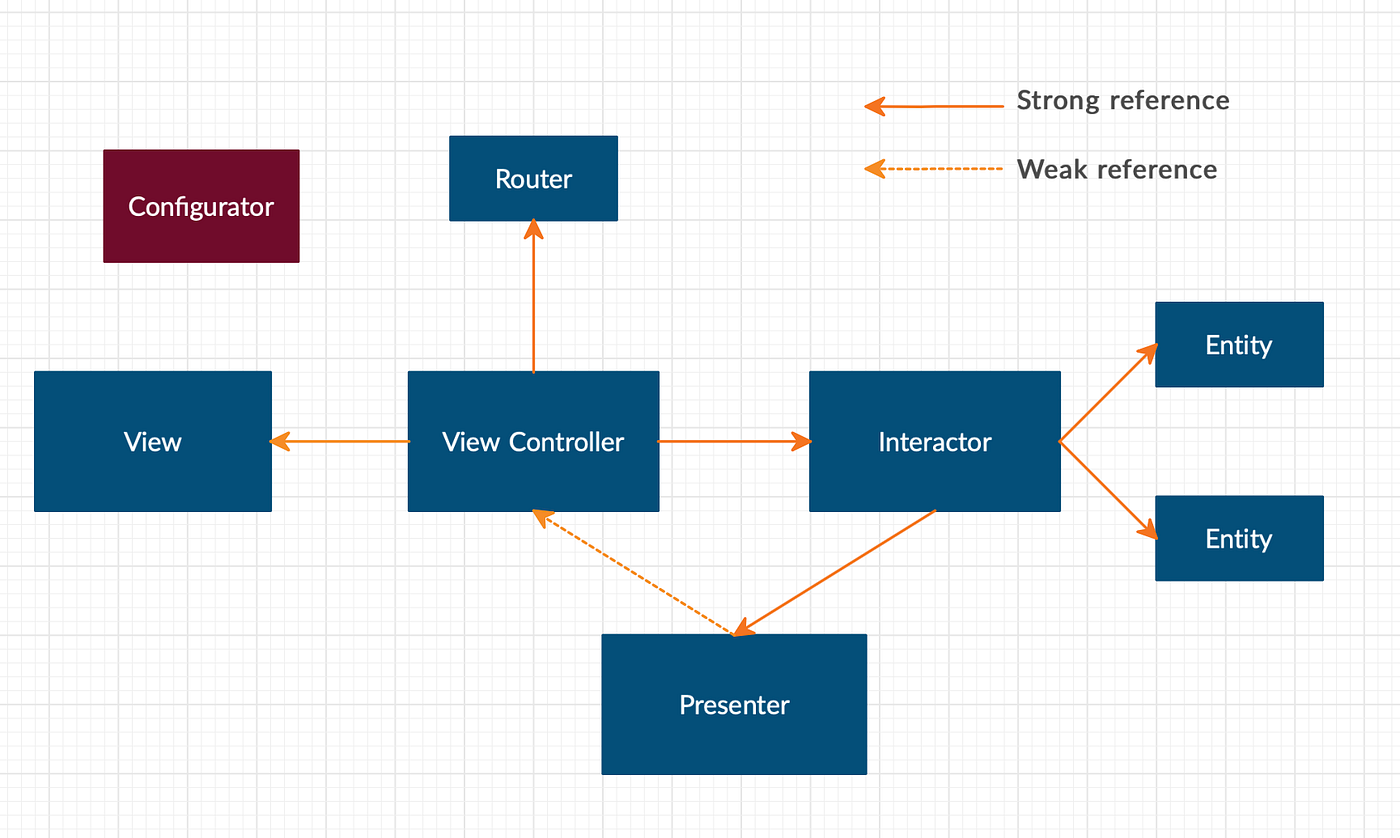
This projected was created with VIP architecture.
"The Clean Swift architecture is using a VIP cycle to help you separate logic in your application. The VIP cycle consists of a ViewController, Interactor and a Presenter. All classes are responsible for some logic. The ViewController is responsible for the display logic, the Interactor is responsible for the business logic and the Presenter is responsible for the presentation logic."
https://zonneveld.dev/the-clean-swift-architecture-explained/

Apart from this three layers, this app has two more components, Router and Configurator. Router is the layer responsible for the navigation between screens and Configurator is a factory class responsible to create this layers.
The next image gives you a better overview.
The project has no third-party dependencies.
This project has Unit Tests and UI Test
Although I did not covered all the cases (not even close), I think the unit tests I've implemented can give you a perception in how modular is this project and how flexible is to implement unit tests.
Unfortunately the UI Tests are very very basic. They need mocks, they need to be better structure, definitely this is something that needs a big improvement.
NOTE
I did not have time to investigate an issue after we run the app after executing UITests. When we launch the app, the table view appears with a black background as well as the cells. I tried to do a quick investigation but I did not found any fix for this. In order to fix this, we need to reset the simulator 😩
The API used for this project was V4 that is documented here.
- UI
- Improve Network Reachability and improve integration with UI/Network actions
- Try to reduce/clean some methods from View/Interator/Presenter protocols (maybe using a single method that receives an enum action)
- Apply a big improvement on error handling
- Give a loading feedback for each section to the user (one example is when app is fetching next launches page)
- Image loader (used on cells to retrieve images from network) must be improved in order to be testable
- Add more unit tests
- Add many more UITests and implicity create mock data in order to be able to run without being dependent on external data (internet)
- ...
(I'm sure there are more improvements to do but in my opinion, these are the most notorios ones)
For manual tests, I've used the XCode iPhones 12 and 8 (iOS 15.0) from simulator.
There might be some edge cases that I did not found. I apologize for that.