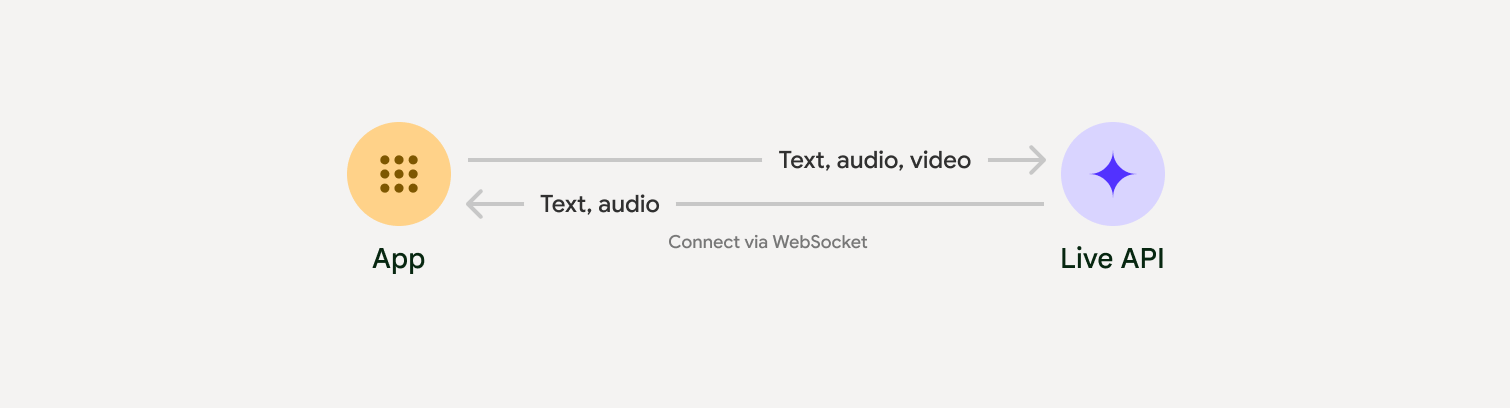
The Live API enables low-latency, real-time voice and video interactions with Gemini. It processes continuous streams of audio, video, or text to deliver immediate, human-like spoken responses, creating a natural conversational experience for your users.
Try the Live API in Google AI Studio
Live API can be used to build real-time voice and video agents for a variety of industries, including:
- E-commerce and retail: Shopping assistants that offer personalized recommendations and support agents that resolve customer issues.
- Gaming: Interactive non-player characters (NPCs), in-game help assistants, and real-time translation of in-game content.
- Next-gen interfaces: Voice- and video-enabled experiences in robotics, smart glasses, and vehicles.
- Healthcare: Health companions for patient support and education.
- Financial services: AI advisors for wealth management and investment guidance.
- Education: AI mentors and learner companions that provide personalized instruction and feedback.
Live API offers a comprehensive set of features for building robust voice and video agents:
- Multilingual support: Converse in 70 supported languages.
- Barge-in: Users can interrupt the model at any time for responsive interactions.
- Tool use: Integrates tools like function calling and Google Search for dynamic interactions.
- Audio transcriptions: Provides text transcripts of both user input and model output.
- Proactive audio: Lets you control when the model responds and in what contexts.
- Affective dialog: Adapts response style and tone to match the user's input expression.
The following table outlines the technical specifications for the Live API:
| Category | Details |
|---|---|
| Input modalities | Audio (raw 16-bit PCM audio, 16kHz, little-endian), images/video (JPEG <= 1FPS), text |
| Output modalities | Audio (raw 16-bit PCM audio, 24kHz, little-endian), text |
| Protocol | Stateful WebSocket connection (WSS) |
- Gen AI SDK Python example: Recommended for ease of use. Connect to the Gemini Live API using the Gen AI SDK to build a real-time multimodal application with a Python backend.
- Epheremal tokens and raw WebSocket example: RAW protocol control. Connect to the Gemini Live API using WebSockets to build a real-time multimodal application with a JavaScript frontend and a Python backend.
- Command-line Python example: A minimal command-line app that streams microphone audio to the Gemini Live API and plays back the response in real time using Python.
- Command-line Node.js example: A minimal command-line app that streams microphone audio to the Gemini Live API and plays back the response in real time using Node.js.
Tip
Install the Gemini Live API Dev skill for AI-assisted development with the Live API in your coding agents.
To streamline the development of real-time audio and video apps, you can use a third-party integration that supports the Gemini Live API over WebRTC or WebSockets.
- LiveKit: Use the Gemini Live API with LiveKit Agents.
- Pipecat by Daily: Create a real-time AI chatbot using Gemini Live and Pipecat.
- Fishjam by Software Mansion: Create live video and audio streaming applications with Fishjam.
- Vision Agents by Stream: Build real-time voice and video AI applications with Vision Agents.
- Voximplant: Connect inbound and outbound calls to Live API with Voximplant.
- Agent Development Kit (ADK): Create an agent and use the Agent Development Kit (ADK) Streaming to enable voice and video communication.
- Firebase AI SDK: Get started with the Gemini Live API using Firebase AI Logic.