This is the Android SDK used to send beacons to GroupBy.
Like other GroupBy beacon SDKs, it allows you to send a beacon representing a shopping event to GroupBy whenever that event occurs. This causes anonymous information about the shopper and the search results and products they interact with to be saved in GroupBy's systems to power GroupBy's platform.
Examples of platform components enhanced by beacons:
- Search results are more personalized
- Recommendations are better
- Insights are available in analytics dashboards
You can install the library into your Android app via Jitpack.
- Add the Jitpack Maven repository to your Gradle config by adding
maven {url 'https://www.jitpack.io'}underrepositoriesunderdependencyResolutionManagement. - Add the desired version of the library under
dependencies. For example,implementation 'com.github.groupby:gb-android-tracker-client:1.1.0'. - Perform a Gradle sync.
See installing for more details.
You must program your app so that this happens when the app starts and a reference should be kept to the same tracker client object to re-use throughout the entire lifecycle of your app on the shopper's Android device.
Example:
// login status for a shopper who is not logged in
Login login = new Login(false, null);
GbTracker instance = GbTracker.getInstance("my-customer-id", "my-area", login);
See Creating the tracker instance for more details.
You must program your app so that the sendXEvent methods (where "X" is the name of the event to send) are called at the appropriate times throughout the lifecycle of your app on the shopper's Android device, reflecting shopping behavior. The single instance of the tracker (described in the previous step) should be re-used to do this.
An example of a method you can call to send an event is the sendViewProductEvent method.
See Sending events for more details.
Login status describes whether the shopper is logged in or not when the event occurs. With this information set in the tracker GroupBy can anonymously track shoppers across their devices, not just anonymously track them in the Android app.
You can set the login status as you create the tracker instance and by mutating an existing tracker instance throughout the lifecycle of the app.
See Setting login status for more details.
You can test your beacon implementation for validation errors using the onFailure callback. Example, where validation errors returned in a 400 Bad Request response are logged:
@Override
public void onFailure(GbException e, int statusCode) {
    String msg = "Failed to send beacon: " + e.getMessage();
    if (statusCode == 400  && e.getError() != null) {
        List<String> validationErrors = e.getError().getJsonSchemaValidationErrors();
        msg = msg + "; validation errors: " + validationErrors;
    }
    Log.e("TEST", msg, e);
}
You can see these logs in Android Studio while debugging your app:
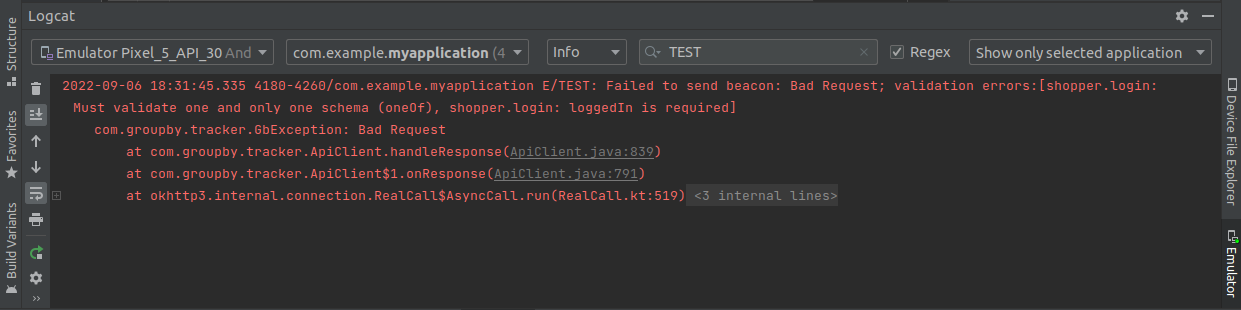
See Validation for more details.
The following event types are supported in the client. The "main four" event types are what GroupBy considers to be a minimum required beacon implementation in your Android app:
| Event type | In "main four"? | Description | Details |
|---|---|---|---|
| autoSearch | Yes | After performing a search using a GroupBy search API, this is used for sending details of the search to GroupBy's beacon API. The details are sent from the web browser using this event instead of being retrieved internally by GroupBy so that client tracking works correctly and aligns with the rest of the event types which must be sent from the client. | autoSearch |
| viewProduct | Yes | For sending details of which product (or SKU within a product) the shopper is viewing details of. | viewProduct |
| addToCart | Yes | For sending details of which products (or SKUs within products) the shopper is adding to their cart. | addToCart |
| removeFromCart | No | For sending details of which products (or SKUs within products) the shopper is removing from their cart. | removeFromCart |
| order | Yes | For sending details of which products (or SKUs within products) the shopper is ordering. | order |
| recImpression | No | For sending details of which products (or SKUs within products) the shopper is viewing on a page where you're rendering recommendations from a GroupBy recommendation API. | recImpression |
When at least the main four event types have been implemented, session level insights become available instead of just event level insights. For example, you can get a breakdown via GroupBy's analytics of which search terms are leading your shoppers to the products they're buying.
Metadata is miscellaneous key value pair data not part of each event's schema that you can include in each beacon you send.
When you include metadata in beacons you send, you extend GroupBy's analytics by enabling new dimensions.
See Metadata for more details.
Experiments are key value pairs of data not part of each event's schema that you can in each beacon you send.
When you are running an A/B test, including details of the experiments in your A/B testing allows you to extend GroupBy's analytics by using your experiment as a a new dimension in analytics. For example, you can measure revenue for each bucket in your experiment.
See Experiments for more details.
Shoppers are tracked anonymously. GroupBy will know when a shopper returns but will not know who the shopper is.
VisitorId is a UUID used to anonymously track the user. This ID is not tied to any external systems and can only be used to track activity within the same app install. VisitorId has an expiry time of 1 year since the last time the shopper visited. After that, a new ID will be generated.
This shared preferences is stored in a file named com.groupby.tracker, separated from other preferences used by the app.
By default, beacons will be send to the production environment. This can be overridden by specifying a URL to send the beacons in the tracker constructor. This is useful for sending beacons to a test environment or to GroupBy's development environment.
// Optional, overrides the URL the beacon is sent to. Useful for testing.
GbTracker tracker = GbTracker.getInstance("customer_id", "area", "<some_url>");