A stunning, minimal dark blue theme that enhances your coding experience with elegant colors and perfect readability.
Elevate your VS Code editor with Hixbe – inspired by the Ayu Mirage theme, designed for developers who value aesthetics and productivity.





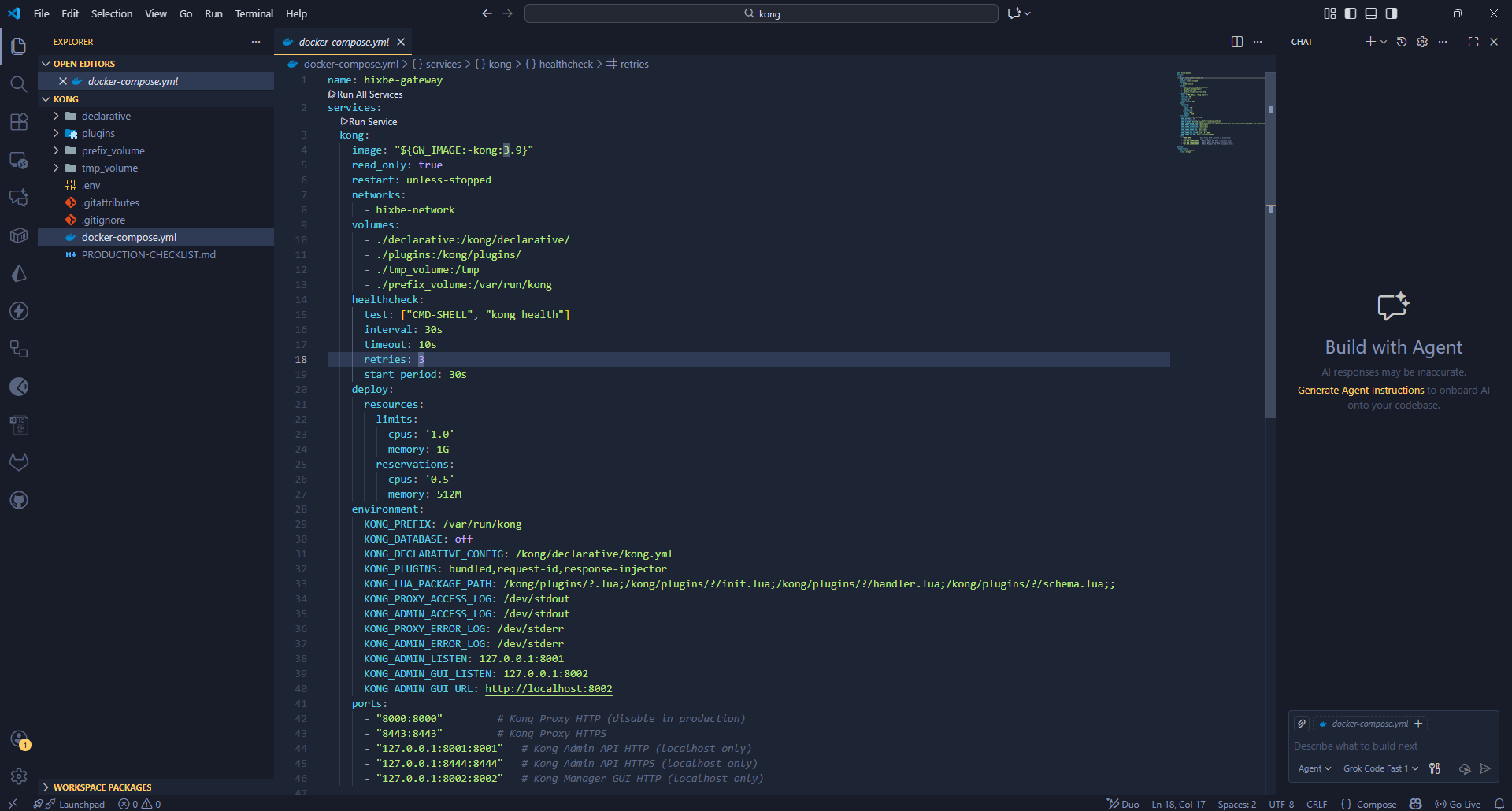
Hixbe Theme in action – clean, dark, and beautiful.
- 🎨 Carefully Crafted Colors: A harmonious dark blue palette that's easy on the eyes during long coding sessions.
- 🔧 Syntax Highlighting: Optimized for multiple programming languages with distinct, readable colors.
- 🌟 UI Consistency: Seamless integration with VS Code's interface for a cohesive experience.
- 🚀 Performance: Lightweight theme that doesn't impact editor performance.
- 🌍 Cross-Platform: Works perfectly on Windows, macOS, and Linux.
- 🔄 Regular Updates: Based on the popular Ayu Mirage theme, with ongoing refinements.
- Open the Extensions view in VS Code (
Ctrl+Shift+XorCmd+Shift+Xon Mac). - Search for
Hixbe Theme. - Click Install.
- Reload VS Code if prompted.
- Go to
File > Preferences > Color Themeand select Hixbe.
For manual installation or development:
- Download the latest
.vsixfile from the Releases page. - In VS Code, go to
View > Command Paletteand runExtensions: Install from VSIX.... - Select the downloaded
.vsixfile. - Follow steps 4-5 above.
For more details, check the VS Code Extension Quickstart Guide.
To complement Hixbe perfectly, we recommend the Material Icon Theme with these settings:
{
  "material-icon-theme.folders.color": "#8695b7",
  "material-icon-theme.folders.theme": "specific",
  "material-icon-theme.hidesExplorerArrows": true
}
This combination creates a cohesive, professional look for your file explorer.
Hixbe uses a carefully selected palette of colors for optimal readability and aesthetics.
| Color | Hex Code | Usage |
|---|---|---|
#c3a6ff |
Keywords, constants, template literals | |
#ffd580 |
Functions, classes, object literal keys | |
#ffae57 |
Constants, operators | |
#bae67e |
Strings, markdown headings | |
#5ccfe6 |
Special keywords, classes, markdown code blocks | |
#a2aabc |
Variables, property names, tags |
| Color | Hex Code | Usage |
|---|---|---|
#171c28 |
Workbench background | |
#1d2433 |
Editor background | |
#2f3b54 |
Highlight, widgets, panels | |
#6679a4 |
Dividers, subtle UI elements | |
#8695b7 |
Status bar text, buttons | |
#d7dce2 |
Active text, highlights | |
#ffcc66 |
Accent, badges | |
#bae67e |
Addition highlights | |
#ef6b73 |
Deletion highlights, errors | |
#5ccfe6 |
Modified highlights |
Hixbe is designed to work out-of-the-box, but you can customize it further:
- Token Colors: Modify
themes/hixbe-theme.jsonto adjust syntax highlighting. - Workbench Colors: Override UI colors in your VS Code settings.
- Extensions: Pair with other themes or extensions for enhanced functionality.
For advanced customization, refer to the VS Code Theme Documentation.
We welcome contributions! Whether it's bug reports, feature requests, or code improvements:
- Fork the repository
- Create a feature branch (
git checkout -b feature/amazing-feature) - Commit your changes (
git commit -m 'Add amazing feature') - Push to the branch (
git push origin feature/amazing-feature) - Open a Pull Request
Please read our Contributing Guidelines for more details.
To publish a new version:
vsce publish patch  # For patch updates
vsce publish minor  # For minor updates
vsce publish major # For major updatesHixbe isn't just for VS Code! Check out the theme for other editors:
This project is licensed under the MIT License - see the LICENSE file for details.
Made with ❤️ by the Hixbe Team