Production-ready SSL certificate pinning for React Native and Expo. Protects against MITM attacks with platform-native enforcement on both iOS and Android.
- Platform-native pinning — TrustKit (iOS) + Network Security Config (Android)
- Single config — one
ssl_config.jsondrives both platforms - Runtime toggle — enable/disable pinning without rebuilding
- Expo + RN CLI — built-in Expo plugin, auto-setup for bare projects
- New Architecture — Fabric/TurboModules supported (RN 0.68+)
- Android NSC generation — auto-generates
network_security_config.xmlat build time, covering OkHttp, WebView, Coil, Glide, and HttpURLConnection
npm install react-native-ssl-manager
# or
yarn add react-native-ssl-manager
iOS:
cd ios && pod installnpx expo install react-native-ssl-managerAdd to app.json:
{
  "expo": {
    "plugins": [
      ["react-native-ssl-manager", { "sslConfigPath": "./ssl_config.json" }]
    ]
  }
}
Expo plugin options:
| Option | Default | Description |
|---|---|---|
sslConfigPath |
"ssl_config.json" |
Path to config relative to project root |
enableAndroid |
true |
Enable Android NSC generation + manifest patching |
enableIOS |
true |
Enable iOS asset bundling |
{
  "sha256Keys": {
    "api.example.com": [
      "sha256/AAAAAAAAAAAAAAAAAAAAAAAAAAAAAAAAAAAAAAAAAAA=",
      "sha256/BBBBBBBBBBBBBBBBBBBBBBBBBBBBBBBBBBBBBBBBBBB="
    ]
  }
}
Always include at least 2 pins per domain (primary + backup) to avoid lockout during certificate rotation.
import { setUseSSLPinning, getUseSSLPinning } from 'react-native-ssl-manager';

// Enable SSL pinning (enabled by default)
await setUseSSLPinning(true);

// Check current state
const isEnabled = await getUseSSLPinning();

// Disable for development/debugging
await setUseSSLPinning(false);
Important: Toggling SSL pinning requires an app restart for changes to take effect. See Runtime Toggle below.
TrustKit is initialized with kTSKSwizzleNetworkDelegates: true, which swizzles URLSession delegates at the OS level. Most libraries using URLSession under the hood are automatically covered — no per-library configuration needed.
Each domain is configured with:
pinnedDomains[domain] = [
    kTSKIncludeSubdomains: true,
    kTSKEnforcePinning: true,
    kTSKPublicKeyHashes: pins  // SHA-256 base64
]Two layers of enforcement:
-
OkHttpClientFactory — Intercepts React Native's HTTP client creation, applies
CertificatePinnerfromssl_config.json. Coversfetch/axioscalls from JS. -
Network Security Config (NSC) — Auto-generated
network_security_config.xmlat build time fromssl_config.json. Enforced at OS level for all stacks using the platform defaultTrustManager.
Generated XML format:
<network-security-config>
  <domain-config cleartextTrafficPermitted="false">
    <domain includeSubdomains="true">api.example.com</domain>
    <pin-set expiration="2027-04-01">
      <pin digest="SHA-256">AAAAAAAAAAAAAAAAAAAAAAAAAAAAAAAAAAAAAAAAAAA=</pin>
    </pin-set>
  </domain-config>
</network-security-config>
Pin expiration defaults to 1 year from build date. If your app already has a network_security_config.xml, the library merges pin-set entries — existing configs (debug-overrides, base-config) are preserved.
| Stack | Platform | Covered | Mechanism |
|---|---|---|---|
fetch / axios |
iOS | Yes | TrustKit swizzling |
URLSession |
iOS | Yes | TrustKit swizzling |
SDWebImage |
iOS | Yes | TrustKit swizzling (uses URLSession) |
Alamofire |
iOS | Yes | TrustKit swizzling (uses URLSession) |
| Other URLSession-based libs | iOS | Yes* | TrustKit swizzling |
fetch / axios |
Android | Yes | OkHttpClientFactory + NSC |
| OkHttp (direct) | Android | Yes | NSC + CertificatePinner |
| Android WebView | Android | Yes | NSC |
| Coil / Ktor OkHttp engine | Android | Yes | NSC |
| Glide / OkHttp3 | Android | Yes | NSC |
HttpURLConnection |
Android | Yes | NSC |
| Cronet | Android | Best-effort* | NSC (if using platform TrustManager) |
* Caveats:
- iOS URLSession: Apps with complex custom
URLSessionDelegateimplementations or other method-swizzling libraries may conflict with TrustKit. TrustKit docs note swizzling is designed for simple delegate setups. - Android Cronet: No authoritative docs confirm Cronet always respects NSC
<pin-set>. Cronet has its own pinning API — useCronetEngine.Builder.addPublicKeyPins()for guaranteed enforcement. - Custom TrustManager: Any library (OkHttp, Cronet, etc.) that builds its own
TrustManagerbypassing the system default will not be covered by NSC. - Custom TLS stacks: iOS libraries not using
URLSession(e.g., OpenSSL bindings) and Android Ktor CIO engine are not covered. See Ktor CIO below.
For native module authors who need a pinned OkHttp client outside React Native's networking layer:
import com.usesslpinning.PinnedOkHttpClient

val client = PinnedOkHttpClient.getInstance(context)- Singleton with double-checked locking
- Reads
ssl_config.jsonand configuresCertificatePinnerwhen pinning is enabled - Returns plain
OkHttpClientwhen pinning is disabled - Auto-invalidates when pinning state changes via
setUseSSLPinning
@GlideModule
class MyAppGlideModule : AppGlideModule() {
    override fun registerComponents(context: Context, glide: Glide, registry: Registry) {
        registry.replace(
            GlideUrl::class.java,
            InputStream::class.java,
            OkHttpUrlLoader.Factory(PinnedOkHttpClient.getInstance(context))
        )
    }
}val imageLoader = ImageLoader.Builder(context)
.okHttpClient { PinnedOkHttpClient.getInstance(context) }
.build()val httpClient = HttpClient(OkHttp) {
engine {
preconfigured = PinnedOkHttpClient.getInstance(context)
}
}CIO uses its own TLS stack — not covered by NSC or PinnedOkHttpClient. Manual TrustManager required:
import io.ktor.client.*
import io.ktor.client.engine.cio.*
import java.security.MessageDigest
import java.security.cert.X509Certificate
import javax.net.ssl.X509TrustManager

val httpClient = HttpClient(CIO) {
    engine {
        https {
            trustManager = object : X509TrustManager {
                override fun checkClientTrusted(chain: Array<X509Certificate>, authType: String) {}
                override fun checkServerTrusted(chain: Array<X509Certificate>, authType: String) {
                    val leafCert = chain[0]
                    val publicKeyHash = MessageDigest.getInstance("SHA-256")
                        .digest(leafCert.publicKey.encoded)
                    val pin = android.util.Base64.encodeToString(publicKeyHash, android.util.Base64.NO_WRAP)
                    val expectedPins = listOf("YOUR_PIN_HERE") // from ssl_config.json
                    if (pin !in expectedPins) {
                        throw javax.net.ssl.SSLPeerUnverifiedException("Certificate pin mismatch")
                    }
                }
                override fun getAcceptedIssuers(): Array<X509Certificate> = arrayOf()
            }
        }
    }
}Toggling SSL pinning requires a full app restart because pinning is enforced at the native level (TrustKit initialization on iOS, OkHttpClientFactory on Android).
import { setUseSSLPinning } from 'react-native-ssl-manager';
import RNRestart from 'react-native-restart'; // optional

await setUseSSLPinning(false);
RNRestart.Restart(); // apply change
Default state is enabled (true). State is persisted in:
- iOS:
UserDefaults - Android:
SharedPreferences(context:AppSettings, key:useSSLPinning)
Enable or disable SSL pinning. Requires app restart to take effect.
Returns current pinning state. Defaults to true if never explicitly set.
interface SslPinningConfig {
  sha256Keys: {
    [domain: string]: string[];
  };
}

interface SslPinningError extends Error {
  code?: string;
  message: string;
}Must be named exactly ssl_config.json and placed in the project root.
{
  "sha256Keys": {
    "api.example.com": [
      "sha256/primary-cert-hash=",
      "sha256/backup-cert-hash="
    ]
  }
}
Pin format: sha256/ prefix + base64-encoded SHA-256 hash of the certificate's Subject Public Key Info (SPKI). The sha256/ prefix is stripped automatically when generating NSC XML.
| Platform | RN CLI | Expo |
|---|---|---|
| iOS | Podspec script phase copies to app bundle | Plugin copies to ios/ + adds to Xcode project |
| Android (OkHttp) | Postinstall copies to assets/ |
Plugin copies to app/src/main/assets/ |
| Android (NSC) | Gradle task generates XML in res/xml/ |
Plugin generates XML in res/xml/ |
| Android (Manifest) | Gradle task patches manifest | Plugin patches manifest |
Android (RN CLI): After building, run:
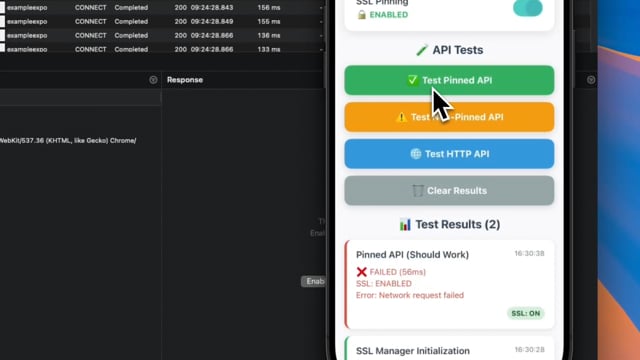
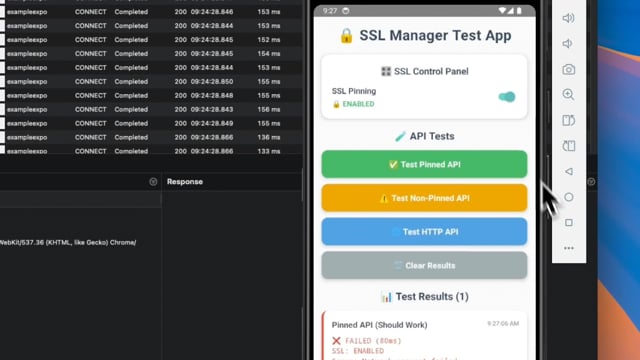
./gradlew checkSslConfigTesting with Proxyman/Charles: Enable pinning, then attempt to intercept traffic. Requests should fail with SSL handshake errors. Disable pinning to inspect traffic during development.
| Minimum | |
|---|---|
| iOS | 13.0 |
| Android | API 21 (5.0) |
| React Native | 0.60+ (AutoLinking), 0.68+ (New Architecture) |
| Expo | SDK 47+ |
| Node | 16+ |
- Certificate rotation support and expiry notifications
react-native-ssl-manager-glide— optional artifact with pre-configuredAppGlideModule- React Native Web support
| iOS | Android |
|---|---|
 |
 |
git clone https://github.com/huytdps13400/react-native-ssl-manager.git
cd react-native-ssl-manager
yarn install
npm run build

# Example apps
npm run example:ios
npm run example:android
npm run example-expo:ios
npm run example-expo:android
See CONTRIBUTING.md for details.
MIT