A remote control receiver with many functions based on cheap hardware.
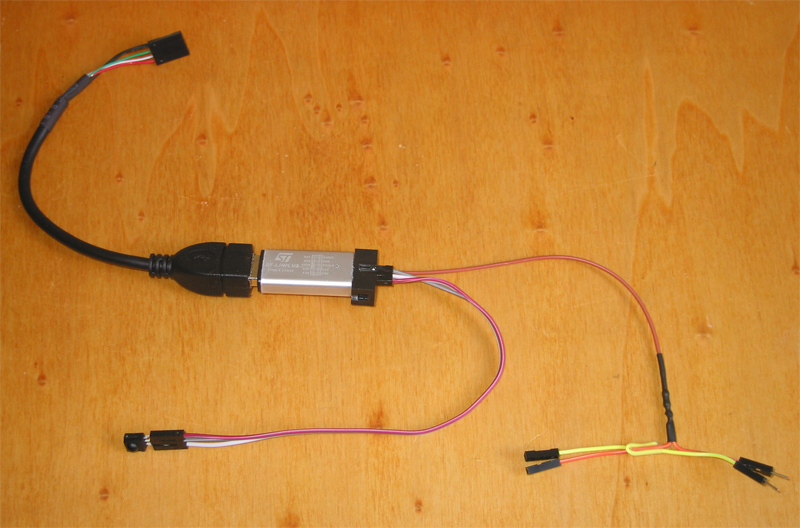
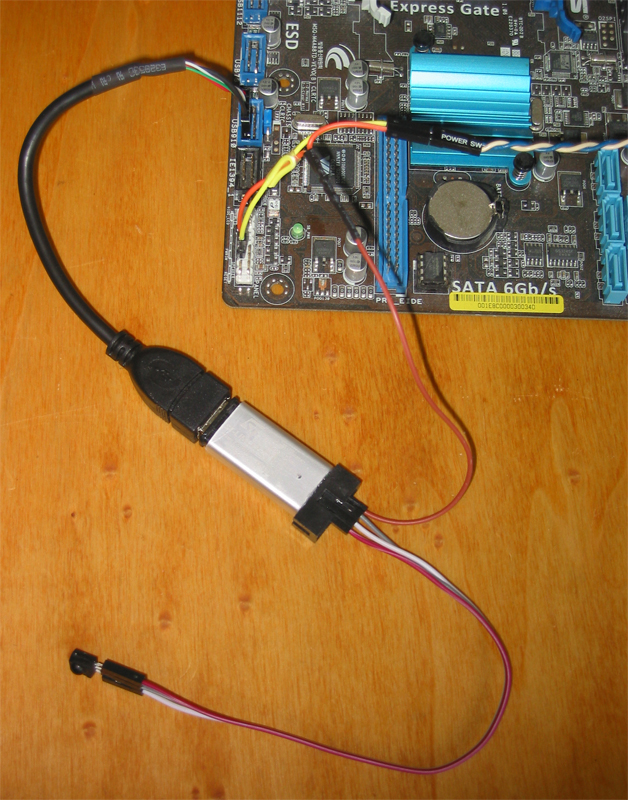
For 2 € you can buy an ST-Link emulator or a STM32F103 development board, usually made in China, on ebay. The STM32F103 microcontroller on it is flashed with an open source firmware with many functions.
- connection via USB
- registers as USB HID Keyboard device and appears as /dev/hidraw or "Custom HID device", no drivers needed
- transfers the data over USB2 in hardware at fullspeed
- IR receiver (about 40 protocols decoded in hardware)
- power on PC via remote control from S3 (STR) and S4 (STD) via USB or from S3, S4 and S5 (SoftOff) via motherboard switch (+5V required, on USB or from PSU or motherboard)
- power on PC via built-in timer from S3 (STR) and S4 (STD) via USB or from S3, S4 and S5 (SoftOff) via motherboard switch (+5V required, on USB or from PSU or motherboard)
- IR transmitter (about 40 protocols)
- the configuration is stored in the emulated eeprom
- bootloader for easy firmware update
- macro support (*)
A macro allows a sequence of IR commands to be sent via the transmitter diode when a trigger is received. macroslot0 is the trigger, macroslot1 … macroslot7 are the commands to be sent.
(*) RP2xxx only
- GUI configuration tool stm32kbdIRconfig_gui for configuration: set, get and reset wakeups, macros, irdata, keys, alarm time, repeat. It is possible to program wakeups, macros and irdata via remote control. Create the eeprom map with remote control and mouse. Comprehensive debug messages. Firmware update.
- interactive command line program stm32kbdIRconfig for configuration: set, get and reset wakeups, macros, irdata, keys, alarm time, repeat and send IR. It is possible to program wakeups, macros and irdata by remote control.
- stm32kbdIRalarm for to set and read alarm time via script
- stm32FWupgrade for command line firmware upgrade
- GUI configuration tool stm32kbdIRconfig_gui (same as linux)
- interactive command line programm stm32kbdIRconfig (same as linux)
- stm32kbdIRalarm to set and read alarm time via script
- stm32FWupgrade for command line firmware upgrade
The stm32kbdIRconfig_gui can be used to create an eeprom map using the keyboard and the remote control.
There are three methods.
(1)
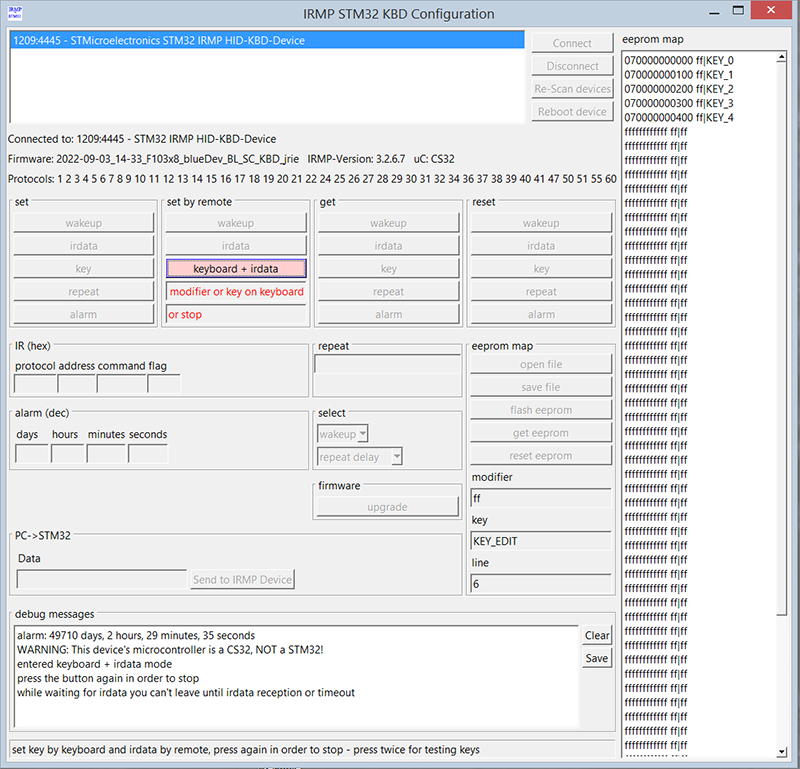
First method: Click on a line, click on "set by remote - keyboard + irdata", press the modifier or key on your keyboard, press the key if the first was a modifier, press the button on the remote.
The red text below the keyboard + irdata button will guide you through the process.
Repeat as many times as necessary.
(2)
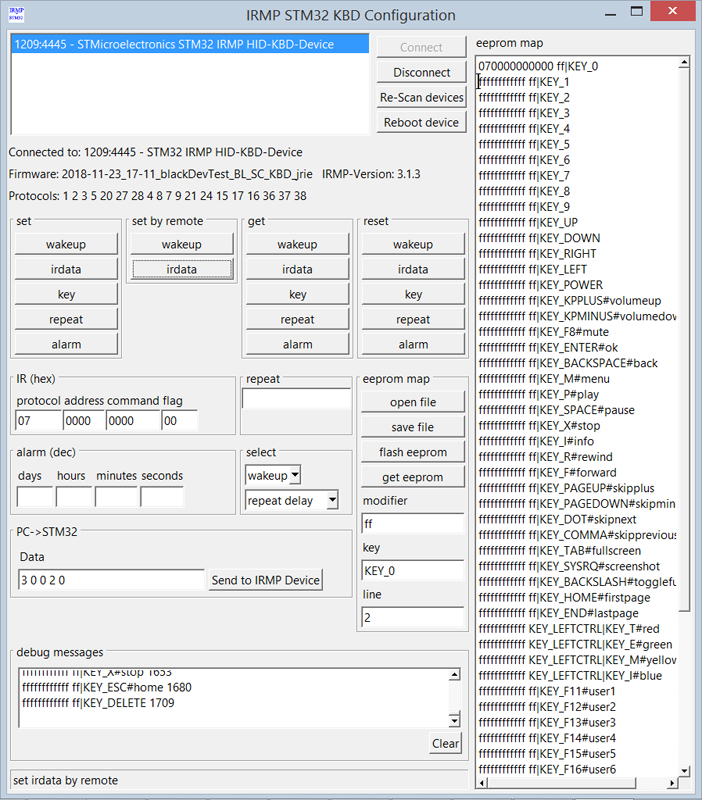
Second method: Open the template keymap. Remove lines with keys you don't need.
Click on the line with the name of the key, click "set by remote - irdata", press the button on the remote - repeat this for all buttons.
Click on "flash eeprom".
(3)
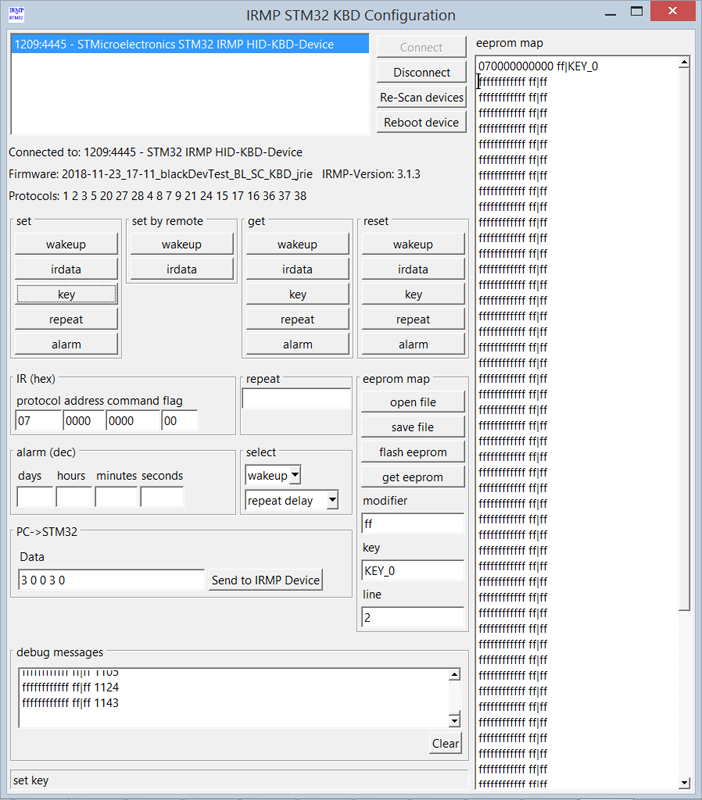
Third method: Click a line, click "set by remote - irdata", press the button on the remote.
Click a line, type the key (and modifier), click "set - key".
Repeat as many times as necessary.
If you press the keyboard + irdata-button twice, you can test your keyboard keys and on Windows even already configured buttons on the remote.
On Linux you can test the eeprom map with evtest: After pressing the button on the remote, evtest should show the corresponding key.
It is recommended to start with a fresh eeprom by pressing "eeprom map - reset eeprom".
If the wakeup is empty, the first IR data received will be stored in the wakeup.
Change wakeup with stm32kbdIRconfig_gui: press set by remote - wakeup, press button on remote control.
Important for testing: wakeup only happens, if the PC is switched off.
If the PC is powered on, only the key is sent to the PC (so you can use the same button to switch on and off).
The sources are not complete until you run the prepare script, the script downloads the IRMP sources, extracts and patches the sources. You have to download the ST sources manually, because unfortunately you have to register.
This makes it possible to put the patches under the GPL, without interfering with the original licences.
It is also easier to see, what has been changed, too.
Compile with arm-none-eabi-gcc.
See /STM32Fxxxxx/src/config.h.
Get the STM32 ST-Link Utility.
Connect
Programmer SWDIO -> IO
Programmer SWCLK -> CLK
Programmer GND -> G
Programmer 3V3 -> V3
File - Open File - boot.blackDev.bin (https://github.com/j1rie/STM32F103-bootloader/tree/master/binaries)
Target - Program & Verify (confirm a message about read out protection, if it appears)
https://github.com/j1rie/IRMP_STM32_KBD/wiki/Herstellungsprozess-Schwarze#bootloader-flashen
Disconnect from USB.
Linux: Start ./stm32FWupgrade ./2019-07-06_16-32_blackDev_BL_SC_jrie.bin
Windows: Start stm32FWupgrade.exe 2020-02-15_00-29_blueDev_BL_SC_jrie.bin
Attach to USB.
Instead of stm32FWupgrade you can use stm32IRconfig_gui.
https://github.com/j1rie/IRMP_STM32_KBD/wiki/Herstellungsprozess-Schwarze#firmware-flashen
Flashing with an USB-serial-TTL is possible on the developer boards.
Flashing over USB is possible on the boards, that support it.
See https://www.mikrocontroller.net/articles/IRMP_auf_STM32_-_ein_USB_IR_Empf%C3%A4nger/Sender/Einschalter_mit_Wakeup-Timer#Firmware_Flashing
See /eventlircd/README.
Frank Meyer for IRMP. [1]
Uwe Becker for adapting IRMP to the STM32F4xx and his USB-HID for the STM32F4xx. [2]
His work helped me to get started with the STM32F105.
Andrew Kambaroff for his USB-HID for the STM32F103. [3]
His work helped me to get started with the STM32F103.
Ole Ernst for code review, linux Makefile and linux download-extract-patch-script and new protocol. [4]
Manuel Reimer for gcc-4.9 fix, SimpleCircuit and check if host is running. [5]
Martin Neubauer for integration into EasyVDR, addon board development and selling ready-to-use receiver sets. [6]
Alexander Grothe for integration into yaVDR and much help with difficult questions. [7]
Helmut Emmerich for selling ready-to-use receiver sets and user support. [8]
Claus Muus for integration into MLD. [9]
Bernd Juraschek for vdr-plugin-statusleds, which was the base for vdr-plugin-statusleds2irmphidkbd. [10]
All Users for questions, feature requests, feedback and ideas.
[1] https://www.mikrocontroller.net/articles/IRMP
[2] http://mikrocontroller.bplaced.net/wordpress/?page_id=744
[3] https://habr.com/post/208026/
[4] https://github.com/olebowle
[5] https://github.com/M-Reimer
[6] https://www.vdr-portal.de/user/4786-ranseyer/, https://github.com/ranseyer/STM32-IRMP-Hardware
[7] https://www.vdr-portal.de/user/24681-seahawk1986/
[8] https://www.vdr-portal.de/user/13499-emma53/
[9] https://www.vdr-portal.de/user/942-clausmuus/
[10] statusleds@bjusystems.de
Comments, questions and suggestions can be sent to https://www.vdr-portal.de/forum/index.php?thread/132289-irmp-auf-stm32-ein-usb-hid-keyboard-ir-empf%C3%A4nger-einschalter-mit-wakeup-timer/
https://github.com/j1rie/IRMP_STM32_KBD/wiki/Herstellungsprozess-Schwarze
https://www.mikrocontroller.net/articles/IRMP_auf_STM32_%E2%80%93_stark_vereinfachte_Bauanleitung
https://www.mikrocontroller.net/articles/IRMP_auf_STM32_-_Bauanleitung
The latter two are also in /doc/old.
Have fun with IRMP on STM32!
Copyright (C) 2018-2025 Jörg Riechardt