



A minimalist ESP32-C6 project that displays information like the current volume of your Sonos speaker on a 1.47" touch display. The screen turns off after 10 seconds of inactivity and wakes up automatically on volume changes. Uses UPnP subscription to listen for RenderingControl events from the Sonos speaker every 55 seconds.
I've created this because I missed some visual feedback from my Sonos sound system. This setup allows to receive visual information from your Sonos speakers. It currently only shows volume information but you can now extend this any way you like.
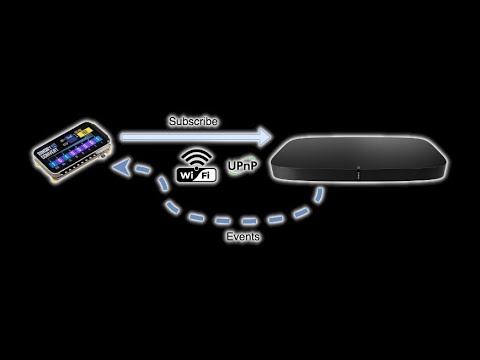
- 📡 Subscribes to Sonos rendering control events every 55 seconds
- 🔊 Displays current volume in real time
- 💤 Automatically turns off display after 10 seconds of inactivity
- 🔔 Wakes display on volume change
- 🧠 UI built with SquareLine Studio and LVGL
- 💾 Built with Arduino IDE using minimal libraries
- ESP32-C6-Touch board
- Display: 1.47" via
Arduino_GFX_Library - LVGL GUI (via SquareLine Studio)
- Arduino Framework
- WiFi for Sonos UPnP event subscription
- Lightweight XML parsing with
yxml - Custom
WiFiCreds.hfor storing credentials
- Arduino IDE 2.x or later
- ESP32 board manager (with C6 support)
- Arduino libraries:
WiFiArduino_GFX_Librarylvglyxml
-
Clone this repository:
git clone https://github.com/yourusername/esp32-c6-sonos-volume.git
-
Open the
.inoproject in Arduino IDE. -
Under Settings in the Arduino IDE add
https://dl.espressif.com/dl/package_esp32_index.jsonto the Addtional Boards manager URLs. (comma seperated:http://arduino.esp8266.com/stable/package_esp8266com_index.json,https://dl.espressif.com/dl/package_esp32_index.json) -
Add the
ESP32 by Espressifboards via the boards manager -
Install missing libraries via the Library Manager or manually. (see requirements and external docs and videos)
-
Connect your ESP32-C6 board.
-
Under Tools -> Board -> esp32 -> select the ESP32-C6 Board
-
Under Tools -> Port -> Select the correct serial port
-
Under Tools -> set
USB CDC On BoottoEnabled -
Under Tools -> set
Flash Sizeto8MB (64mb) -
Under Tools -> set
Partition Schemeto8M with spiffs (3MB APP/1.5MB SPIFFS) -
Create a file called
WiFiCreds.hin the project folder or create a small library in your Arduino/library folder for your personal WiFi credentials:#pragma once const char* ssid = "YOUR_WIFI_SSID"; const char* password = "YOUR_WIFI_PASSWORD";
-
Replace
sonosIPwith your Sonos speaker IP. -
Compile, upload, and monitor the serial output.
⚠️ Important:
I had a lot off time consuming issues as this was my first esp32 project on MacBook. To save time:
- If the ESP32 doesn't show up in the Serial Ports (or
/dev/cu.*) make sure your USB cable is the right one, some cables only provide power but no data. Try different cables!!!- On My MacBook I installed The CP210x USB to UART Bridge Virtual COM Port (VCP) drivers which work with USB-C but also via dongles or other usb adapters. I have also tried the ch34xser_macos Drivers. But in the end it was the cable and I switched back to the CP210X driver.
- If in the Serial Monitor you don't see any data check if you have set the
USB CDC On Bootand other settings correctly under tools.
- WaveShare ESP32-C6-Touch-LCD-1.47 Wiki (also contains the demo's and libraries under the
Resourcessection) - Youtube video: Get Started with ESP32: Lesson 05 - LVGL Demo Test
- Youtube Video: Waveshare ESP32-C6 : LVGL UI Tutorial with Squareline Studio
- Youtube video: How to Interact with Your UI - LVGL and Squareline Studio
- A small HTTP server listens for Sonos NOTIFY events
- Every 55 seconds, it resubscribes to the speaker’s
RenderingControlservice - When a volume change is detected, the screen wakes up and updates
- After 10 seconds of inactivity, the display is turned off to save power
- The code needs optimization, pull requests are welcome!
- I have merged different demo's, examples and other code into this project. So there may be unused or obsolete code in the project, pull reqests are welcome!
- UI is auto-generated with SquareLine Studio
- Files are located in the
ui/folder and copied to your project folder (see videos)
- Files are located in the
- Display driver setup uses
Arduino_GFX_Library - Project is built around Arduino’s event loop using
millis()for timing - Parsing of Sonos event XML is done with
yxml, ensuring a small memory footprint - Built entirely using Arduino IDE for simplicity and portability
MIT License
Copyright (c) 2025
Permission is hereby granted, free of charge, to any person obtaining a copy
of this software and associated documentation files (the “Software”), to deal
in the Software without restriction, including without limitation the rights
to use, copy, modify, merge, publish, distribute, sublicense, and/or sell
copies of the Software, and to permit persons to whom the Software is
furnished to do so, subject to the following conditions:
The above copyright notice and this permission notice shall be included in
all copies or substantial portions of the Software.
THE SOFTWARE IS PROVIDED “AS IS”, WITHOUT WARRANTY OF ANY KIND, EXPRESS OR
IMPLIED, INCLUDING BUT NOT LIMITED TO THE WARRANTIES OF MERCHANTABILITY,
FITNESS FOR A PARTICULAR PURPOSE AND NONINFRINGEMENT. IN NO EVENT SHALL THE
AUTHORS OR COPYRIGHT HOLDERS BE LIABLE FOR ANY CLAIM, DAMAGES OR OTHER
LIABILITY, WHETHER IN AN ACTION OF CONTRACT, TORT OR OTHERWISE, ARISING FROM,
OUT OF OR IN CONNECTION WITH THE SOFTWARE OR THE USE OR OTHER DEALINGS IN THE
SOFTWARE.