🧪 An open-source, up-to-date toolkit for building decentralized applications (dapps) on the Ethereum blockchain. It's designed to make it easier for developers to create and deploy smart contracts and build user interfaces that interact with those contracts.
⚙️ Built using NextJS, RainbowKit, Hardhat, Wagmi, Viem, and Typescript.
- ✅ Contract Hot Reload: Your frontend auto-adapts to your smart contract as you edit it.
- 🪝 Custom hooks: Collection of React hooks wrapper around wagmi to simplify interactions with smart contracts with typescript autocompletion.
- 🧱 Components: Collection of common web3 components to quickly build your frontend.
- 🔥 Burner Wallet & Local Faucet: Quickly test your application with a burner wallet and local faucet.
- 🔐 Integration with Wallet Providers: Connect to different wallet providers and interact with the Ethereum network.

Before you begin, you need to install the following tools:
- Node (>= v20.18.3)
- Yarn (v1 or v2+)
- Git
📚 This tutorial is meant for developers that already understand the 🖍️ basics .
🧑🏫 If you would like a more gentle introduction for developers, watch our 15 video 🎥 Web2 to Web3 series.
🎫 Tokenize unique items:
👷♀️ You'll compile and deploy your first smart contracts. Then, you'll use a template NextJS app full of important Ethereum components and hooks. Finally, you'll deploy a non-fungible token to a public network where you can send it to anyone! 🚀
🌟 The final deliverable is an app that lets users mint and transfer NFTs and understand onchain ownership. Deploy your contracts to a testnet, then build and upload your app to a public web server. Submit the url on SpeedRunEthereum.com!
💬 Meet other builders working on this challenge and get help in the Challenge Telegram!
❓ Wondering what "tokenization" means?
Tokenization is like giving anything a digital passport you can carry in your wallet. It proves who owns it, lets you hand it off in a click, and lets apps recognize it automatically. In this challenge you'll mint ERC-721 tokens (NFTs): each token is one-of-one, owned by a single address (what `ownerOf(tokenId)` returns). Transfers are atomic, instant, traceable, and run by code.-
Real-World Assets (RWAs): Think stocks, bonds, gold, and real estate. If these are tokenized, the token acts as a digital claim or registry entry. For real-world effect, an issuer/custodian or legal framework must link onchain transfers to off-chain rights; without that bridge, it's a collectible, not a legal transfer.
-
Who has the right to tokenize?: The legitimate owner or authorized issuer. If you don't control the thing, your token is unofficial fan art, not enforceable rights.
-
Blockchain-native assets: Some things are born onchain; art, game items, ENS names, fully-onchain media, and even concert tickets designed for onchain verification. Here, the token is the thing. That makes them globally transferable, permissionless, and composable. Plug them into marketplaces, auctions, lending, or games. As the world moves onchain we'll see more native experiences like tickets that verify at the door, auto-split royalties on resales, and unlock perks across apps.
🚫 "Wait, aren't NFTs just monkey JPEGS?" That couldn't be further from the truth! While some NFTs are nothing more than metadata pointing to an image, the important part is to realize how assets on Ethereum unlock composability.
🌐 Look at how ENS is improving upon the Domain Name System (DNS aka website addresses). These are just NFTs but they carry a lot of usefulness. The same usefulness that is unlocked by not having to remember to type 64.233.180.138 to get to Google.com is unlocked by these ENS names but the usefulness goes further than that. You can use these ENS names to alias wallet addresses as well. Check out the ENS record for vitalik.eth to see how there are many records - some for addresses, some for content. Try going to vitalik.eth.limo and see how the contentHash record resolves to his personal webpage.
🦄 Or checkout how Uniswap V3 is using NFTs to track each liquidity providers portion in the pool. Don't worry if you don't understand all those words yet, just realize that this is a big deal to represent ownership of assets this way.
♻️ Even if the NFT itself is completely inert and reflects complete speculation on a "worthless" image, you can still use that NFT in other smart contracts to build interesting projects like what they have done at PunkStrategy where you can buy tokens in a protocol that gives you fractional exposure to CryptoPunk NFTs while also having part in a strategy that automatically uses profit from token sales to buy the lowest valued Punk on the market, then relists it at a 20% premium - over and over again, forever!
🔓 Composability unlocks all of this and so much more!
🚀 Are you ready? You're about to mint something the entire internet can see, trade, and build on.
But wait! Wait does "NFT" stand for?
NFT stands for Non-Fungible Token. Non-fungible means that each token is unique. Fungible tokens (often represented as ERC-20s) are all the same. Each one looks and acts the same and has the same abilities. With NFTs there is something unique about each token. That is why they do well to express unique names, images (monkey JPEGS), DEX liquidity positions, and maybe some day real estate parcels.Start your local network (a blockchain emulator in your computer):
yarn chainin a second terminal window, 🛰 deploy your contract (locally):
yarn deployin a third terminal window, start your 📱 frontend:
yarn start📱 Open http://localhost:3000 to see the app.
🔧 If you are a vibe-coder and don't care about understanding the syntax of the code used and just want to understand the general takeaways, you can re-enable AI by:
- Cursor: remove
*from.cursorignorefile - VSCode: set
chat.disableAIFeaturestofalsein.vscode/settings.jsonfile
⛽️ Gas is the tiny fee that powers your transactions, like postage for the blockchain. Grab test funds from the faucet so you can interact onchain.

🦊 At first, don't connect MetaMask. If you are already connected, click Disconnect:


🔥 We'll use burner wallets on localhost. They're disposable wallets that auto-sign transactions so you can keep building.
👛 Explore burner wallets in 🏗 Scaffold-ETH 2: open an incognito window and visit http://localhost:3000. You'll see a totally new address in the top-right. Copy it and send test funds from your first window using the Faucet button (bottom-left):

👨🏻🚒 When you close the incognito window, that account is gone forever. Burner wallets are perfect for local dev; you'll switch to a permanent wallet on public networks.
🦓 In this challenge we will be minting (or creating) collectible Buffalo, Zebra and Rhino NFTs. Their metadata is stored on IPFS. These won't feign any real value but what price can you put on your own understanding of intricate blockchain ownership designs? Face it, it's priceless!
✏️ Time to create something new. Click MINT NFT in the
My NFTstab to mint an ERC-721 token; your unique, onchain collectible.

👀 You should see your NFTs start to show up:

👛 Open an incognito window and navigate to http://localhost:3000.
🎟 Try a transfer! Send a token to the incognito window address using the UI:

👛 Try to mint an NFT from the incognito window.
Can you mint an NFT with no funds in this address? You might need to grab funds from the faucet to pay for the gas!
🕵🏻♂️ Inspect the Debug Contracts tab to figure out what address is the owner of a specific token (ownerOf(tokenId)) in YourCollectible.
🔏 You can also check out your smart contract YourCollectible.sol in packages/hardhat/contracts.
💼 Take a quick look at your deploy script 01_deploy_your_collectible.ts in packages/hardhat/deploy.
- What is ownership? Onchain ownership of a unique item is whoever
ownerOf(tokenId)returns. - Who can transfer? Only the owner or an approved operator can transfer a token.
- What happens on transfer? Ownership moves atomically to the new address and a
Transferevent is emitted. - How do approvals work? Use
approvefor a single token orsetApprovalForAllfor an operator across all your tokens. - How to count holdings?
balanceOf(address)shows how many unique tokens an address owns.
📝 If you want to edit the frontend, navigate to packages/nextjs/app and open the specific page you want to modify. For instance: /myNFTs/page.tsx. For guidance on routing and configuring pages/layouts checkout the Next.js documentation.
🛰 Ready to go public (on testnet)? Let's ship it.
Change the defaultNetwork in
packages/hardhat/hardhat.config.tstosepolia.

🔐 Generate a deployer address with yarn generate. This creates a unique deployer address and saves the mnemonic locally. You will be prompted to enter a password, which will be used to encrypt your private key. Make sure to remember this password, as you'll need it for future deployments and account queries.
This local account will deploy your contracts, allowing you to avoid entering a personal private key.

👩🚀 Use yarn account to view your deployer account balances.

⛽️ Fund your deployer with testnet ETH from a faucet or another wallet so it can pay gas.
Some popular Sepolia faucets are the Alchemy Faucet, Infura Faucet, and Google Cloud Faucet.
⚔️ Side Quest: Keep a 🧑🎤 punkwallet.io on your phone's home screen and keep it loaded with testnet eth. 🧙♂️ You'll look like a wizard when you can fund your deployer address from your phone in seconds.
🚀 Deploy your NFT smart contract with yarn deploy.
💬 Hint: You can set the
defaultNetworkinhardhat.config.tstosepoliaOR you canyarn deploy --network sepolia.
✏️ Tune your frontend for the right chain. In
packages/nextjs/scaffold.config.ts, settargetNetworktochains.sepolia:

Confirm the network badge in the UI at http://localhost:3000 shows Sepolia:

🦊 Since we have deployed to a public testnet, you will now need to connect using a wallet you own or use a burner wallet. By default 🔥
burner walletsare only available onhardhat. You can enable them on every chain by settingonlyLocalBurnerWallet: falsein your frontend config (scaffold.config.tsinpackages/nextjs/)

🚀 Deploy your NextJS app
yarn vercelYou might need to log in to Vercel first by running
yarn vercel:login. Once you log in (email, GitHub, etc), the default options should work.
If you want to redeploy to the same production URL you can run
yarn vercel --prod. If you omit the--prodflag it will deploy it to a preview/test URL.
Follow the steps to deploy to Vercel. It'll give you a public URL.
yarn testBy default, 🏗 Scaffold-ETH 2 provides predefined API keys for popular services such as Alchemy and Etherscan. This allows you to begin developing and testing your applications more easily, avoiding the need to register for these services. This is great to complete your SpeedRunEthereum.
For production-grade applications, it's recommended to obtain your own API keys (to prevent rate limiting issues). You can configure these at:
-
🔷
ALCHEMY_API_KEYvariable inpackages/hardhat/.envandpackages/nextjs/.env.local. You can create API keys from the Alchemy dashboard. -
📃
ETHERSCAN_API_KEYvariable inpackages/hardhat/.envwith your generated API key. You can get your key here.
💬 Hint: It's recommended to store env's for nextjs in Vercel/system env config for live apps and use .env.local for local testing.
You can verify your smart contract on Etherscan by running (yarn verify --network network_name):
yarn verify --network sepoliaVerifying your contract is important for enabling others to be able to look at your contract and verify that it isn't a scam.
If it says your contract is already verified, that's fine. It just means Etherscan recognized the contract bytecode as being the same as one that was already deployed and verified. Copy the address of
YourCollectible.soland search it on Sepolia Etherscan to grab the URL you'll submit for this challenge.
👩❤️👨 Share your public url with a friend and ask them for their address to send them a collectible:

🎫 Want to see your new NFTs? Check your MetaMask extension! Your minted NFTs should appear in the NFTs section.
🌐 Important: Make sure you switch to the Sepolia testnet in MetaMask before checking for your NFTs, since that's where you deployed your contract.
🔍 Make sure you have minted some NFTs on your Vercel page, then open your MetaMask extension and navigate to the "NFTs" tab.
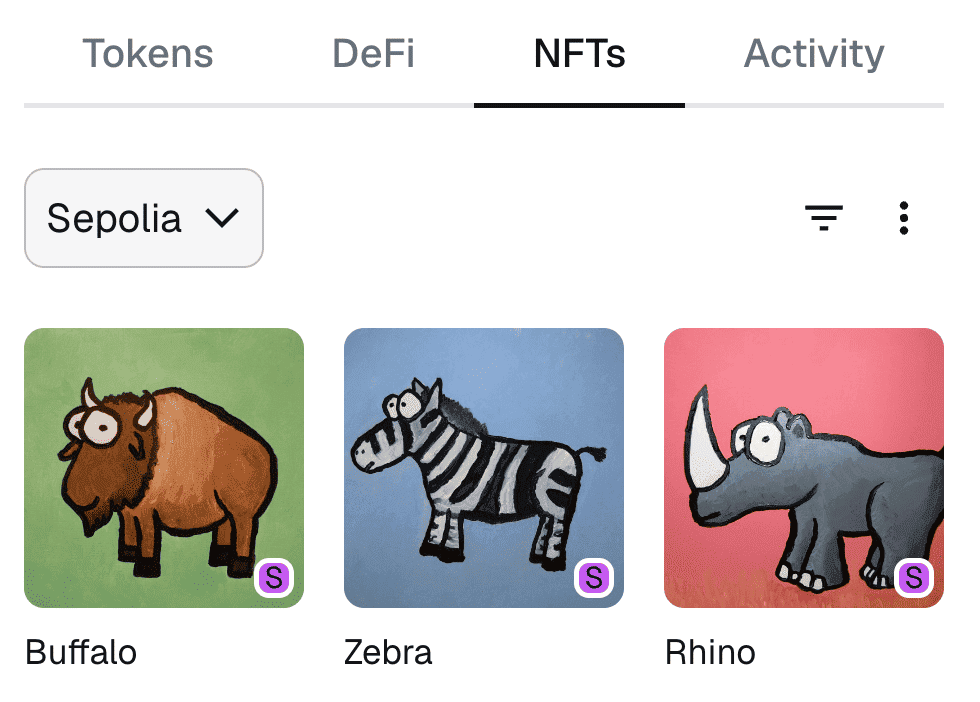
You can see your collection of shiny new NFTs directly in your wallet!
(It can take a while before they show up in MetaMask, but they should appear in the NFTs section once detected.)
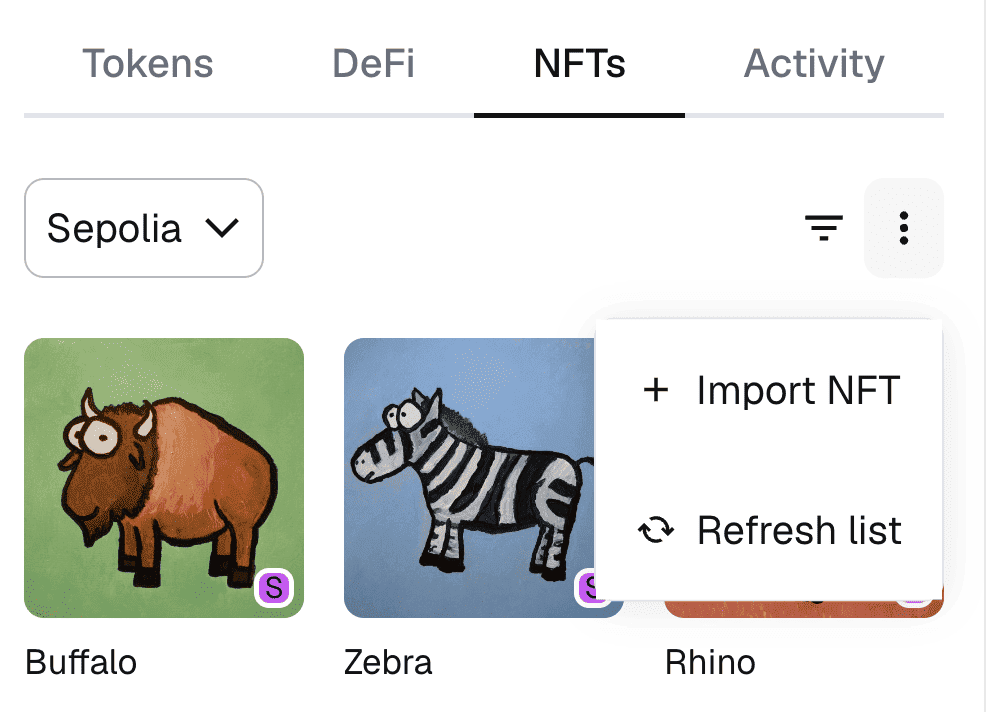
🔧 Not seeing your NFTs? Sometimes MetaMask doesn't automatically detect new NFTs. You can manually add them by clicking "Import NFT" in the NFTs tab and entering network, your contract address and token ID.
🏃 Head to your next challenge here.
💬 Problems, questions, comments on the stack? Post them to the 🏗 scaffold-eth developers chat
Visit our docs to learn how to start building with Scaffold-ETH 2.
To know more about its features, check out our website.
We welcome contributions to Scaffold-ETH 2!
Please see CONTRIBUTING.MD for more information and guidelines for contributing to Scaffold-ETH 2.