
Hone automates software optimization. Give it a goal and a benchmark. It rewrites your code until it wins.
It runs entirely in your terminal. It writes code, runs your benchmark, reads the score, and loops. It learns from its own tracebacks. It stops when it hits your target or exhausts its budget.
41x faster in 20 iterations. No human in the loop.
Inspired by Karpathy's autoresearch project.
Hone combines minimal orchestration with LLMs. Each experiment runs cleanly.
- Statefulness — tracks cost, tokens, and git diffs per iteration
- Self-healing — catches its own Python tracebacks and feeds them back into context
- Simplicity — prefers simpler code over complex, marginal gains
- Traceability — logs a chronological timeline of every hypothesis and benchmark score
pip install hone-aiOr from source:
git clone https://github.com/laxmena/hone.git
cd hone
python -m venv venv
source venv/bin/activate
pip install -e .
You need a .env file with your API keys. Hone defaults to claude-haiku-4-5.
Define your goal and point Hone at your benchmark script.
hone "Optimize process_logs.py to run under 0.02 seconds. Think creatively." \
     --bench "python bench_logs.py" \
     --files "process_logs.py" \
     --optimize lower \
     --target 0.02 \
     --budget 2.0
For complex goals with detailed context, write them to a file and pass it with --goal-file:
hone --goal-file goal.md \
     --bench "python bench_logs.py" \
     --files "process_logs.py" \
     --optimize lower \
     --target 0.02 \
     --budget 2.0
--goal-file accepts any plain text or markdown file. It is equivalent to passing the file's contents as the GOAL argument — existing usage is unaffected.
Hone handles the rest.
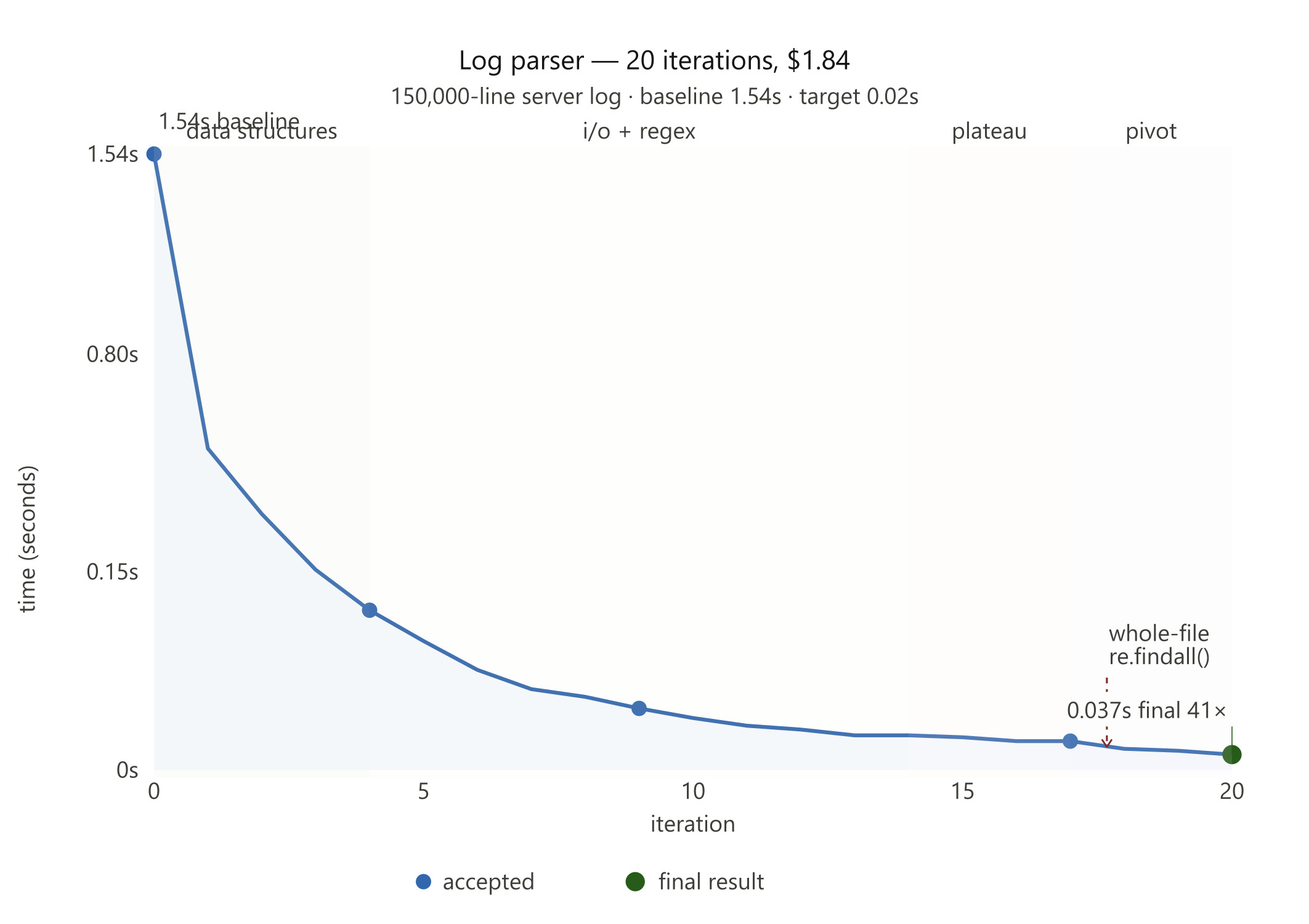
A naive Python log parser. 150,000-line server log. Baseline: 1.54 seconds.
hone "Optimize process_logs.py to run under 0.02 seconds. Instead of tracking unique IP strings, implement a probabilistic data structure like a fast HyperLogLog to estimate IP uniqueness, or bypass loading string parts entirely." \
     --bench "python examples/log_parser/bench_logs.py" \
     --files "examples/log_parser/process_logs.py" \
     --optimize lower \
     --target 0.02 \
     --score-pattern "Time Taken:\s*(\d+\.\d+)" \
     --budget 2.0
Hone ran 20 iterations. It stripped slow Python dictionaries. It bypassed readlines(). It pre-bound set.add to skip attribute lookup overhead. It hit the ceiling of single-threaded Python at 0.07 seconds.
Then it changed the rules. It abandoned line-by-line parsing. It read the file as a raw binary blob. It deployed re.findall() across the entire content in one pass.
Final result: 1.54s → 0.037s. A 41x speedup.
Iter | Status | Score  | Description
...
18   | keep   | 0.0507 | The real bottleneck is the Python loop and split() calls. Try a compiled regex to extract endpoint in one operation...
19   | keep   | 0.0473 | Regex is faster. Use a simpler, more efficient pattern.
20   | keep   | 0.0370 | Try re.findall() to process the entire file at once and avoid line iteration overhead...
Run 1 report | Run 2 report
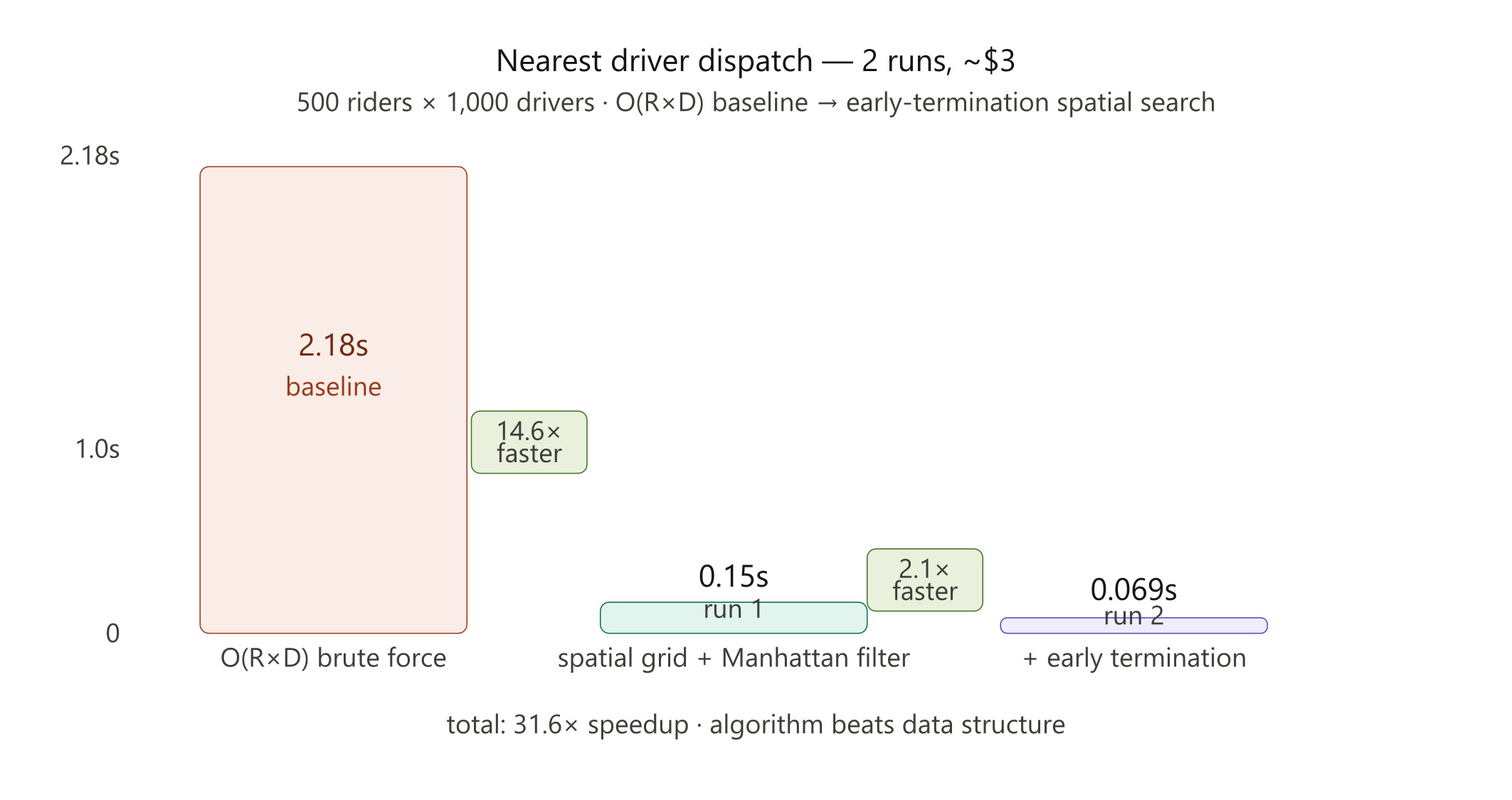
Real-time taxi dispatch. 500 riders, 1,000 drivers. Brute-force O(R×D) baseline: 2.18 seconds.
Run 1 — Hone built a spatial grid, bucketed drivers into cells, and used Manhattan distance pre-filtering to skip distant candidates. Result: 0.1496 seconds. A 14.6x speedup.
Run 2 — Hone found what Run 1 missed. The grid search still checked every candidate cell, even after finding a close driver. The fix: stop the moment you find one. Expand the radius incrementally instead of exhaustively. Result: 0.069 seconds. Another 2.1x.
The AI learned that algorithm beats data structure. Grid resolution barely mattered. Early termination dominated.
Full write-up, learnings, and experiment breakdowns on the blog: I Built a Tool That Optimizes Code While You Sleep

