This repo is to help developers to easily understand how to do feature tests with Behat, and to start writing feature tests for REST APIs.
This is based on Keith Loy's work (which was essential a hard fork of Chris Cornutt's work), with following major changes made by me:
- The best of all: for the project you are working on, you don't have to put this repo into your project or create feature tests under this repo. You can always create feature tests under your project, then use this repo to run the tests. Thus, both your project and this repo are separated from each other and clean.
- Added sample RESTful services, and changed/added features to test against the services.
- Added samples for closured steps.
- Added samples for closured hooks.
- Removed anything related to PHP framework Laravel.
Because of the heavy changes made above, instead of forking from Keith's repo directly, I created a new repo with same repo name.
Pull requests are welcome.
- PHP 5.3.3+
- PHP extension mbstring (used by Behat)
- PHPUnit: PHPUnit is used as an assertion tool.
- Guzzle: Guzzle is used to make RESTful API calls.
You will need to download composer.phar and run the install command under the same directory where the 'composer.json' file is located:
curl -s http://getcomposer.org/installer | php && ./composer.phar install
You can have a virtual host set up under Apache, with DocumentRoot set to "www/" of this repo and DirectoryIndex set to "router.php". Please make sure that module mod_rewrite is enabled, otherwise the REST server won't be able to handle requests properly. You may also need to update option "base_url" in the configuration file "behat.yml".
Alternatively, you may consider to use the PHP 5.4 built-in web server following these steps:
If you happen not have PHP 5.4, please download it and use following command to install it:
./configure --prefix=/usr/local/php54
make
sudo make install
To start the PHP 5.4 built-in web server, please run following command:
/usr/local/php54/bin/php -S localhost:8081 www/router.php
The web server now serves as the REST API server. You can visit URL http://localhost:8081 to see if the server runs properly or not (If everything is good, the URL should return string "OK" back).
For the sample test provided, you can create the file by copying directly from file "behat.yml.dist" without any modifications required.
Now, run following command to test sample features:
vendor/bin/behat
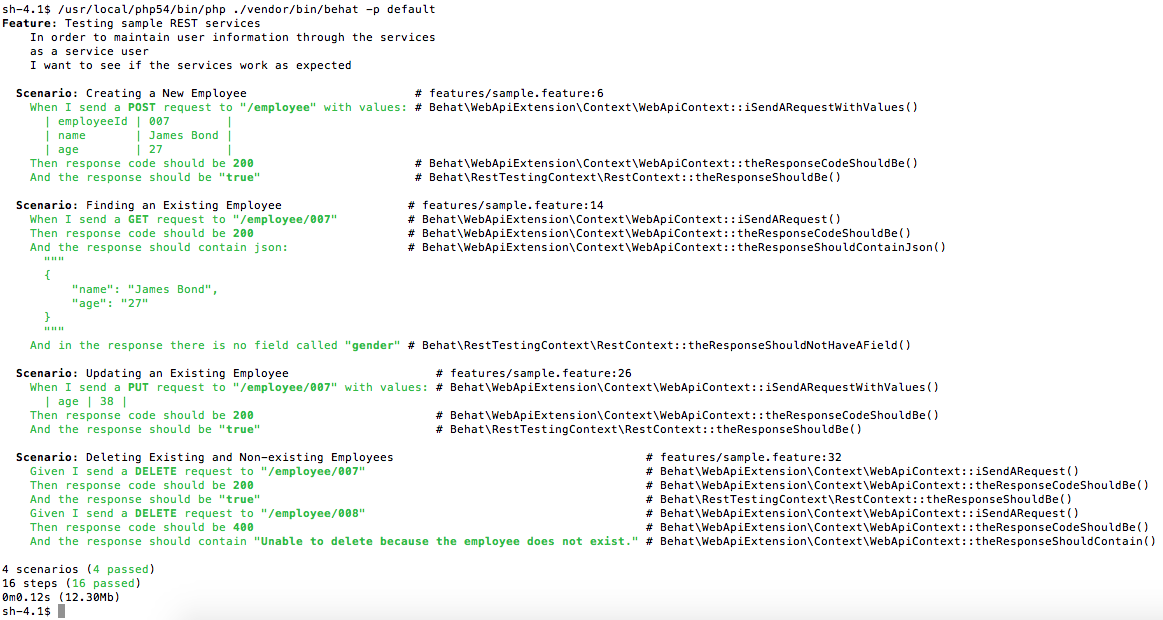
If everything is good, you should see the output as in following screenshot:

You can always create step/hook definitions under the installation of this repo. However, a better way might be to organize your files like this:
/behat-rest-testing/
     behat.yml
/myProject
    src/
    tests/
        features/
        	myProjectFeature.1.feature
        	myProjectFeature.2.feature
            steps/
                myProjectSteps.1.php
                myProjectSteps.2.php
                // ......
            support/
                myProjectHooks.1.php
                myProjectHooks.2.php
                // ......
Your put your step/hook definitions under folder "/myProject/tests/features", and have paths defined in the configuration file "/behat-rest-testing/behat.yml". Then, you can call command "/behat-rest-testing/vendor/bin/behat" to test your REST APIs.
- Allow to add project-related .feature files outside the repo.
- Support different environments (development, QA, staging, production, etc).
- Not allow to add project-related .feature files outside the repo.
- The code may not work under Windows platforms.
- Keith Loy's work at https://github.com/kloy/behat-rest-testing
- Chris Cornutt's work at https://github.com/enygma/behat-fuel-rest