This program demonstrates the use of threads and thread pools to improve the performance and efficiency of a program by allowing for concurrent execution of tasks. It also demonstrates how to manage and execute tasks with different priorities in a concurrent manner.
This program requires Java 8 or later to be installed.
- Option 1: Running from the terminal.
To run the program from the terminal, navigate to the root directory of the project and use the following command:
Javac Main.java
java Main
You will be prompted to enter the number of files, seed and bound, which are used to create the text files. Once you have entered the values, the program will execute the methods of counting the number of lines in the files and display the results.
- Option 2: Running from an IDE. To run the program from an IDE (such as Eclipse or IntelliJ IDEA), you will need to import the project into the IDE.
- Here are the general steps to do so:
- Open the IDE and go to the File menu. Select "Import" or "Open Project," depending on the IDE.
- In the import wizard, select "Existing Projects into Workspace" and click Next.
- Browse to the root directory of the project and select the project's main folder. Click Finish.
- Once the project is imported, you should see the project files and directories in the IDE's Project Explorer or Package Explorer.
- To run the program, you will need to find the Main class. It should be located in the "src" folder and contain the main method.
- Right-click on the Main class and select "Run As" or "Debug As" and then "Java Application."
You will be prompted to enter the number of files, seed and bound, which are used to create the text files. Once you have entered the values, the program will execute the 3 methods of counting the number of lines in the files and display the results. It's important to note that if the input parameters are not valid (n > 0 and bound > 0) the program will throw an IllegalArgumentException.
The assigment is divided into 2 main parts :
- Part A - Use of threads, thread pool: Examining the running time of a simple function in relation to threads and thread pool.
- Part B - Managing and executing tasks with different priorities in a concurrent manner.
In the first part we had to build 4 methods:
This method creates n text files and returns an array of the file names. The parameter n controls the number of files created. The parameter seed is used as a seed for the random number generator, and bound is used as the upper bound for the random number of rows in each file. Each file is named "file_i.txt", where i is the index of the file in the array. The method first checks that the input parameters are valid (n > 0 and bound > 0), if not it throws an IllegalArgumentException. It then creates an array of file names and a buffered writer for each file, with the file name "file_i.txt". A random number generator is created with the seed parameter, and it generates a random number between 0 and bound, which represents the number of rows for the current file. It then writes the string "hello world" (at least 10 characters) for the number of rows determined by the random number, for each file. Finally it closes the buffered writer.
This method takes a string array of file names and returns the sum of the total number of lines in all the files. It creates a variable to store the total lines count and using a for loop, it opens a buffered reader for each file in the array, it reads each line in the file and increment the count variable, after reading all the file lines, it closes the buffered reader and returns the total lines count.
This method does the same as the previous method, but uses threads to read the files. It creates an array of threads, with one thread for each file in the fileNames array. Each thread is created with the Mythread class, which reads the corresponding file and increments a shared AtomicInteger variable that stores the total number of lines read. Finally it starts all the threads, waits for them to finish, and then it returns the total number of lines.
This method does the same as the previous two methods, but uses a thread pool to read the files. The function then creates a fixed thread pool using the "Executors.newFixedThreadPool(available_cores)" method, which creates a thread pool with a fixed number of threads equal to the number of available cores. Then it submits a Callable task for each file, and collects the returned value of each task, which is the number of lines in the corresponding file. Finally, it shutdowns the thread pool and returns the sum of all the returned values as the total number of lines in all the files.
In Java, threads are mapped to system-level threads, which are the operating system's resources. If we create threads uncontrollably, we may run out of these resources quickly.
The operating system does the context switching between threads as well — in order to emulate parallelism. A simplistic view is that the more threads we spawn, the less time each thread spends doing actual work.
The Thread Pool pattern helps to save resources in a multithreaded application and to contain the parallelism in certain predefined limits.
When we use a thread pool, we write our concurrent code in the form of parallel tasks and submit them for execution to an instance of a thread pool. This instance controls several re-used threads for executing these tasks.
Runnable or Callable interfaces Interfaces are used by Thread, Mythread and ThreadPool (ExecutorService) to read the files and count the number of lines.
Runnable is an interface in Java that defines a single method, run(), which contains the code that will be executed by a thread. In order to run code in a separate thread, you need to create a class that implements Runnable and overrides the run() method with the code you want to run in the separate thread.
Callable is similar to Runnable, but it allows the thread to return a result when it completes its execution. Callable is a functional interface, it defines a single method, call(), that contains the code that will be executed by a thread and returns a value.
Thread class is a predefined class in Java that allows creating and controlling a thread of execution, it can be used by extending the class or providing a Runnable object or using the Thread constructor. Mythread is an example of extending the Thread class.
ExecutorService is an interface that provides methods for executing tasks using a pool of threads, the tasks are either Runnable or Callable, ExecutorService provides more functionality than thread creation and management, it also provides ways of managing the thread pool and handling the thread exceptions.
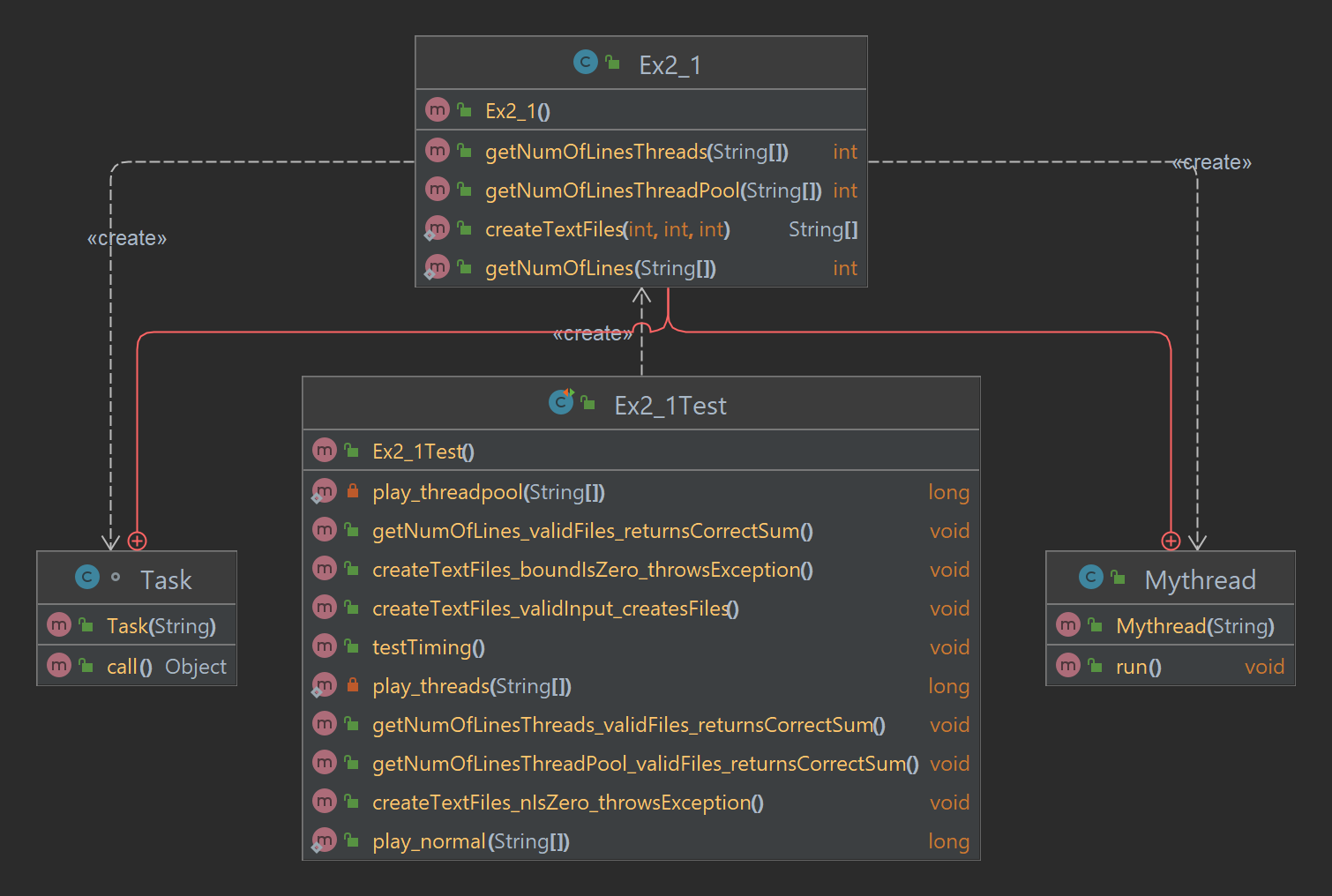
It appears that the test cases are checking the performance of the program using three different methods of executing the tasks (normal, using threads, and using thread pool) and comparing their average execution times. The test is creating text files, and it is calling three different methods to count the number of lines in these text files and comparing the time it takes for each method. There is also test cases for creating text files and validating if the files are created successfully, and a test case for checking if the total number of lines returned is correct.
In the test results, it was shown that the function implemented with threads had the best performance among the three methods, followed by the function implemented with threadpool and lastly, the function implemented in a traditional, single-threaded way.
There are several reasons why this might be the case: First, in the traditional, single-threaded method, the program only uses one core of the CPU, which can cause a bottleneck in performance as the program's operations can only be processed one at a time. On the other hand, the thread-based method and threadpool-based method utilizes multiple threads, which can run concurrently and can therefore perform multiple operations at the same time, resulting in better performance.
Threadpool-based method has a limitation that it can only queue a certain number of thread, and each thread has a cost of instantiation, the thread-based method is more effective if the number of requests is not constant.
Additionally, thread-based method can have a lower overhead because it doesn’t require the threadpool manager to add and remove threads, this means that it can create and destroy threads on the fly as needed, which can lead to better performance.
In conclusion, using threads and threadpools can greatly improve the performance of your program, especially when dealing with concurrent tasks. However, the best method to use depends on the specific requirements and nature of the task at hand.
In part two, we provided four classes and an enumeration that work together to manage and execute tasks with different priorities in a concurrent manner.
Defines the type of a task with its priority value and has three enumeration constants: COMPUTATIONAL, IO, and OTHER, each with an associated priority value passed to the constructor.
- setPriority(int priority) : sets the priority value of the task type
- getPriorityValue() : returns the priority value of the task type
- getType() : returns the task type
Used to create and manage tasks with priorities, it implements the Callable and Comparable interfaces.
- createTask(Callable my_task, TaskType task_type) : creates a task with a task_type
- createTask(Callable my_task) : creates a task without a task_type
- call() : executes the task
- compareTo(Task task) : compares the tasks based on their priority
- getPriority() : returns the priority of the task
- getMyTask() : returns the task
Used to convert a Task object to a FutureTask object, it extends the FutureTask class and implements the Comparable interface.
- compareTo(Task task) : compares the tasks based on their priority
- getTask() : returns the task
- setTask(Task task) : sets the task
The CustomExecuter class is used to create a thread pool and submit tasks to it. It extends the ThreadPoolExecutor class and keeps track of the priority of the submitted tasks, allowing for the graceful termination of the thread pool. The class has an array "priority" to keep track of the number of tasks submitted with a certain priority.
- submit(Task task) : submits the task to the thread pool
- submit(Callable my_task) : submits the task to the thread pool
- submit(Callable my_task, TaskType task_type) : submits the task to the thread pool with a task type
- gracefullyTerminate() : initiates the shutdown process of the thread pool
- getCurrentMax() : returns the current maximum number of tasks submitted with a certain priority
- beforeExecute(Thread t, Runnable r): overridden method, decrements the counter of the priority array after the execution of the task.
- toString(): overridden method, prints the current state of the thread pool.

In conclusion, the first part of the assignment demonstrated how to use threads and thread pools to improve the performance and efficiency of a program by allowing for concurrent execution of tasks, and highlighted the importance of properly managing these resources to avoid issues such as resource depletion and decreased performance. The second part of the assignment showed how to manage and execute tasks with different priorities in a concurrent manner using the TaskType enumeration, Task, TaskConverter, and CustomExecuter classes. Overall, the assignment taught how to use threads and thread pools in a Java program to improve performance and manage concurrent tasks with different priorities. It also emphasized the importance of properly managing resources when using threads and thread pools and the use of interfaces such as Runnable, Callable and the Comparable interface.
If you have any questions or feedback about this program, please don't hesitate to reach out. You can contact us at:
-
Maya Rom
-
Email:maya5660@gmail.com
-
phone number: 0547655170
-
Avichai Mizrachi
-
Email: Avichai_miz@gmail.com
-
phone number: 054-775-7734
we will be happy to help and we will try to get back to you as soon as possible.
- https://learn.microsoft.com/en-us/dotnet/api/system.threading.threadpool.setminthreads?view=net-7.0
- https://www.geeksforgeeks.org/thread-pools-java/
- https://www.digitalocean.com/community/tutorials/threadpoolexecutor-java-thread-pool-example-executorservice
- https://www.educative.io/courses/java-multithreading-for-senior-engineering-interviews/RLg4O1VYJ3w
- friends
- moodle