A terminal UI for running mise tasks or other commands supporting --usage specs.
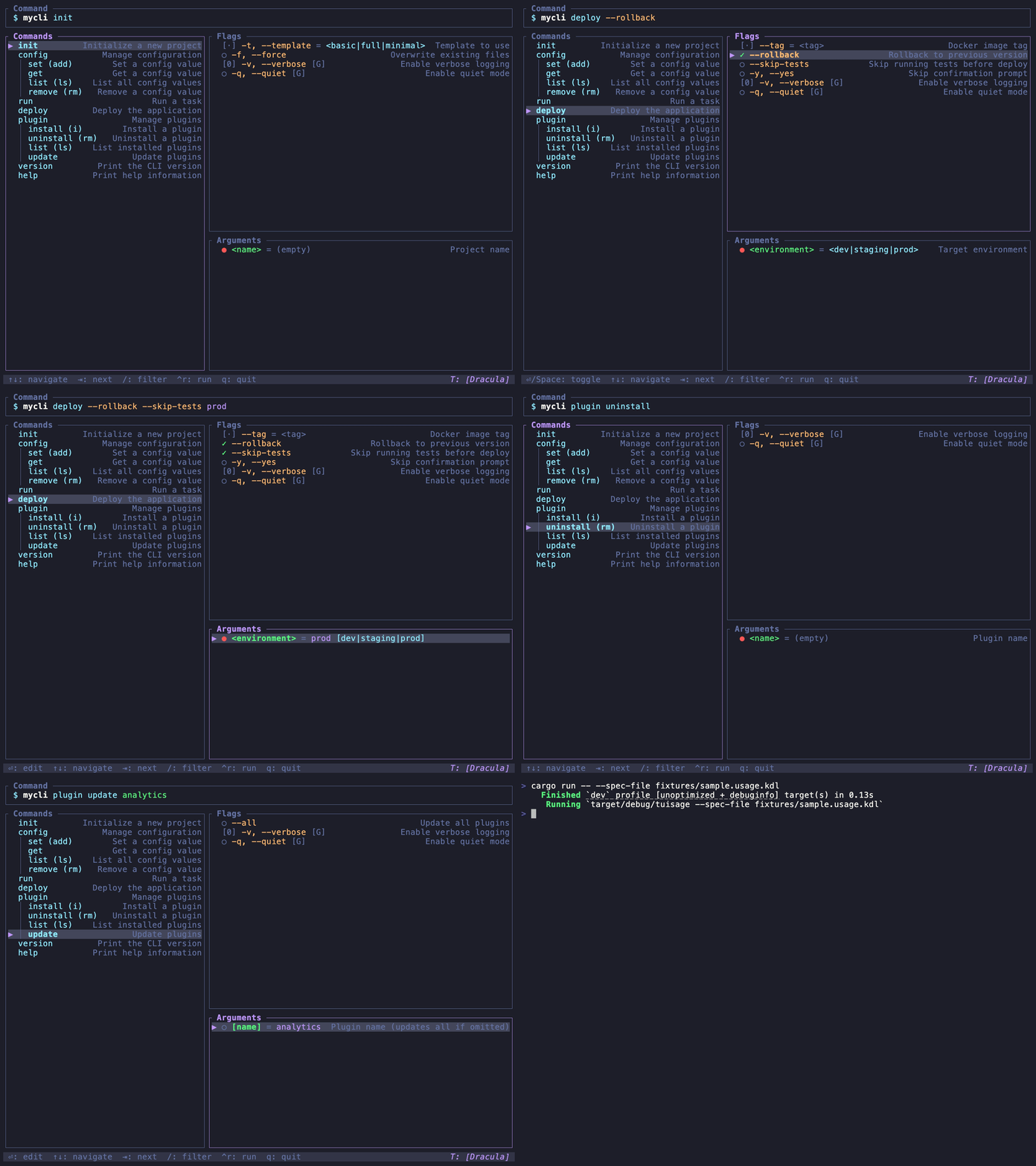
- Execute commands — Runs in an embedded terminal so you can see the output, then return to the UI.
- Fuzzy filter — Press
/to activate search mode, or start typing in a "select" box. Uses nucleo for fzf-style matching. - Dynamic completions — Supports running a custom command to generate completion values. See the spec for the "complete" statement.
- Mouse support — Click to select, or mouse wheel to scroll up and down.
- Themes — Press "T" or click the name to open the theme selector. Uses ratatui-themes.
Clone the repo, then:
cargo install --path .Or build from source:
cargo build --release
./target/release/tuisageThis is designed to work well with mise. Running mise tasks ls --usage prints the full usage spec the tasks, though you need to specify --cmd "mise run" as the command prefix to run the tasks:
tuisage --cmd "mise run" mise tasks ls --usageFor convenience, you can add it to your mise config file to run as mise tui:
[tasks.tui]
description = "TUI to run mise tasks"
run = 'tuisage --cmd "mise run" mise tasks ls --usage'For tools supporting --usage you can run them like:
tuisage mytool --usageYou can also provide your own --usage spec from a file:
tuisage --spec-file path/to/cli.usage.kdlYou can combine these as well:
tuisage --cmd "docker compose" --spec-file docker-compose.usage.kdl| Flag | Description |
|---|---|
[SPEC_CMD]... |
Command to run to get the usage spec (e.g., tuisage mycli --usage) |
--spec-file <FILE> |
Read usage spec from a file |
--cmd <CMD> |
Base command to build (overrides the spec's binary name) |
--usage |
Generate usage spec for TuiSage itself |
-h, --help |
Print help |
-V, --version |
Print version |
Provide either trailing arguments (spec command) or --spec-file (but not both).
| Key | Action |
|---|---|
↑ / ↓ or k / j |
Navigate within a panel or select box |
Tab / Shift-Tab |
Cycle focus between panels |
Enter |
Activate the selected input |
Space |
Toggle or increment a flag |
Backspace |
Remove/clear: decrement or clear a value |
/ |
Enter search mode |
Esc |
Cancel filter / stop editing |
Ctrl+R |
Execute command |
] / [ |
Cycle through themes |
T |
Open theme picker |
q or Ctrl+C |
Quit |
Left click to activate most elements. Mouse wheel scrolls selection up and down.
This has been mostly tested in ghostty, though I have also tried it with the Mac built-in Terminal.app, and the Zed and VSCode embedded terminals. Some seem to trouble aligning the box-drawing characters, but are otherwise functional.
Only run this with trusted tools. Since it automatically runs custom commands provided by the usage spec, it could run an unintended command.
# Run all tests (180 tests: unit + rendering + snapshots)
cargo test

# Review snapshot changes interactively
cargo insta review

# Run with acceptance of new snapshots
cargo insta test --acceptSome features I would like to implement:
- History / favorites – revisit commands from the current session, save them for fast use in the future.
- Saving preferences – persist theme selection, or maybe other options.
- Filename and other completions – Recognize inputs for file paths to provide a file navigator, present a calendar picker for date fields, etc.
This README presents the main documentation intended for users. Other documents are primarily designed to help building and maintaining the app with AI agents, but may provide insight into the development.
| Document | Purpose |
|---|---|
| AGENTS.md | Development guidelines for agents |
| REQUIREMENTS.md | High-level goals, features, and user stories |
| SPECIFICATION.md | Detailed behavioral specification (UI, interactions, data flow) |
| IMPLEMENTATION.md | Architecture, code structure, and development state |
| Crate | Purpose |
|---|---|
| clap | CLI argument parsing (derive) |
| clap_usage | Generate usage specs from clap definitions |
| usage-lib | Parse usage specs (KDL format) |
| ratatui | TUI framework |
| crossterm | Terminal backend & events |
| ratatui-interact | UI components (TreeView, input, focus management) |
| ratatui-themes | Color theming |
| nucleo-matcher | Fuzzy matching |
| portable-pty | Cross-platform pseudo-terminal for command execution |
| tui-term | Pseudo-terminal widget for embedded terminal output |
| vt100 | Terminal emulation (VT100 parser) |
| color-eyre | Error reporting |
| insta | Snapshot testing (dev) |
MIT